

Tomato: Focus Timer
Eui-Gyom Kim Productivity iPhoneiPadiPod touch
Tomato: Focus Timer is a free Productivity app for iPhone and iPad by Eui-Gyom Kim. Requires iOS 18.0. Updated July 7, 2026.
- Price
- Free
- on the App Store
- Size
- 2 MB
- Age 4+
- Updated
- Jul 7
- 2026 · v1.0
Screenshots

About Tomato: Focus Timer
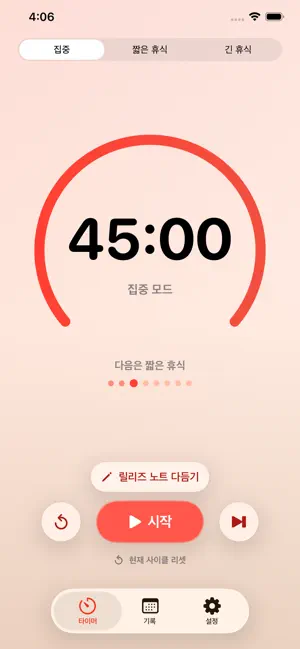
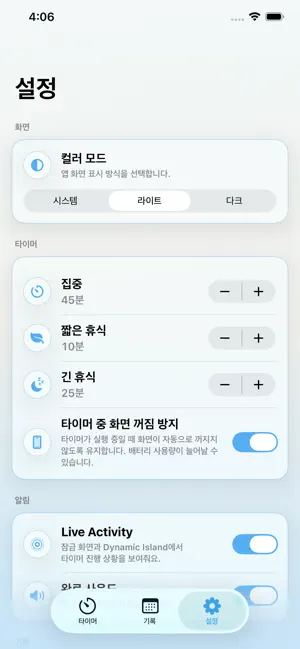
Tomato is a Pomodoro timer that helps you move smoothly between focus and rest. Follow a simple cycle of focus sessions, short breaks, and long breaks as you work through your day one session at a time. You can start with the classic Pomodoro rhythm, or adjust each session length from 1 to 120 minutes to match the way you work. Add a note to your current session, and Tomato will save it with your history so you can easily look back on what you focused on. Recent notes are available again when you need to start a recurring task quickly. Tomato keeps the experience simple with dedicated Timer, History, and Settings tabs. The app’s accent color changes with your current session type, and Live Activity support lets you check your progress from the Lock Screen when enabled. If you want a calmer way to separate focus time from break time, Tomato helps you build a rhythm you can return to every day.
App privacy
The developer, Eui-Gyom Kim, reported these privacy practices to Apple.
Data Not Collected
The developer does not collect any data from this app.
Alternatives to Tomato: Focus Timer
Looking for apps like Tomato: Focus Timer? Here are 6 similar apps on the App Store. The highest rated is Tomato Timer – Productivity (3.3/5), and all 6 are free to download.
-
 Tomato Focus Timer
-
 Pomotime - Focus Timer
-
 WhatToDo: Focus Timer & Tasks
-
 FocusPomo: Pomodoro Timer
-
 HabitGo: Habit Tracker & Goals
-
 Tomato Timer – Productivity
3.2
Tomato Timer – Productivity
3.2
| App | Rating | Price | Last updated | Compare |
|---|---|---|---|---|
| Tomato: Focus Timer | – | Free | July 7, 2026 | |
| Tomato Focus Timer | – | Free | Aug 1, 2026 | Compare |
| Pomotime - Focus Timer | – | Free | Mar 7, 2026 | Compare |
| WhatToDo: Focus Timer & Tasks | – | Free | Nov 15, 2025 | Compare |
| FocusPomo: Pomodoro Timer | – | Free | Jun 19, 2026 | Compare |
| HabitGo: Habit Tracker & Goals | – | Free | Apr 9, 2025 | Compare |
| Tomato Timer – Productivity | 3.3 / 5 (4) | Free | Jul 31, 2026 | Compare |