

GuideTone
Michael Colon Music iPhoneiPadiPod touchMac
GuideTone is a free Music app for iPhone and iPad by Michael Colon. Rated 5.0/5 from 3 ratings. Requires iOS 18.0. Updated October 15, 2026.
- Rating
- 5.0
- 3 ratings
- Price
- Free
- on the App Store
- Size
- 49 MB
- Age 4+
- Updated
- Oct 15
- 2026 · v2.2.0
Screenshots



About GuideTone
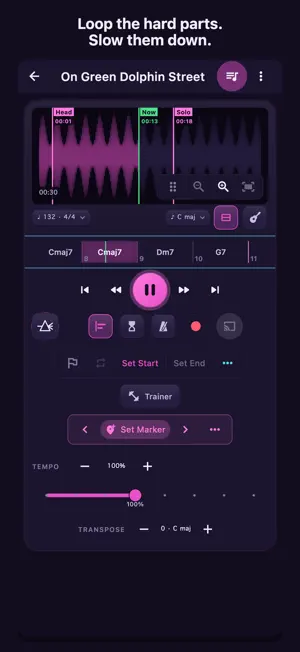
GuideTone turns any recording into your personal practice room. A guide tone is the 3rd or the 7th of a chord — the note that tells you where the harmony is going, and the one worth hearing first. That is the whole idea: show you what actually matters in a song, so the practice can start. Import a track, loop the hard parts, slow them down without changing the pitch, pull the band apart, and see the changes written out — all on your iPhone or iPad, and all without an internet connection. WRITE YOUR OWN MUSIC Start a new score with its key, time signature and tempo, then tap notes in on the piano and hear each one as it lands. Add dynamics, accents, slurs and chord symbols, lay out repeats and endings, copy and paste bars, or write a phrase through all twelve keys. Export a PDF to print, or a MusicXML file that opens in MuseScore, written for your instrument or at concert pitch. OPEN SCORE FILES Bring in a MusicXML or .mxl chart and read it engraved: as written or at concert pitch, one part at a time, with a tap on any note to hear it. Anything GuideTone can't draw yet is listed, and your original file is kept. IMPORT MUSIC YOU OWN Bring in tracks from Files, iCloud Drive, or AirDrop — MP3, M4A, WAV, AIFF, FLAC. GuideTone renders a clean waveform so you can see the music while you work. (Streaming subscription downloads are copy-protected and cannot be imported by any app.) LOOP & SLOW DOWN Set A/B markers and loop any passage. Change tempo and pitch independently, a fast lick at half speed without the chipmunk effect or a friendlier key, and ramp the tempo up rep by rep with the Speed Trainer. ISOLATE THE PARTS (ON-DEVICE) Split a song into 2, 4 or 6 stems right on your iPhone or iPad. Mute the vocals for karaoke, mute the melody and take the solo, or solo the drums to lock in your time. Nothing is uploaded. SEE THE CHORDS GuideTone listens to the song and writes out its chords, laid out bar by bar on a Chord Ribbon that follows along as it plays. Choose a Pop or Jazz vocabulary. Wrong chord? Correct the label, set its exact spelling, or retime it by hand — your edit sticks. READ THE WORDS GuideTone listens to a song and writes down its lyrics on your iPhone or iPad, each word lined up to the audio. Read them as a chord sheet, or open the Karaoke page to read from across the room: each word lights as it's sung and the page turns itself. Tap a word to jump there, hold a line to loop it, and fix a word right in the sheet. READ IT ON THE STAFF Open the Chart to read the chords on a properly engraved lead sheet that follows the playhead, re-engraves when you transpose, and takes your edits right on the page. Engraved or handwritten-jazz notation, your choice. Tap Edit to write your own notes on it in the Transcription Editor. KNOW THE SHAPES Every chord in the song, drawn for guitar and for piano — and they sound when you touch them. Switch benches to see the same chord either way, with the positions and inversions laid out beneath it. CAST THE WORDS TO A TV Cast the Karaoke page to a TV or a second screen, with words lighting as they're sung and chords in time, while your iPhone or iPad stays the remote. RECORD YOUR TAKES Play along and capture it with a built-in count-in, then balance the backing against your mic before you save. EDIT LIKE A PRO A live, non-destructive audio editor: cut, copy, paste, fade, gain, one-tap normalize and snap to the beat. Hear every change at once, then save, or save a copy. TUNER & METRONOME A precise chromatic tuner and a sample-locked metronome are built in, and the song's own tempo and beats set the metronome and the count-in. EVERYTHING STAYS ON YOUR iPhone or iPad Your audio, your recordings, and your practice happen on-device. No account required. PRICING Try every feature free for 14 days. After that, unlock GuideTone forever with a single one-time purchase — no subscription. Restore Purchases is built in. Questions or feedback? We'd love to hear from you.
What’s new
Version 2.2.0 · Updated October 15, 2026
GuideTone 2.2: hear what you wrote. Press Play on a score and hear it, whether you're reading it or editing it. A strip at the top of the page plays your score at its written tempo or any speed from half to double, through every repeat, ending and jump as written. A line rides the staff on the beat, the page turns a bar ahead, and the note that's sounding lights up. Count in, play the metronome's click along, and tap any bar in the strip to start there. Switch between reading and editing and the music keeps going. Your notes on a song play too. On a song's Chart, choose what plays from the switch beside Tempo: the recording, your notes, or both together, in time with the song's own bars, so you can check a transcription by ear against the record it came from, or hear the line on its own. The Chart plays the recording until you choose. Slow the song down, change its key or loop a section and the notes follow. The Mixer gets a NOTES fader to set how loud they are against the recording. Every score and song plays in an instrument you pick: piano, soprano, alto, tenor and baritone sax, trumpet, trombone, clarinet, flute, acoustic and electric bass, strings or a synth lead. GuideTone picks one for the instrument you read for; tap the sound to choose another, and touch a voice to hear it before you choose. The sounds download once, with one tap, the first time a score needs them. Jazz is written straight and played swung, so your eighths swing when your lettering is set to Jazz, in the Composer and on your songs: a light lilt, straightening out at the fastest tempos. Swing shows the ratio it's playing; hold it for Straight, Light, Medium or Heavy. Also in this release: - Export a score or a song as a MIDI file for a DAW or a sequencer, in the sound it plays in: as it plays, with the form and the swing, or as written. - Two new guided-tour stops and three new Help pages: Play your score, Swing and the click, and Hear what you wrote. - Mordents and turns: add them from Marks, see them on the staff, hear them played, and export them. - The Transcription Editor opens ready to write, a note you type replaces the one under the caret, and while the song plays the arrow keys seek and change the tempo as they do in the Player. - Fixed: on Mac and iPad, a song's click now sounds its first beat after a count-in. - Press ⌘E to open the Mixer from the Player, a song's Chart or the Transcription Editor, and again to close it. Move it in Settings → Keyboard Shortcuts, which offers only keys nothing else uses.
App privacy
The developer, Michael Colon, reported these privacy practices to Apple.
Data Not Linked to You
The following data, which may be collected but is not linked to your identity, may be used for the following purposes:
- Identifiers: Device ID
- Usage Data: Product Interaction
- Diagnostics: Other Diagnostic Data, Crash Data
Used for: Analytics, App Functionality
Alternatives to GuideTone
Looking for apps like GuideTone? Here are 6 similar apps on the App Store. The highest rated is Mezetude (5.0/5), and all 6 are free to download.
-
 BandCut
-
 Mezetude
5.0
Mezetude
5.0
-
 GigShed: Stems, Chords & Key
5.0
GigShed: Stems, Chords & Key
5.0
-
 metronomious
5.0
metronomious
5.0
-
 AI Metronome & Tuner
5.0
AI Metronome & Tuner
5.0
-
 Refrain: Audio Looper
| App | Rating | Price | Last updated | Compare |
|---|---|---|---|---|
| GuideTone | 5.0 / 5 (3 ratings) | Free | October 15, 2026 | |
| BandCut | – | Free | Oct 21, 2026 | Compare |
| Mezetude | 5.0 / 5 (1) | Free | Sep 7, 2026 | Compare |
| GigShed: Stems, Chords & Key | 5.0 / 5 (1) | Free | Jul 14, 2026 | Compare |
| metronomious | 5.0 / 5 (3) | Free | Jun 17, 2026 | Compare |
| AI Metronome & Tuner | 5.0 / 5 (2) | Free | Jun 15, 2026 | Compare |
| Refrain: Audio Looper | – | Free | Sep 4, 2026 | Compare |
Compare GuideTone with the top alternatives: ratings, updates, ASO score and keyword gaps →