

Censorly: Redact PDF & Photo
JUAN SEBASTIAN DURAN CHIRIBOGA Utilities iPhoneiPadiPod touch
Censorly: Redact PDF & Photo is a free Utilities app for iPhone and iPad by JUAN SEBASTIAN DURAN CHIRIBOGA. Rated 5.0/5 from 1 ratings. Requires iOS 26.5.
- Rating
- 5.0
- 1 ratings
- Price
- Free
- on the App Store
- Size
- 8 MB
- Age 4+
- Updated
- Nov 12
- 2026 · v3.1
Screenshots
Save to Pinterest
About Censorly: Redact PDF & Photo
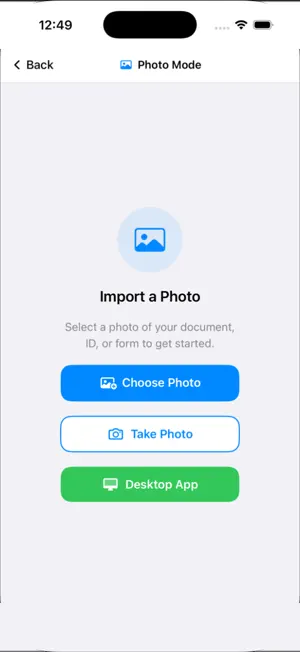
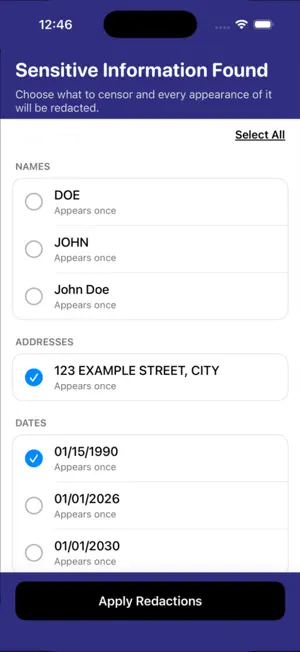
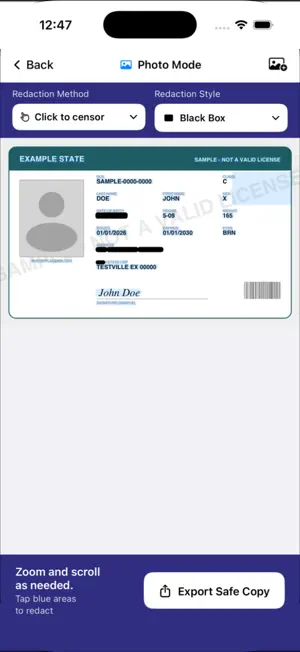
A redaction tool that automatically detects names, addresses, phone numbers, emails, IDs, credit cards, bank accounts, dates and business names. Strategy Redact once, redact everywhere. We detect repeated sensitive data so that you only need to click once to redact it everywhere. Privacy Your documents stay local. We don't take anything from you. Unlike AI tools, where you upload your files. Advantages: • Human Error Free: No black boxes that can be lifted off, and no text left hidden underneath. Censorly replaces the pixels themselves, so redacted areas can't be recovered with any editing tool. • 100% Offline: Everything happens on your phone. No internet needed, and your files are never uploaded. • Advanced PDF Censoring: Censorly turns each PDF page into a flat file with the redactions built in, then saves a brand-new PDF. • Zoom in to redact small text precisely, and scroll through long documents with ease. • Face Detection: Censorly finds the faces in your photos and PDFs so you can cover them with a tap. • Metadata Removal: Files carry hidden details like location, date, device, author and title. Censorly removes them from every file it saves. Target Customers Ideal for attorneys, civilians, businesses, human resources, healthcare professionals, journalists, researchers, real estate professionals, teachers and schools. Use Cases for Attorneys • Redact Social Security numbers, birth dates, financial account numbers and minors' names before filing with a court. • Remove privileged or confidential details from documents produced in discovery. • Share exhibits and evidence with clients, experts or opposing counsel without exposing unrelated personal data. • Hide the identities and faces of victims, witnesses and minors in photos and records. • Strip client details from past documents before reusing them as samples or templates. • Remove hidden details like author names and past edits from PDF exhibits. Each page is saved as a picture, so the text can't be searched afterward. Save Word files as PDF first. Use Cases for Civilians • Share a photo of your ID, passport or driver's license with the number and address hidden. • Send bank statements or pay stubs to a landlord or lender showing only what they need. • Post screenshots of chats, emails or receipts without revealing names, phone numbers or addresses. • Hide your children's faces before posting photos online. • Cover your address and order numbers on shipping labels and receipts when selling items online. • Share medical bills or insurance letters with family or support groups while keeping account numbers private. • Report scams or harassment with screenshots that hide your own personal details. Use Cases for Businesses & Human Resources • Hide employee Social Security numbers and salaries before sharing payroll or tax documents. • Remove customer names, emails and card numbers from invoices used in examples, case studies or support tickets. • Share contracts with partners while keeping pricing or bank details private. Use Cases for Healthcare Professionals • Remove patient names, birth dates and record numbers from documents and images used for teaching or second opinions. • Hide patient faces in clinical photos before sharing them with colleagues. Use Cases for Journalists & Researchers • Protect sources by hiding names, faces and contact details in leaked documents and photos. • Anonymize interview notes, survey forms and records before publishing or sharing them. • Remove location and device details from photos before sharing them, so sources can't be traced. • Remove location from photos of activists, human rights workers and people in unsafe situations, such as domestic violence survivors and witnesses, before sharing them. Use Cases for Real Estate Professionals • Hide Social Security numbers and bank details on rental applications before sending them to property owners. • Share leases and closing documents with only the details the other party needs.
What’s new
Version 3.1 · Updated November 12, 2026
new layout design. new auto-detect tool.
App privacy
The developer, JUAN SEBASTIAN DURAN CHIRIBOGA, reported these privacy practices to Apple.
Data Not Collected
The developer does not collect any data from this app.
Alternatives to Censorly: Redact PDF & Photo
Looking for apps like Censorly: Redact PDF & Photo? Here are 6 similar apps on the App Store. The highest rated is Curse-free Audio: HearNoEvil (4.5/5), and all 6 are free to download.
-
 PDFCensor: PDF Redaction
-
 Curse-free Audio: HearNoEvil
4.5
-
 Filtre - Keyword Filter
3.1
-
 Chess Scanner - Digitizer
3.8
-
 IITC-Mobile
3.5
-
 Arabic Keyboard - Translator
4.1
| App | Rating | Price | Last updated | Compare |
|---|---|---|---|---|
| Censorly: Redact PDF & Photo | 5.0 / 5 (1 rating) | Free | November 12, 2026 | |
| PDFCensor: PDF Redaction | – | Free | Sep 7, 2026 | Compare |
| Curse-free Audio: HearNoEvil | 4.5 / 5 (2) | Free | Mar 20, 2026 | Compare |
| Filtre - Keyword Filter | 3.1 / 5 (8) | Free | Nov 26, 2026 | Compare |
| Chess Scanner - Digitizer | 3.8 / 5 (24) | Free | Nov 10, 2026 | Compare |
| IITC-Mobile | 3.5 / 5 (72) | Free | Feb 21, 2024 | Compare |
| Arabic Keyboard - Translator | 4.1 / 5 (137) | Free | Sep 20, 2025 | Compare |