

iChart: Music Notation
Benjamin Rossman Music iPad
iChart: Music Notation is a free Music app for iPad by Benjamin Rossman. Rated 3.7/5 from 3 ratings. Requires iOS 17.0. Updated October 18, 2026.
- Rating
- 3.7
- 3 ratings
- Price
- Free
- on the App Store
- Size
- 20 MB
- Age 4+
- Updated
- Oct 18
- 2026 · v1.2.3
Screenshots


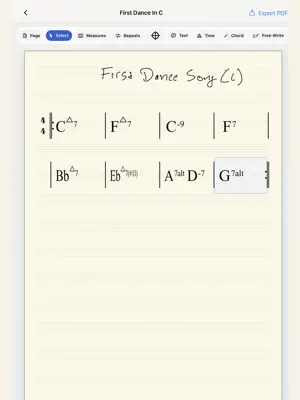

About iChart: Music Notation
Hi, I’m Beni Rossman, a bassist, composer, educator, arranger, software engineer, and the solo developer behind iChart. I started building iChart out of a somewhat selfish necessity. I was writing paper charts for one-off gigs and wanted an easier way to keep track of them, make changes, and use them again whenever I needed them. I wanted to keep the speed and freedom of writing by hand while making charts easier to edit, transpose, organize, export, and use again. iChart is for musicians preparing charts for rehearsals, gigs, lessons, sessions, and practice. Map out a song’s harmony, prepare a rhythm-section chart with hits and chords, adjust a setlist, or change keys while keeping your original chart editable. Write it, make it yours, and use it again - Create Simple Chord Sheet and Rhythm Section Sheet charts. - Handwrite chord symbols with Apple Pencil, review the suggestions, and correct them before rendering. - Add bar lines, freehand notes and rhythm cues, text, repeats, score markings, and meter changes. - Move chords and adjust their width. - Duplicate charts and transpose chord symbols. - Export PDFs and organize them into setlists. Pro access is currently included at no charge Verified iChart accounts start with free Pro access, including unlimited local charts, Projects, cloud backup and restore, and Forums for sharing reviewed community chart PDFs. No checkout or new subscription is required for this free access. It does not automatically convert into a paid subscription. You can choose Use Basic or rejoin free Pro in the app’s Plan settings. Basic includes the core chart-writing tools and unlimited PDF exports, with a three-chart limit for new chart creation. Choosing Basic keeps your existing charts editable and does not delete your saved work. A free account and email verification are required to use iChart. Existing Apple subscriptions Changing your access in iChart does not cancel an existing Apple subscription or issue a refund. Existing Apple billing is separate from this free access. Use Manage My Subscription in the app to manage or cancel a subscription with Apple. Built around musicians’ feedback Handwritten chord readings are suggestions you can review and correct. iChart is built for practical charts rather than full score engraving. I’m one musician building a tool for other musicians. If something isn’t working, feels awkward, or could make your musical life easier, please tell me. Thanks for using iChart. Beni [email protected]
What’s new
Version 1.2.3 · Updated October 18, 2026
Pro features are now available at no charge by default for verified accounts. • Choose Basic or rejoin free Pro from Plan settings without checkout. • Keep your existing charts editable when choosing Basic. • Improved account recovery and access updates. • More reliable handling of pending Forum publishing when accounts or access change. This release also includes PDF setlists, chart/PDF batch deletion, chord review and placement controls, width adjustment, dark-mode viewing, and optional diagnostics controls. Existing Apple subscription billing is unchanged. Manage My Subscription remains available in the app. Thanks for using iChart. Beni
App privacy
The developer, Benjamin Rossman, reported these privacy practices to Apple.
Data Linked to You
The following data, which may be collected and linked to your identity, may be used for the following purposes:
- Purchases: Purchase History
- Identifiers: User ID, Device ID
- Usage Data: Product Interaction, Other Usage Data
- Diagnostics: Performance Data, Other Diagnostic Data
- Contact Info: Email Address, Name
- User Content: Customer Support, Other User Content
Used for: Analytics, App Functionality
Alternatives to iChart: Music Notation
Looking for apps like iChart: Music Notation? Here are 6 similar apps on the App Store. The highest rated is Dorico - Compose Music (4.6/5), and all 6 are free to download.
-
 Dorico - Compose Music
4.6
Dorico - Compose Music
4.6
-
 ViSi Listen
1.8
ViSi Listen
1.8
-
 Notion: Music Notation & Tab
3.1
Notion: Music Notation & Tab
3.1
-
 Notation Pad-Sheet Music Score
4.3
Notation Pad-Sheet Music Score
4.3
-
 Sibelius
4.2
Sibelius
4.2
-
 Composer Pro-Sheet Music Maker
4.5
Composer Pro-Sheet Music Maker
4.5
| App | Rating | Price | Last updated | Compare |
|---|---|---|---|---|
| iChart: Music Notation | 3.7 / 5 (3 ratings) | Free | October 18, 2026 | |
| Dorico - Compose Music | 4.6 / 5 (2,237) | Free | Jun 10, 2026 | Compare |
| ViSi Listen | 1.8 / 5 (118) | Free | Dec 5, 2023 | Compare |
| Notion: Music Notation & Tab | 3.1 / 5 (72) | Free | Aug 18, 2026 | Compare |
| Notation Pad-Sheet Music Score | 4.3 / 5 (5,286) | Free | Aug 23, 2025 | Compare |
| Sibelius | 4.2 / 5 (1,809) | Free | Sep 29, 2026 | Compare |
| Composer Pro-Sheet Music Maker | 4.5 / 5 (689) | Free | Sep 23, 2026 | Compare |