

DayKeeper: Birthdays & More
Alexander Bekherman Lifestyle iPhoneiPadiPod touch
DayKeeper: Birthdays & More is a free Lifestyle app for iPhone and iPad by Alexander Bekherman. Requires iOS 18.0. Updated September 30, 2026.
- Price
- Free
- on the App Store
- Size
- 201 MB
- Age 4+
- Updated
- Sep 30
- 2026 · v4.0
Screenshots
About DayKeeper: Birthdays & More
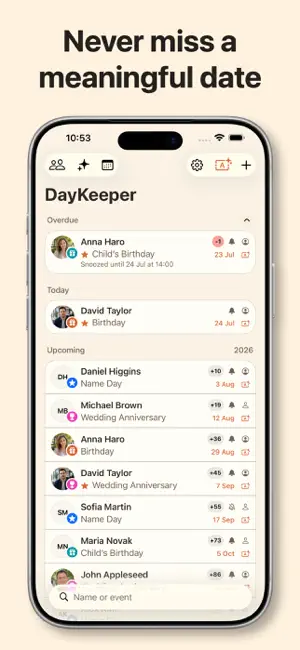
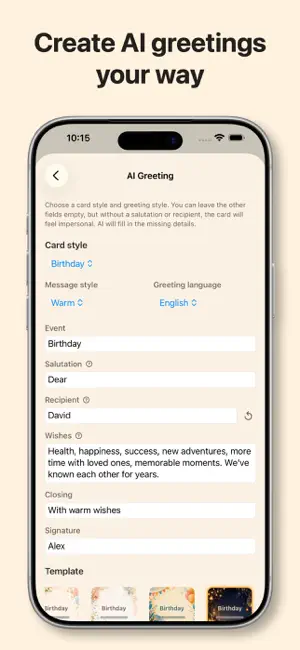
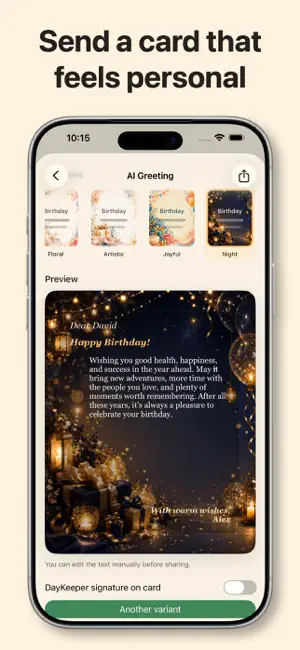
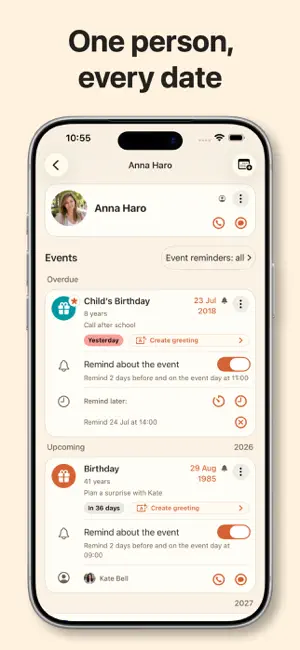
Remember an important occasion in the lives of friends, loved ones, colleagues, or clients in time, find the right words, create a personal card, and send a greeting—DayKeeper helps at every step. The app tracks dates from Contacts and events you add, reminds you at the right time, and displays them in widgets. When it is time to send your wishes, DayKeeper uses AI to help you create a personal message in seconds (for example, warm, romantic, poetic, playful, or humorous), place it on a beautiful card, and send the finished greeting through the iOS share sheet. DayKeeper is powerful yet easy to use. Everyday use requires no complex setup: the app keeps track of dates and reminds you when it is time to reach out. If you prefer full control, you can tailor DayKeeper to your habits and lifestyle by customizing reminders for individual people and events, widgets, appearance, and app behavior. What DayKeeper can do: - track birthdays, anniversaries, and any other occasions; - create greeting texts with AI and place them on beautiful cards (with Pro); - send created greeting cards through the iOS share sheet (with Pro); - add unlimited records for people who are not in Contacts; - add unlimited custom events, choose event icons and colors, and mark events as priority; - show today’s, upcoming, and overdue events as a list or calendar; - show how many days remain until an event or have passed if it was missed; - quickly find people and their events using search and flexible filters; - remind you before an event and on the event day, and let you snooze reminders; - quickly open a call, message, or person card; - mark events as completed manually or automatically with a configurable auto-completion period; - show current events and a counter of remaining or elapsed days in widgets, and also the nearest upcoming events in the large widget; - use quick actions in widgets to mark an event as completed, snooze a reminder, or open card creation; - customize reminders, the app badge, widgets, event icons, app appearance, and event behavior. What else DayKeeper can do: - assign priorities to people and events and configure automatic repeat reminders for priority events; - create group events, each with its own shared date for the people added to that event; - set custom pre-reminders and same-day reminders for specific people and events; - choose a custom reminder sound for events (with Pro); - add an additional contact number for a person; - link an iOS contact to a person, making it easy to send greetings for all of that person's events; - link an iOS contact to a specific event, making it easy to send a greeting for that event. DayKeeper Pro unlocks: - iCloud sync; - AI greeting generation; - advanced widgets; - advanced app settings; - additional reminder sounds; - additional ready-made themes and app icons; - an editor for creating your own theme with live preview and contrast checks. If your Pro AI generation limit runs out, you can buy additional Plus greeting generation packs. DayKeeper is made for anyone who wants to remember important dates and congratulate people on time. It also works well for companies, offices, and teams: keep track of birthdays, professional holidays, company dates, and other important occasions, even for employees who are not in your Contacts. Terms of Use: https://www.apple.com/legal/internet-services/itunes/dev/stdeula/
What’s new
Version 4.0 · Updated September 30, 2026
Meet DayKeeper 4.0! A special gift for DayKeeper Pro subscribers: a full-featured editor for creating your own theme! Start with any ready-made theme and make the app your own: customize colors for screens, cards, text, buttons, event badges, and more. See changes instantly in the preview, while contrast checks help keep text easy to read. And there’s another gift — this one is for everyone: the new white theme is free! A reminder: if you’ve never used DayKeeper Pro, you can try the custom theme editor, greeting generator, and other Pro features free for one calendar month. The trial includes two AI-generated greetings, with no subscription and no automatic charges. Widgets now show how many days remain until an event — or how many have passed since it. We’ve also added more ready-made themes and made small improvements to the interface and the app overall.
App privacy
The developer, Alexander Bekherman, reported these privacy practices to Apple.
Data Linked to You
The following data, which may be collected and linked to your identity, may be used for the following purposes:
- Diagnostics: Other Diagnostic Data
- Purchases: Purchase History
- User Content: Other User Content
- Identifiers: User ID
- Usage Data: Product Interaction
Used for: Analytics, App Functionality
Data Not Linked to You
The following data, which may be collected but is not linked to your identity, may be used for the following purposes:
- Identifiers: User ID
- Usage Data: Product Interaction
Used for: Analytics
Alternatives to DayKeeper: Birthdays & More
Looking for apps like DayKeeper: Birthdays & More? Here are 6 similar apps on the App Store. The highest rated is MyWishly (5.0/5), and 5 of the 6 are free to download.
-
 Wirasat
-
 MyWishly
5.0
MyWishly
5.0
-
 Anniversaries countdown
-
 Zuying · Family Tree
-
 Birthday Reminder - Birthly
-
 My Birthday Tracker
| App | Rating | Price | Last updated | Compare |
|---|---|---|---|---|
| DayKeeper: Birthdays & More | – | Free | September 30, 2026 | |
| Wirasat | – | Free | Jul 15, 2026 | Compare |
| MyWishly | 5.0 / 5 (2) | Free | Feb 25, 2026 | Compare |
| Anniversaries countdown | – | 0.99 USD | Apr 22, 2026 | Compare |
| Zuying · Family Tree | – | Free | Sep 9, 2026 | Compare |
| Birthday Reminder - Birthly | – | Free | Apr 17, 2026 | Compare |
| My Birthday Tracker | – | Free | Nov 22, 2025 | Compare |