

Camera Tools for DJI®
Harald Meyer Photo & Video iPhoneiPadiPod touchMac
Camera Tools for DJI® is a paid Photo & Video app for iPhone and iPad by Harald Meyer. Requires iOS 16.2. Updated September 2, 2026.
- Price
- 7.99 USD
- on the App Store
- Size
- 85 MB
- Age 4+
- Updated
- Sep 2
- 2026 · v1.0.3
Screenshots


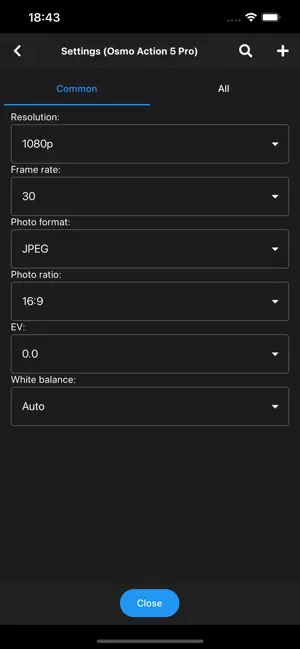
About Camera Tools for DJI®
Turn your iPhone or iPad into a wireless monitor and full remote control for your DJI camera. Camera Tools for DJI connects directly to your camera — no account, no cloud, no subscription — and puts a live view and every important setting on your screen. Demo video: https://youtu.be/Ef-M2wprDw8 LIVE PREVIEW See exactly what your camera sees, in real time. Frame the shot, check focus and exposure, and monitor recording from a comfortable distance. FULL REMOTE CONTROL Change resolution, frame rate, field of view, stabilization, ISO, shutter, exposure and white balance, and switch between photo and video modes — all from the app. Start and stop recording and take photos with a tap. GIMBAL CONTROL Pan and tilt the gimbal on your Osmo Pocket 2 and Osmo Pocket 3 straight from the app. MEDIA BROWSER Browse the photos and videos on your camera, preview them, download them to your device, and delete the ones you no longer need. MULTI-CAMERA OVER BLUETOOTH Connect and control several cameras at once over Bluetooth (Osmo Action 4, Osmo Action 5 Pro, Osmo Action 6 and Osmo 360). DIRECT & PRIVATE Camera Tools talks to your camera over a direct Bluetooth and Wi-Fi connection. Nothing is routed through the internet — no sign-in, no tracking. SUPPORTED CAMERAS • DJI Action 1 • DJI Action 2 • DJI Osmo Action 3 • DJI Osmo Action 4 • DJI Osmo Action 5 Pro • DJI Osmo Action 6 • DJI Osmo Pocket 2 • DJI Osmo Pocket 3 • DJI Osmo 360 Most models connect one camera at a time over the camera's Wi-Fi. Multi-camera control over Bluetooth is available on Osmo Action 4, Osmo Action 5 Pro, Osmo Action 6 and Osmo 360. — Camera Tools for DJI is an independent third-party app. It is not made by, affiliated with, endorsed by, or sponsored by DJI or SZ DJI Technology Co., Ltd. "DJI", "Osmo", "Osmo Action" and "Osmo Pocket" are trademarks of their respective owners.
What’s new
Version 1.0.3 · Updated September 2, 2026
# 01-09-2026 Fixed: Press-and-hold on a camera list entry now correctly opens a context menu.
App privacy
The developer, Harald Meyer, reported these privacy practices to Apple.
Data Not Collected
The developer does not collect any data from this app.
Alternatives to Camera Tools for DJI®
Looking for apps like Camera Tools for DJI®? Here are 6 similar apps on the App Store. The highest rated is Multicam: Action Cam Remote (5.0/5), and 5 of the 6 are free to download.
-
 Scout Cam Control
-
 Multicam: Action Cam Remote
5.0
Multicam: Action Cam Remote
5.0
-
 Camerama: Multi-Cam Remote
5.0
Camerama: Multi-Cam Remote
5.0
-
 It's my Live
2.2
It's my Live
2.2
-
 EasyAction 4
5.0
EasyAction 4
5.0
-
 PIXEL86: Retro Media Editor
4.6
PIXEL86: Retro Media Editor
4.6
| App | Rating | Price | Last updated | Compare |
|---|---|---|---|---|
| Camera Tools for DJI® | – | 7.99 USD | September 2, 2026 | |
| Scout Cam Control | – | 9.99 USD | Feb 18, 2026 | Compare |
| Multicam: Action Cam Remote | 5.0 / 5 (3) | Free | Oct 27, 2026 | Compare |
| Camerama: Multi-Cam Remote | 5.0 / 5 (4) | Free | Sep 5, 2026 | Compare |
| It's my Live | 2.2 / 5 (5) | Free | Apr 14, 2025 | Compare |
| EasyAction 4 | 5.0 / 5 (1) | Free | May 14, 2026 | Compare |
| PIXEL86: Retro Media Editor | 4.6 / 5 (42) | Free | Jun 16, 2026 | Compare |