

Posme AI: Your Pose Director
Rulead Yeni Medya Limited Sirketi Photo & Video iPhoneiPadiPod touch
Posme AI: Your Pose Director is a free Photo & Video app for iPhone and iPad by Rulead Yeni Medya Limited Sirketi. Requires iOS 15.5.
- Price
- Free
- on the App Store
- Size
- 79 MB
- Age 9+
- Updated
- Oct 5
- 2026 · v1.0.1
Screenshots

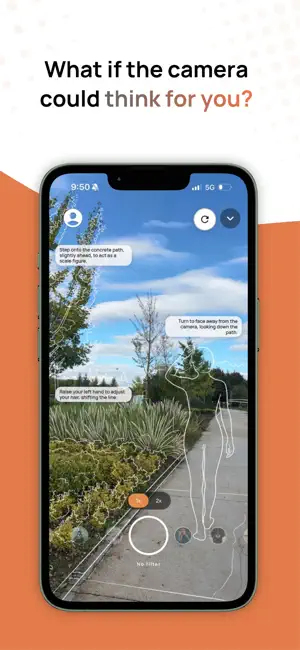


About Posme AI: Your Pose Director
Nobody is a natural in front of a camera. Posme is your AI photography director: it draws a pose right on your live view, then coaches you into it, so you know how to stand before anyone presses the shutter. No photography experience needed. HOW IT WORKS 1. Open the camera and frame the spot where you'll stand. 2. Tap "I'm ready — suggest poses". Posme reads that one frame and asks its AI director for a pose built for your exact scene. 3. Seconds later a pose guide appears over your live camera view. 4. Step into it. As you move, Posme compares your pose with the guide, tells you what to fix and shows how close you are. 5. Shoot. Every real photo you take under that guide is unlimited and free — a shot is what the AI guide costs, never the shutter. LIVE COACHING - Match score: a number beside your photo shows how close you are to the guide, and turns green as you get there. - What to fix: up to three short lines, each with an arrow showing which way to move. Each one disappears the moment you get it right. - Voice guidance: hear the next fix out loud and keep your eyes on the pose. One tap turns it off. - Shoot from a distance: raise a hand above your head and hold it for a moment. The camera counts down from three and takes the photo. Or set a 3, 5 or 10 second timer. Live coaching works best when most of your body is in the frame. Close-ups and selfies still get the pose guide. WHAT A "SHOT" IS One shot is one AI-generated pose guide, not one photograph. The optional AI touch-up on the review screen uses one too, and always asks you first. WHY PEOPLE USE POSME - Concrete photo poses on screen instead of "just look natural". - A director that tells you what to change, instead of a friend saying "a bit more… no, the other way". - Selfie poses, couple shots, travel photos, outfit pictures, family pictures — nobody has to be a professional model. - Free shots the moment you open the app. No account, no card. - The photos you keep go straight to your iPhone's own photo library. There's no second gallery to manage and nothing locked inside the app. BEFORE YOU KEEP A PHOTO Every capture opens a review screen first: look it over, share it, retouch it with AI, or throw it away. Only what you keep is written to your photo library. If a pose guide or a retouch misses, tap the flag and tell us what went wrong. PRIVACY - Live coaching runs entirely on your iPhone. The camera view it watches is never uploaded. - Photos leave your device only when you ask them to: the single frame you submit for a pose guide, a photo you choose to retouch with AI, and the images attached to a report you send us. Reported images are deleted once we've reviewed the report. - No cloud photo storage and no backup. The photos you keep live in your own photo library, and nowhere else. - Use Posme fully as a guest, with no account at all. Sign in with Apple only if you want your shots to follow you to another device. - No ads and no third-party analytics. PLANS - Every new install starts with free shots — no account needed. - Posme Plus, Pro and Studio each include a set number of shots every billing period, billed monthly or yearly. Real photos stay unlimited and free on every plan. Available in English and Turkish. Terms of Use (EULA): https://posme.ai/en/terms/ Privacy Policy: https://posme.ai/en/privacy/ Questions or feedback: [email protected]
What’s new
Version 1.0.1 · Updated October 5, 2026
Your director now coaches you live. - Live match: a number beside your photo shows how close you are to the guide, and turns green as you get there. - What to fix: up to three short lines, each with an arrow showing which way to move. Each one disappears the moment you get it right. - Voice guidance: Posme says the next fix out loud, so your eyes can stay on the pose. Turn it off with one tap. - Shoot from a distance: raise a hand above your head and hold it. The camera counts down from three and takes the photo. - Self-timer: 3, 5 or 10 seconds. - Guide or retouch missed? Tap the flag and tell us what went wrong. - The camera now opens on the full frame, and no longer stays black after you allow camera access on first launch. - Subscribers can change plan straight from their profile, and subscriptions now always stay with the account you're signed in to. Live coaching works best when most of your body is in the frame.
App privacy
The developer, Rulead Yeni Medya Limited Sirketi, reported these privacy practices to Apple.
Data Not Linked to You
The following data, which may be collected but is not linked to your identity, may be used for the following purposes:
- Diagnostics: Crash Data, Performance Data, Other Diagnostic Data
Used for: App Functionality
Alternatives to Posme AI: Your Pose Director
Looking for apps like Posme AI: Your Pose Director? Here are 6 similar apps on the App Store. The highest rated is Framelight (5.0/5), and all 6 are free to download.
-
 Wipest: Photo Cleaner
-
 Framelight
5.0
Framelight
5.0
-
 PoseMe AI Camera
-
 Posed: AI Pose Coach
3.9
Posed: AI Pose Coach
3.9
-
 Posee: AI pose matching camera
1.0
Posee: AI pose matching camera
1.0
-
 PoseUP - Photo Pose Guide
5.0
PoseUP - Photo Pose Guide
5.0
| App | Rating | Price | Last updated | Compare |
|---|---|---|---|---|
| Posme AI: Your Pose Director | – | Free | October 5, 2026 | |
| Wipest: Photo Cleaner | – | Free | Oct 20, 2026 | Compare |
| Framelight | 5.0 / 5 (5) | Free | Aug 7, 2026 | Compare |
| PoseMe AI Camera | – | Free | Oct 27, 2026 | Compare |
| Posed: AI Pose Coach | 3.9 / 5 (11) | Free | Jul 22, 2026 | Compare |
| Posee: AI pose matching camera | 1.0 / 5 (1) | Free | Sep 14, 2026 | Compare |
| PoseUP - Photo Pose Guide | 5.0 / 5 (1) | Free | Sep 25, 2026 | Compare |