

Passport Photo - AI ID Maker
Gadhiya Bhavnaben Photo & Video iPhoneiPadiPod touch
Passport Photo - AI ID Maker is a free Photo & Video app for iPhone and iPad by Gadhiya Bhavnaben. Rated 4.7/5 from 3 ratings. Requires iOS 26.0.
- Rating
- 4.7
- 3 ratings
- Price
- Free
- on the App Store
- Size
- 2 MB
- Age 4+
- Updated
- Jun 29
- 2026 · v1.0.1
Screenshots


About Passport Photo - AI ID Maker
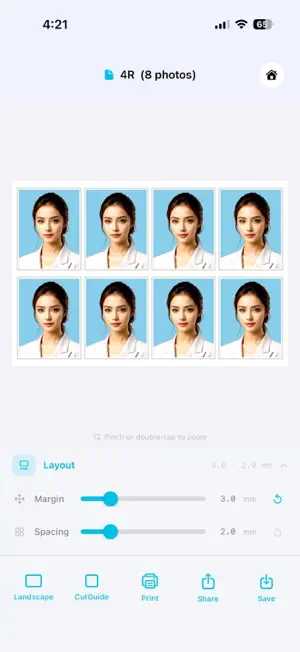
Turn your iPhone into a professional passport photo studio. PassportSizePhoto creates perfectly sized, compliant passport, visa, and ID photos for 190+ countries — in seconds. WHY PASSPORTSIZEPHOTO? Most passport photo apps charge per photo or produce images that get rejected at the counter. PassportSizePhoto gives you everything you need, once, on your iPhone: • Exact dimensions for any country — 35×45 mm, 2×2 inch, 51×51 mm and 100+ other official sizes • AI-powered background removal — cuts the subject cleanly using Apple Vision, 100% on-device • Print-ready PDF on A4, 4R, 5R, 6R, or 8R paper — export, print, cut • Precise crop overlay with real-time guides so your face fills the frame to spec • Complete history of every photo you have made, searchable by document type • Works fully offline — no cloud upload, no privacy risk # HOW IT WORKS 1. Choose your document type (Passport, Visa, National ID, Driver's Licence, OCI, Green Card & more) 2. Select your country — official size, background colour & aspect ratio load automatically 3. Take a photo with the built-in camera or import from your library 4. Crop and adjust; optionally remove or swap the background colour 5. Export as a print-ready PDF or save the image to Photos # SUPPORTED DOCUMENT TYPES Passport · Visa · National ID Card · Driver's Licence · OCI Card · Green Card · PAN Card · Aadhaar · and more — across 190+ countries # PRINT-READY OUTPUT Generate a PDF with multiple copies on a single sheet. Supports A4, 3R, 4R, 5R, 6R and 8R paper sizes. Adjust margins and photo spacing, toggle cut guides, and print directly from your iPhone — or share the PDF to any print shop or photo lab. # 190+ COUNTRIES BUILT-IN Every spec follows official government requirements. Sizes in mm or inches, background colour codes, face-to-frame ratio — all preset and maintained. Whether you need a US 2×2" biometric photo or a UK 35×45 mm passport photo, it is one tap away. # PRIVACY FIRST All processing happens on-device using Apple's Vision framework. Your photos are never sent to any server, never stored in the cloud, never shared with third parties. # CAMERA FEATURES • Real-time crop guide overlay with face-alignment indicators • Front and rear camera with 1× and 2× zoom • Tap-to-focus and tap-to-expose • Self-timer (3 s and 10 s) for hands-free shots • Camera grid for precise head alignment Perfect for — First-time passport applicants · Frequent travellers · Parents making photos for children · Schengen, UK, US, Indian and Chinese visa applications · Anyone renewing documents without visiting a studio · Photographers who need fast, compliant output for clients
What’s new
Version 1.0.1 · Updated June 29, 2026
- Localisation added for English, Chinese, French, German, Japanese, Korean, Malay languages
App privacy
The developer, Gadhiya Bhavnaben, reported these privacy practices to Apple.
Data Not Collected
The developer does not collect any data from this app.
Alternatives to Passport Photo - AI ID Maker
Looking for apps like Passport Photo - AI ID Maker? Here are 6 similar apps on the App Store. The highest rated is ID Photo: Passport Photo Maker (4.7/5), and all 6 are free to download.
-
 Baby Sticker: Photo Cutout
-
 Fluxify AI Art Generator
-
 AI Video ‐ AI Video Generator
4.1
AI Video ‐ AI Video Generator
4.1
-
 CoCamera: Dual Camera & PiP
3.1
CoCamera: Dual Camera & PiP
3.1
-
 ID Photo: Passport Photo Maker
4.7
ID Photo: Passport Photo Maker
4.7
-
 Smartphone iD - Passport photo
4.7
Smartphone iD - Passport photo
4.7
| App | Rating | Price | Last updated | Compare |
|---|---|---|---|---|
| Passport Photo - AI ID Maker | 4.7 / 5 (3 ratings) | Free | June 29, 2026 | |
| Baby Sticker: Photo Cutout | – | Free | Oct 12, 2026 | Compare |
| Fluxify AI Art Generator | – | Free | Jul 9, 2026 | Compare |
| AI Video ‐ AI Video Generator | 4.1 / 5 (36) | Free | Oct 6, 2026 | Compare |
| CoCamera: Dual Camera & PiP | 3.1 / 5 (9) | Free | Oct 13, 2026 | Compare |
| ID Photo: Passport Photo Maker | 4.7 / 5 (825) | Free | Sep 6, 2026 | Compare |
| Smartphone iD - Passport photo | 4.7 / 5 (1,523) | Free | Oct 15, 2026 | Compare |