

Alarra: Mission Alarm Clock
Can Komsuoglu Utilities iPhoneiPadiPod touch
Alarra: Mission Alarm Clock is a free Utilities app for iPhone and iPad by Can Komsuoglu. Rated 5.0/5 from 1 ratings. Requires iOS 26.1.
- Rating
- 5.0
- 1 ratings
- Price
- Free
- on the App Store
- Size
- 106 MB
- Age 4+
- Updated
- Oct 13
- 2026 · v2.3
Screenshots


About Alarra: Mission Alarm Clock
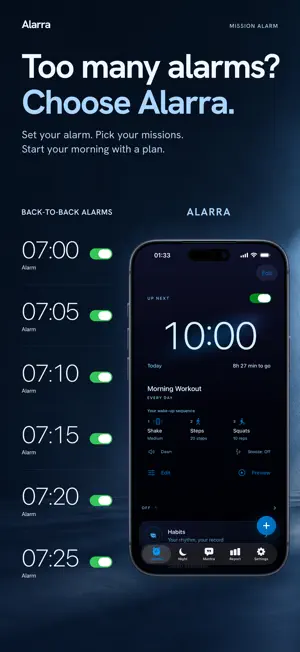
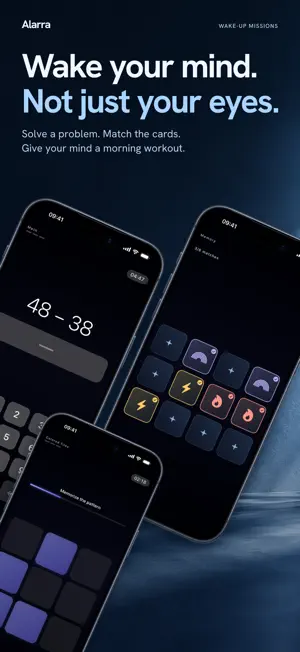
Your morning shouldn’t begin with a row of alarms. Alarra turns a carefully set alarm into a wake-up system you control: choose a mission, dismiss with intention, and add Stay-Up Check when you want another check-in. Built for heavy sleepers, it uses Apple's AlarmKit so alarms can ring through Silent and Focus. Snooze is off by default; if you enable it, using it requires a deliberate press and hold. GET OUT OF BED WITH A MISSION • Math — solve a few quick problems • Memory — find the matching cards • Shake — shake your phone to the target • Photo — match a photo you set, such as your bathroom sink • Barcode — scan a barcode you chose, such as your toothpaste • Steps — get up and walk • Squats — complete your reps • Tap Tiles — memorize the pattern and tap it back Free includes unlimited alarms, a broad wake-sound selection, and six missions — Math, Memory, Shake, Tap Tiles, Photo, and Barcode — with one mission per alarm. Photo and Barcode require you to save a reference first. Alarra Pro adds Steps, camera-verified Squats, and mission chains. BUILT TO RING RELIABLY Alarra uses Apple's system alarm technology, so alarms can ring at the time you set even when your iPhone is locked, the app is closed, or Silent or Focus mode is on. Your alarms work without an internet connection. STAY UP AFTER YOU WAKE UP Pro's Stay-Up Check follows up after the interval you choose and rings again if you do not answer. Dice can pick a random mission. Bargain compares the start of your Night session with your bedtime target. If it starts beyond the grace period, difficulty rises by up to one level; otherwise, or with no session record, your chosen difficulty stays the same. BUILD BETTER MORNINGS • Plan habits separately from wake-up alarms and record what you actually did • See when you dismissed your alarm and how long it rang • Review your Wake Score, heatmap, and morning trends • Plan bedtime and wake-up times with Sleep Plan • Wind down with Lights Out and ambient sounds PRIVATE BY DESIGN No cross-app tracking. No account required—Sign in with Apple is optional. Alarm scheduling and ringing work on-device, and your morning data is never sold. Sleep times are entered manually; Alarra does not use HealthKit. DAILY MANTRA Open the Mantra tab for a short, thoughtfully written line that helps set the tone for your day. ALARRA PRO Pro adds movement missions, a follow-up after dismissal, and insights into your morning consistency. Pro adds Steps and camera-verified Squats; mission chains; Stay-Up Check; Dice & Bargain; a one-year heatmap, past weeks, and day details; additional layered sleep sounds; exclusive wallpapers; separate Habit plans with self-reported check-ins stored on this device; and alarm and wake-history sync across your devices. Choose monthly or yearly billing. The yearly plan includes a seven-day free trial for eligible users; monthly billing starts immediately. Without a free trial, Apple charges your account at confirmation. The trial or subscription renews automatically unless canceled at least 24 hours before renewal. Manage or cancel it in Settings > [your name] > Subscriptions. iPhone only. Requires iOS 26.1 or later. Terms of Use: https://www.apple.com/legal/internet-services/itunes/dev/stdeula/ Privacy Policy: https://alarra.vetrinaworks.com/privacy?lang=en
What’s new
Version 2.3 · Updated October 13, 2026
What’s new in 2.3 • Memory mission cards have been redesigned, making symbols and matched cards easier to tell apart. • Longer mission descriptions in alarm setup are no longer cut off.
App privacy
The developer, Can Komsuoglu, reported these privacy practices to Apple.
Data Linked to You
The following data, which may be collected and linked to your identity, may be used for the following purposes:
- Purchases: Purchase History
- Contact Info: Email Address
- Other Data: Other Data Types
Used for: App Functionality
Data Not Linked to You
The following data, which may be collected but is not linked to your identity, may be used for the following purposes:
- Identifiers: Device ID
- Usage Data: Product Interaction
- Location: Coarse Location
Used for: Analytics, App Functionality
Alternatives to Alarra: Mission Alarm Clock
Looking for apps like Alarra: Mission Alarm Clock? Here are 6 similar apps on the App Store. The highest rated is RiseNow: Wake Up Alarm (5.0/5), and 5 of the 6 are free to download.
-
 DRILL: Loud Alarm Clock
-
 Makeover Pro - Custom CSS
-
 RiseNow: Wake Up Alarm
5.0
RiseNow: Wake Up Alarm
5.0
-
 Maxima Portal
-
 AlarMix Alarm
-
 VUEROID Car
| App | Rating | Price | Last updated | Compare |
|---|---|---|---|---|
| Alarra: Mission Alarm Clock | 5.0 / 5 (1 rating) | Free | October 13, 2026 | |
| DRILL: Loud Alarm Clock | – | Free | Oct 10, 2026 | Compare |
| Makeover Pro - Custom CSS | – | 2.99 USD | Sep 14, 2026 | Compare |
| RiseNow: Wake Up Alarm | 5.0 / 5 (1) | Free | Jul 18, 2026 | Compare |
| Maxima Portal | – | Free | Oct 21, 2025 | Compare |
| AlarMix Alarm | – | Free | Aug 28, 2026 | Compare |
| VUEROID Car | – | Free | Nov 16, 2025 | Compare |