

Pinyin Scholar
昶 黄 Education iPhoneiPadiPod touch
Pinyin Scholar is a free Education app for iPhone and iPad by 昶 黄. Requires iOS 17.0. Updated October 22, 2026.
- Price
- Free
- on the App Store
- Size
- 15 MB
- Age 4+
- Updated
- Oct 22
- 2026 · v1.2.3
Screenshots
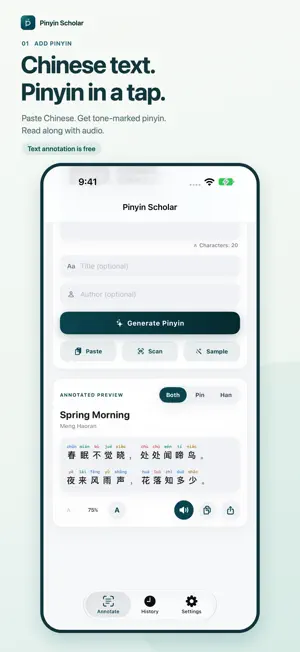


About Pinyin Scholar
PRINT YOUR WAY Choose standard layout, large-print reading, or extra space for handwritten notes. Adjust text size and line spacing; export format, paper size, and layout choices are remembered for next time. Preview all layouts for free. Pinyin Scholar helps you add pinyin to Chinese text quickly. Paste text, scan a page or photo, then view clear pinyin annotations with tone colors, review possible polyphonic characters, listen to Chinese text aloud, and export the result for study, work, or reference. Core annotation works offline with no app account, tracking, or ads. FREE FEATURES - Unlimited pasted-text annotation, local history and search. - Tone marks, tone numbers, IPA, and optional tone colors. - Review OCR text before generating pinyin. - Choose pronunciations for polyphonic characters. - Dictionary details, copy, system read-aloud, and image export. - Five confirmed single-page OCR scans per day. - Free PDF and editable RTF previews before choosing Pro export. PINYIN SCHOLAR PRO - Optional article and pronunciation-correction sync in your private iCloud database. - Multi-photo OCR and multi-page document scanning with page review. - A4 / US Letter PDF export with automatic pagination for long articles. - Editable Word-compatible RTF export. - Monthly, yearly, and one-time lifetime purchase options. Earlier users retain their existing annotation, single-page OCR, and export features. iCloud sync requires an iCloud account and is off by default. Available in English, Simplified Chinese, and Japanese. Subscriptions renew automatically unless canceled before renewal. Eligible customers may receive a 7-day yearly-plan trial; after the trial, the yearly subscription renews at the price shown before purchase. Manage or cancel subscriptions in your Apple account settings. Lifetime is a one-time purchase, not a subscription. Privacy Policy: https://huangcodes.com/apps/pinyinscholar/privacy/ Terms of Use: https://www.apple.com/legal/internet-services/itunes/dev/stdeula/
What’s new
Version 1.2.3 · Updated October 22, 2026
- New print presets: standard layout, large-print reading, and room for handwritten notes. - Adjust text size and line spacing, with layout choices saved for your next export. - Keep the export button within reach while adjusting your preview. - Improved purchase verification and recovery of existing access. After unlocking an export or scan, continue the action you started. - Improved single-page scan replacement and multi-page access checks.
App privacy
The developer, 昶 黄, reported these privacy practices to Apple.
Data Not Collected
The developer does not collect any data from this app.
Alternatives to Pinyin Scholar
Looking for apps like Pinyin Scholar? Here are 6 similar apps on the App Store. The highest rated is Pinyin Reader (5.0/5), and all 6 are free to download.
-
 Pinyin Helper - Chinese Study
-
 汉语拼音大师 | 多音字准确率 99%
-
 HanziCamera
-
 Snap Pinyin: Photo Translator
-
 Pinyin: Chinese Hanzi Reader
-
 Pinyin Reader
5.0
| App | Rating | Price | Last updated | Compare |
|---|---|---|---|---|
| Pinyin Scholar | – | Free | October 22, 2026 | |
| Pinyin Helper - Chinese Study | – | Free | Oct 3, 2026 | Compare |
| 汉语拼音大师 | 多音字准确率 99% | – | Free | Apr 15, 2026 | Compare |
| HanziCamera | – | Free | Aug 23, 2026 | Compare |
| Snap Pinyin: Photo Translator | – | Free | Jul 20, 2026 | Compare |
| Pinyin: Chinese Hanzi Reader | – | Free | Oct 3, 2026 | Compare |
| Pinyin Reader | 5.0 / 5 (1) | Free | Oct 5, 2026 | Compare |
Compare Pinyin Scholar with the top alternatives: ratings, updates, ASO score and keyword gaps →