

Biblio.ink: 3D Bookshelf
groov creator limited Book iPhoneiPadiPod touchMac
Biblio.ink: 3D Bookshelf is a free Book app for iPhone and iPad by groov creator limited. Rated 5.0/5 from 5 ratings. Requires iOS 18.0.
- Rating
- 5.0
- 5 ratings
- Price
- Free
- on the App Store
- Size
- 79 MB
- Age 12+
- Updated
- Oct 21
- 2026 · v1.11.10
Screenshots
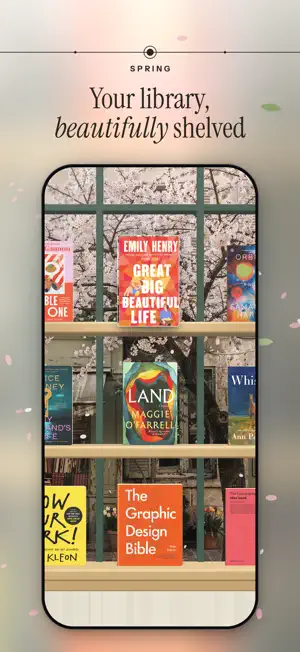
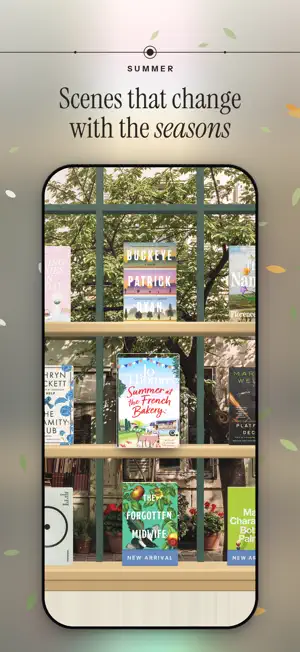
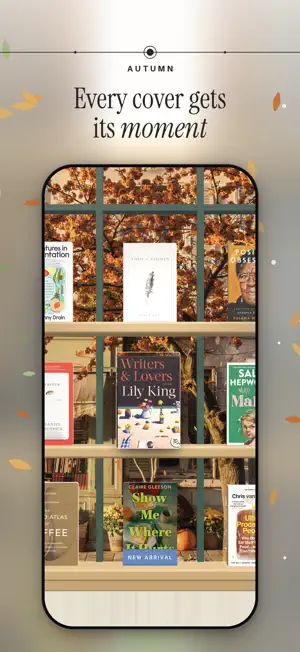

About Biblio.ink: 3D Bookshelf
Your unified library in 3D, your physical books and ebooks live together. Drop in an EPUB or PDF and watch it become a hardcover you can pick up, browse, and read. Biblio turns a folder of files into a library you actually want to visit. Every book stands on a real 3D shelf, spine, cover, and page edges you can reach in and pick up, turn over, and start reading. A pile of downloads becomes a collection you browse the way you browse a bookshelf at home. One library, every kind of book Your ebooks and your physical books live side by side. Scan a barcode, photograph a whole shelf at once, search by title or author, or add a book by hand. However it arrives, it stands on the same shelf. See your collection, your way • Shelf: your whole library on beautiful 3D shelves; pinch to see every book at once • Cascade: flip through your books like flipping through records • Map: Your library on a world map: books pin to the places they're about, and tapping a place fans out its covers. Pan, zoom, and switch between Map and Constellation in the Graph view. • Constellation: a quiet map of how your books connect to one another • List: search, sort, and organize in a tap A reader that gets out of the way Clean typography, smooth page turns, and a layout built for long reading. PDFs support markup with Apple Pencil. Your place is always saved. Share a shelf with anyone Publish a shelf to your own page at biblio.ink and send the link to a friend — no account required to view. Yours, and private Biblio is local-first: your library lives on your device. Turn on iCloud to keep it in sync across iPhone, iPad, and the web, privately. Biblio is for people who love books — not just reading them, but keeping them, arranging them, and coming back to them. Terms: https://biblio.ink/terms
Ratings & reviews
5.0
5 ratings
What’s new
Version 1.11.10 · Updated October 21, 2026
Covers for the books you scan, and Biblio from the Home Screen. • A book you scan now shows its cover. When no catalogue has one, photograph the front and it becomes the cover. • Press and hold Biblio’s icon for Scan barcode, Shelf photo and Write in the journal. • Writing in the journal is smoother, however many entries your year has. • On iOS 27, the Shelf widget also comes in the new tall size. • While something loads, Biblio shows its own mark instead of the spinning wheel. • Settings now introduces Biblio Times, a morning paper made from the feeds you follow.
App privacy
The developer, groov creator limited, reported these privacy practices to Apple.
Data Not Linked to You
The following data, which may be collected but is not linked to your identity, may be used for the following purposes:
- Usage Data: Product Interaction
- Contact Info: Email Address
- Identifiers: User ID
Used for: Analytics, App Functionality
Alternatives to Biblio.ink: 3D Bookshelf
Looking for apps like Biblio.ink: 3D Bookshelf? Here are 6 similar apps on the App Store. The highest rated is Nightstand - Book Tracking App (4.9/5), and all 6 are free to download.
-
 Librero: Your Book Canvas
-
 MOBS: My Online Bookshelf
4.5
MOBS: My Online Bookshelf
4.5
-
 Better Bookshelf
4.4
Better Bookshelf
4.4
-
 Book Nook - My Digital Library
4.8
Book Nook - My Digital Library
4.8
-
 Nightstand - Book Tracking App
4.9
Nightstand - Book Tracking App
4.9
-
 Leaf & Spine: Reader & Tracker
4.3
Leaf & Spine: Reader & Tracker
4.3
| App | Rating | Price | Last updated | Compare |
|---|---|---|---|---|
| Biblio.ink: 3D Bookshelf | 5.0 / 5 (5 ratings) | Free | October 21, 2026 | |
| Librero: Your Book Canvas | – | Free | Aug 21, 2026 | Compare |
| MOBS: My Online Bookshelf | 4.5 / 5 (13) | Free | Oct 17, 2026 | Compare |
| Better Bookshelf | 4.4 / 5 (5) | Free | Oct 6, 2026 | Compare |
| Book Nook - My Digital Library | 4.8 / 5 (6) | Free | Oct 21, 2026 | Compare |
| Nightstand - Book Tracking App | 4.9 / 5 (10) | Free | Sep 30, 2026 | Compare |
| Leaf & Spine: Reader & Tracker | 4.3 / 5 (7) | Free | Oct 21, 2026 | Compare |