

Coach Clock: Class Timer
Quoc Nguyen Health & Fitness iPhoneiPadiPod touch
Coach Clock: Class Timer is a free Health & Fitness app for iPhone and iPad by Quoc Nguyen. Requires iOS 17.0. Updated July 7, 2026.
- Price
- Free
- on the App Store
- Size
- 15 MB
- Age 4+
- Updated
- Jul 7
- 2026 · v1.1
Screenshots
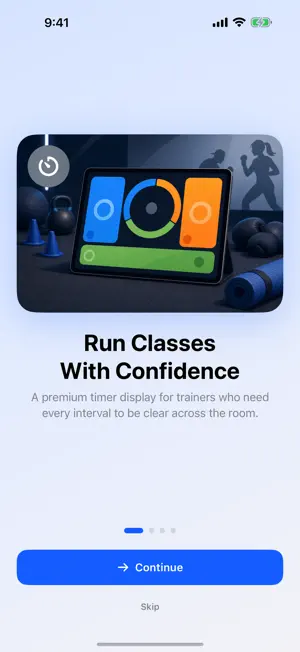

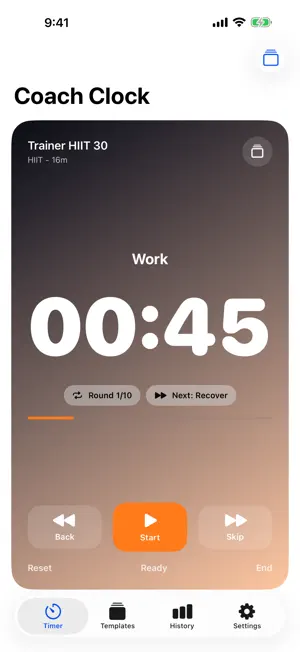
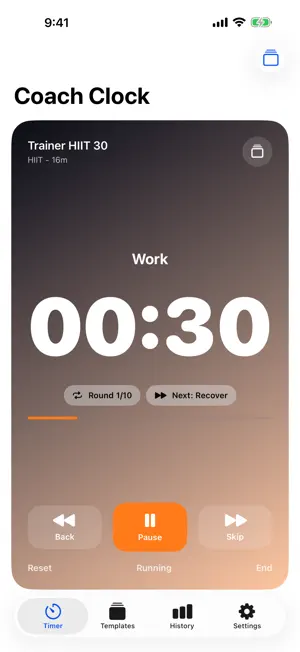
About Coach Clock: Class Timer
Coach Clock is an interval timer for trainers, coaches, and athletes who need reusable class templates, a big readable display, and reliable workout cues. Start free with everything you need to run a session, then unlock Coach Clock Pro once to remove ads and go unlimited. KEY FEATURES - Class-ready timer display: huge countdown, current interval, next interval, round count, elapsed time, and remaining time. - Professional presets: HIIT, Tabata, EMOM, AMRAP, boxing rounds, run/walk intervals, mobility flows, and gym rest timers. - Custom template builder: warmups, work blocks, rests, rounds, cooldowns, names, colors, and cue settings. - Trainer workflow: duplicate templates, favorite your go-to sessions, and (with Pro) share timer files with clients or other coaches. - iPad stage mode: high-contrast timer layouts designed to be seen across a room. - Audio and haptic cues: countdowns, bells, phase changes, and quiet mode options. - Local-first: no account required, and your templates stay on device unless you choose to share them. FREE VS PRO Free: every timer format, all presets, the big display, local class history, and up to 3 custom templates. The free version is supported by ads. Coach Clock Pro (one-time purchase, no subscription): removes ads and unlocks unlimited saved templates, template sharing with import/export, premium display tools, advanced cues, and full class history. WHY COACH CLOCK Generic interval timers can be powerful but slow to set up. Coach Clock is built around the live coaching moment: choose a template, start the class, glance at what is next, and keep the session moving. SAFE FITNESS NOTE Coach Clock provides timing tools only. It does not provide medical, fitness, safety, or coaching advice. You choose the exercises, intensity, and suitability of every session. Consult a qualified professional before starting or changing an exercise routine, especially if you have a medical condition, injury, are pregnant, or are new to exercise. Support, Privacy Policy, and Terms of Use: https://nemostation90.github.io/app-support/apps/coach-clock/
What’s new
Version 1.1 · Updated July 7, 2026
A fresh visual refresh: • Vibrant new studio backgrounds on the timer, paywall, and empty screens • Fixed the large timer display so it fits perfectly on iPad and all screen sizes • Cleaner, more polished visuals throughout the app • Performance and stability improvements Thanks for coaching with Coach Clock!
App privacy
The developer, Quoc Nguyen, reported these privacy practices to Apple.
Data Used to Track You
The following data may be used to track you across apps and websites owned by other companies:
- Identifiers: User ID, Device ID
- Usage Data: Advertising Data
Data Not Linked to You
The following data, which may be collected but is not linked to your identity, may be used for the following purposes:
- Identifiers: User ID, Device ID
- Usage Data: Advertising Data
Used for: Third-Party Advertising
Alternatives to Coach Clock: Class Timer
Looking for apps like Coach Clock: Class Timer? Here are 6 similar apps on the App Store. The highest rated is Taba – Workout Timer (5.0/5), and all 6 are free to download.
-
 Ánima Studio
-
 Taba – Workout Timer
5.0
Taba – Workout Timer
5.0
-
 Exercise Timer Resero
5.0
Exercise Timer Resero
5.0
-
 RestBeat: Gym Rest Timer
-
 JabBell: Boxing Round Timer
-
 mWOD Timer: WOD & HIIT Clock
5.0
mWOD Timer: WOD & HIIT Clock
5.0
| App | Rating | Price | Last updated | Compare |
|---|---|---|---|---|
| Coach Clock: Class Timer | – | Free | July 7, 2026 | |
| Ánima Studio | – | Free | Feb 15, 2024 | Compare |
| Taba – Workout Timer | 5.0 / 5 (1) | Free | Sep 29, 2026 | Compare |
| Exercise Timer Resero | 5.0 / 5 (2) | Free | Oct 18, 2026 | Compare |
| RestBeat: Gym Rest Timer | – | Free | Jun 9, 2026 | Compare |
| JabBell: Boxing Round Timer | – | Free | Aug 1, 2026 | Compare |
| mWOD Timer: WOD & HIIT Clock | 5.0 / 5 (6) | Free | Sep 17, 2026 | Compare |