

Lo Deck
Louis van de Wiele Utilities iPhoneiPadiPod touch
Lo Deck is a free Utilities app for iPhone and iPad by Louis van de Wiele. Requires iOS 17.0. Updated July 4, 2026.
- Price
- Free
- on the App Store
- Size
- 3 MB
- Age 4+
- Updated
- Jul 4
- 2026 · v2.2.0
Screenshots

About Lo Deck
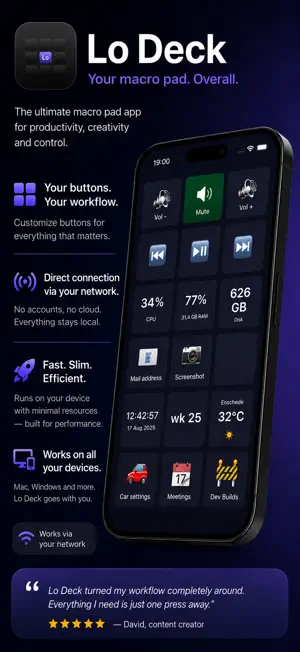
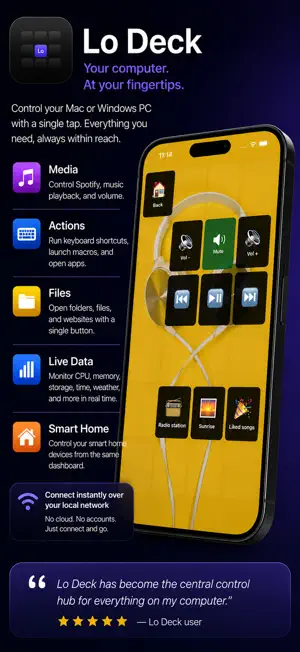
Lo Deck turns your iPad or iPhone into a customizable control surface — a "macro pad" — for your computer. Design a grid of buttons in the free Lo Deck desktop app (macOS & Windows), then tap them on your tablet to run actions on your computer in real time. • Live data on every key — CPU, memory, free disk, a clock, the battery, weather and more. • Three triggers per key — tap, long-press and double-tap each fire a different action. • Media & app control — play/pause, volume, launch apps, fire keyboard shortcuts. • Smart home & car — webhooks and Tesla climate from a button. • Pages, folders & themes — organize hundreds of actions; recolor keys, add emoji or images. • Page backgrounds & translucent buttons — give a page its own background image (fill / contain / stretch) and let buttons show through translucently. • Live-value tiles — show any number from an HTTP/JSON API or a shell command. Connects locally on your own Wi-Fi network (no account), or from anywhere via your Lo Deck account. This is a companion app: it needs the free Lo Deck desktop app running on your computer.
What’s new
Version 2.2.0 · Updated July 4, 2026
Button themes — restyle your whole deck in one go. Pick Neon Glow, E-ink, Glass, Flat, Keycaps (3D) or Classic. Themes auto-colour your buttons by type (media, system, weather, car…) and set shape, glow and mood — for the whole deck, per page, or even per button. Also: your app settings (theme, display, tablet) now follow your account, so they come back on all your devices. Plus various minor improvements.