

Anonymize my ID
Nexo Apex Utilities iPhoneiPadiPod touch
Anonymize my ID is a free Utilities app for iPhone and iPad by Nexo Apex. Requires iOS 15.0. Updated August 20, 2026.
- Price
- Free
- on the App Store
- Size
- 39 MB
- Age 4+
- Updated
- Aug 20
- 2026 · v1.1.0
Screenshots


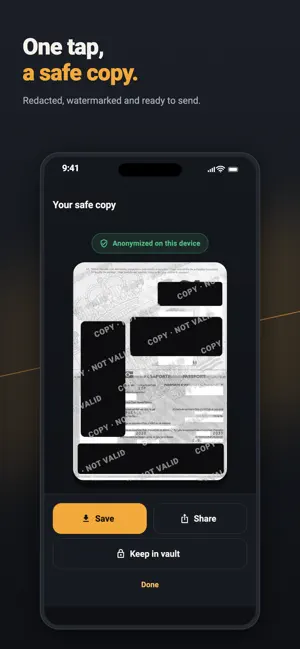

About Anonymize my ID
Share your ID, not your identity. Anonymize my ID turns a photo of your ID card or passport into a safe, watermarked, redacted copy — processed 100% on your phone. No account. No upload. Your original photo never leaves your device. Made for travel: give a hotel, car rental or visa form a copy of your document without handing over the details that matter. THREE TAPS TO A SAFE COPY 1. Snap or pick — photograph your ID or passport with the built-in camera, or choose an existing photo. Everything happens offline. 2. Hide what matters — add a box per field and drag it into place. Free hides everything; Pro lets you choose blur, pixelate, partial or colour. 3. Share safely — export a watermarked copy and send it anywhere. A CAMERA THAT KEEPS ITS MOUTH SHUT Photograph your document inside the app, with a guide frame to line it up. The shot goes straight into memory and the temporary file is deleted immediately — so unlike your phone's camera, no picture of your passport is left sitting in the camera roll, syncing to a cloud you forgot was on. AN ENCRYPTED VAULT, IF YOU WANT ONE Keeping a copy of your passport on your phone is useful and, in a normal photo album, a genuinely bad idea. The vault is the alternative: • Safe copies and untouched originals, encrypted with AES-256 on this device. • Unlocked by a PIN, a passphrase, or Face ID / Touch ID / fingerprint. • The key is wrapped by your phone's secure hardware, so a copy of the files alone is useless to anyone who takes them. • It locks itself the moment you leave the app. • Nothing is uploaded, and there is no recovery — if you forget your PIN, the documents are gone. That is the point. Entirely optional. Turn it on and nothing is stored at all. WHY IT'S DIFFERENT • 100% offline — all processing runs on-device with the system image engine. Nothing is uploaded. • Nothing stored by default — no account, and nothing is kept unless you put it in the vault yourself. • IDs & passports — front and back ID cards plus passport data pages, with sensible field presets. • You decide — add, move, resize and delete the redaction boxes to cover exactly what you want. Resize from any corner. • Your layout, remembered — the positions you settled on come back with one tap next time. • Blur, pixelate or solid bars — pick how each field is hidden. • Partial redaction — reveal just the last digits of a number while hiding the rest. • Black & white or colour — keep the classic photocopy look, or stay in colour. • Tamper-evident watermark — tile a custom watermark across the image so copies can't be reused. TRY IT FREE 2 anonymizations per install — every sensitive field hidden, in black & white, with a watermark. The vault is included on every tier. UNLOCK PRO ONCE A single purchase, no subscription, yours for life: unlimited anonymizations, full control over what to hide, blur / pixelate / solid bars, partial redaction, colour, and a custom watermark. PRIVACY BY DESIGN There is no server, no account and no tracking of your documents. The original photo is processed locally. It is never sent anywhere, and it is never stored unless you explicitly choose to keep it — in which case it is encrypted with a key only your PIN, passphrase or biometrics can release. A product of Nexo Apex S.L.
What’s new
Version 1.1.0 · Updated August 20, 2026
Two big additions, both still entirely on your phone: • Built-in camera — photograph your document inside the app. The shot goes straight into memory and never lands in your camera roll. • Encrypted vault — keep safe copies, and originals, locked behind a PIN, a passphrase or Face ID / fingerprint. AES-256, and the key never leaves this device. Also improved: the on-screen hints no longer sit on top of the photo where they blocked the resize handles, boxes now resize from all four corners, and suggested fields are added one at a time instead of all at once — with your last layout a single tap away.
App privacy
The developer, Nexo Apex, reported these privacy practices to Apple.
Data Not Collected
The developer does not collect any data from this app.
Alternatives to Anonymize my ID
Looking for apps like Anonymize my ID? Here are 6 similar apps on the App Store. The highest rated is Cachera: Redact ID to PDF (5.0/5), and 5 of the 6 are free to download.
-
 Cachera: Redact ID to PDF
5.0
Cachera: Redact ID to PDF
5.0
-
 MayaHelp
-
 Automated Phone
-
 Ctrl ~ A Remote for your Watch
3.0
Ctrl ~ A Remote for your Watch
3.0
-
 Q Booster
-
 DocProtect
| App | Rating | Price | Last updated | Compare |
|---|---|---|---|---|
| Anonymize my ID | – | Free | August 20, 2026 | |
| Cachera: Redact ID to PDF | 5.0 / 5 (1) | Free | Jul 6, 2026 | Compare |
| MayaHelp | – | Free | Apr 21, 2026 | Compare |
| Automated Phone | – | Free | Jun 20, 2025 | Compare |
| Ctrl ~ A Remote for your Watch | 3.0 / 5 (2) | 3.99 USD | Feb 5, 2024 | Compare |
| Q Booster | – | Free | Dec 21, 2025 | Compare |
| DocProtect | – | Free | Jul 10, 2026 | Compare |
Compare Anonymize my ID with the top alternatives: ratings, updates, ASO score and keyword gaps →