

Table Voice Translator
YIYUAN JIN Travel iPhoneiPadiPod touchMac
Table Voice Translator is a free Travel app for iPhone and iPad by YIYUAN JIN. Rated 5.0/5 from 2 ratings. Requires iOS 18.2. Updated August 26, 2026.
- Rating
- 5.0
- 2 ratings
- Price
- Free
- on the App Store
- Size
- 50 MB
- Age 4+
- Updated
- Aug 26
- 2026 · v1.3.0
Screenshots

About Table Voice Translator
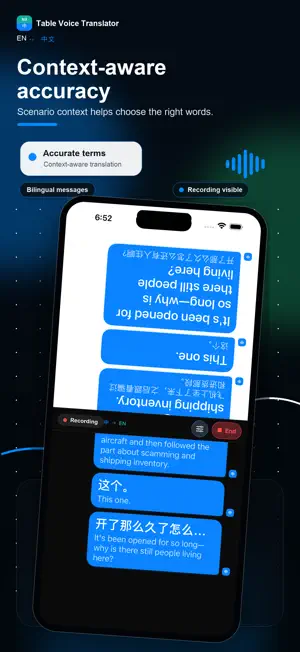
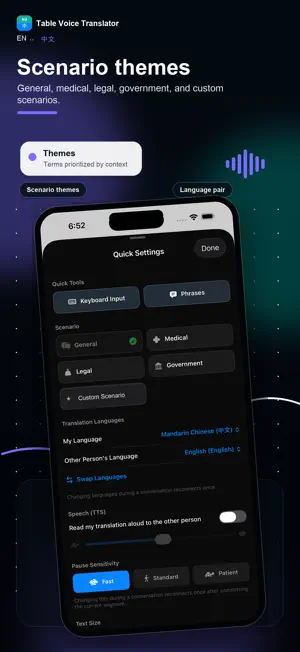
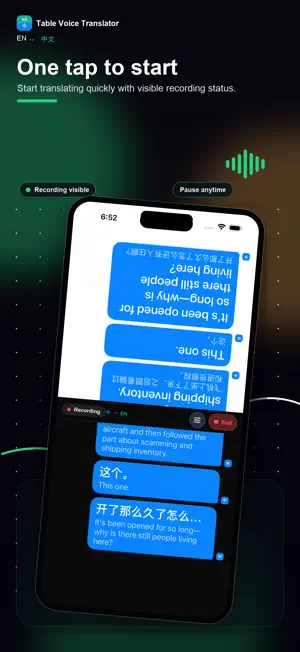
Table Voice Translator turns one iPhone, iPad, or Mac into a hands-free, two-way conversation translator. Place an iPhone or iPad between two people, or use your Mac during an in-person or online conversation. Each person reads their side of the split screen while the app translates the conversation live. Built for travel, clinic visits, front desks, government windows, online meetings, and first conversations where a shared screen is easier than passing a device back and forth. Key features: • Table mode for two people on iPhone and iPad • Mac input from a microphone, system audio, or both at the same time • Live two-way speech translation • Mandarin Chinese and English by default, with configurable language pairs • Quick Phrases for common moments • Keyboard Input when speaking is not comfortable • Scene modes such as General, Medical, Legal, and Government • Adjustable conversation text size • Account & Credits with Apple in-app purchases • Conversation history stored on device • Optional summaries and calendar extraction from history • Home Screen widget, Control Center / Action Button control, and Live Activity quick entry points on supported devices Credits are consumable Apple in-app purchases used for live translation time and related AI features. There is no auto-renewing subscription. Important: translations may contain mistakes. Do not rely on the app for professional, medical, legal, emergency, or safety-critical decisions. A conversation involves another person; tell people that their speech or system audio is being processed and translated, and get consent where required.
What’s new
Version 1.3.0 · Updated August 26, 2026
My voice - speak any language and still be you Table Voice Translator used to tell you and the other person apart by which language was spoken, so your English ended up on their side of the screen. Now you can enroll your voice once, in about twenty seconds, and your lines stay on your side no matter which language you speak. Recognizing a voice takes a few seconds of speaking, so at the start the app places lines by language and tells you it is still working out who's who. The moment it knows, any lines on the wrong side move to where they belong. Your voice profile is stored only inside the app on this device. It is never uploaded, it is excluded from backups, and you can delete it at any time in Settings. Also in this release: long-press any bubble to move it to the other side, and every button now responds when you press it.
App privacy
The developer, YIYUAN JIN, reported these privacy practices to Apple.
Data Linked to You
The following data, which may be collected and linked to your identity, may be used for the following purposes:
- Purchases: Purchase History
- Identifiers: User ID, Device ID
- Usage Data: Product Interaction
- Diagnostics: Crash Data, Performance Data, Other Diagnostic Data
- Contact Info: Email Address
- User Content: Audio Data, Customer Support, Other User Content
Used for: Analytics, App Functionality
Alternatives to Table Voice Translator
Looking for apps like Table Voice Translator? Here are 6 similar apps on the App Store. The highest rated is BabelTable (5.0/5), and all 6 are free to download.
-
 BabelTable
5.0
BabelTable
5.0
-
 LiveHi - AI Translator
5.0
LiveHi - AI Translator
5.0
-
 TransFlow - Live Translator
5.0
TransFlow - Live Translator
5.0
-
 TalkGo : AI Speech Translator
5.0
TalkGo : AI Speech Translator
5.0
-
 Fish Tracker - Fishing Times
4.6
Fish Tracker - Fishing Times
4.6
-
 Kiree - VPN for China
5.0
Kiree - VPN for China
5.0
| App | Rating | Price | Last updated | Compare |
|---|---|---|---|---|
| Table Voice Translator | 5.0 / 5 (2 ratings) | Free | August 26, 2026 | |
| BabelTable | 5.0 / 5 (1) | Free | Oct 1, 2026 | Compare |
| LiveHi - AI Translator | 5.0 / 5 (2) | Free | Oct 27, 2026 | Compare |
| TransFlow - Live Translator | 5.0 / 5 (4) | Free | Sep 18, 2026 | Compare |
| TalkGo : AI Speech Translator | 5.0 / 5 (1) | Free | Feb 1, 2026 | Compare |
| Fish Tracker - Fishing Times | 4.6 / 5 (21) | Free | Aug 23, 2026 | Compare |
| Kiree - VPN for China | 5.0 / 5 (4) | Free | Sep 28, 2026 | Compare |