

Kombine: Daily Planner & Timer
Adam Swiderski Productivity iPhoneiPadiPod touchApple Watch
Kombine: Daily Planner & Timer is a free Productivity app for iPhone and iPad by Adam Swiderski. Requires iOS 17.0. Updated November 6, 2026.
- Price
- Free
- on the App Store
- Size
- 88 MB
- Age 4+
- Updated
- Nov 6
- 2026 · v1.17.0
Screenshots
Save to Pinterest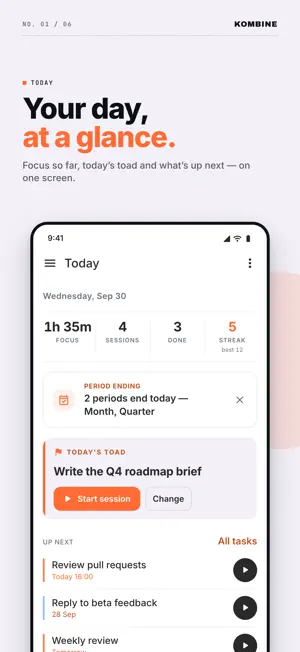

About Kombine: Daily Planner & Timer
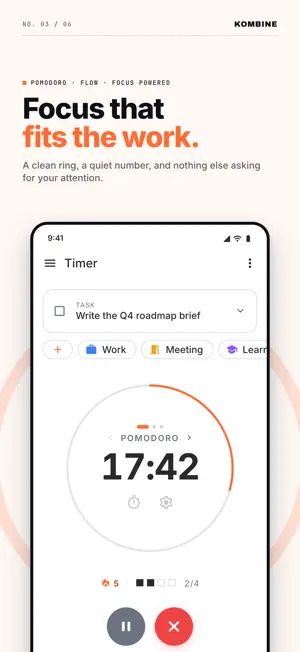
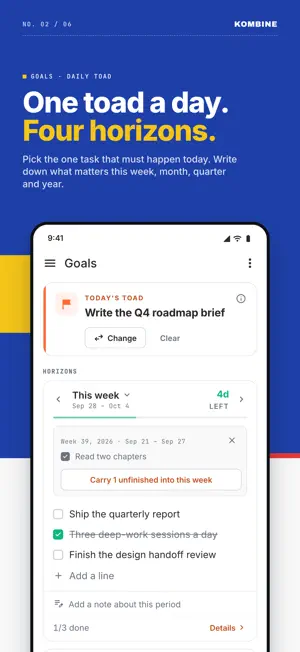
Kombine is a daily planner, to-do list and Pomodoro focus timer in one, with time tracking and an Apple Watch app — so you can plan what needs doing, actually do it, and see where your time went. The key difference: every task has an energy level — low, medium, or high — as well as a priority. When you're drained, filter to low-energy tasks and still move forward. When you're sharp, tackle the hard stuff. It's a small change. It makes a big difference. TODAY Open the app to your day: today's focus time and sessions, your Toad — the one task you'll tackle first — and what's up next. One tap starts a focus session. PLAN Each task takes a deadline, priority, energy level, and tags. Group your list by date, energy, priority, status, or urgency (Eisenhower) — switch any time to see what matters right now. Recurring tasks for the things that come back. Reminders you can act on: start focus or snooze straight from the notification. Import from Todoist or CSV to get started fast. GOALS Set goals for the week, month, quarter, and year. Tick them off, link tasks to them, and when a period ends, review it: keep what you achieved, drop what no longer matters, carry over the rest. Add a note to any period. ACT Three timer modes adapt to how you work: Pomodoro — time-boxed focus blocks with customizable durations and short breaks. Proven and reliable. Flow — open-ended sessions for deep work that needs room to breathe. Adaptive — tell the app how energized you feel; it sets work and break durations to match. Each session links to a task and an activity type — Work, Meeting, Learning, Reading, Writing, Exercise, Creative, Planning, Admin, or your own. Time per task is logged automatically. No manual entry. TRACK The Log is what you actually did, not what you meant to: sessions, notes, and completed tasks on one timeline. Statistics show your focus by week, month, quarter, and year — by activity, by time of day — compared with the same point last period. A streak tracks the days you hit your focus target. Useful patterns surface; bad weeks aren't dramatic, just visible. EVERYWHERE YOU WORK Built for iPhone and iPad, with list and details side by side on the bigger screen. A home screen widget for today's tasks, and a Live Activity that keeps the running timer on your Lock Screen and in the Dynamic Island. Real-time sync across iPhone, iPad, Apple Watch, and the web app — pick up exactly where you left off. Works fully offline; syncs when you're back online. APPLE WATCH Start, pause, or stop a session from your wrist — even without a signal. A complication keeps your active task visible at a glance. Everything reconciles the moment your devices reconnect. PRIVACY No account required to start. All tasks, sessions, and settings are stored locally on your device. Crash reports are sent anonymously for stability monitoring — they contain no task content or personal information. Create an account to sync across devices and restore your data anywhere.
What’s new
Version 1.17.0 · Updated November 6, 2026
Skip a task without pretending you did it. Swipe right on anything due today or overdue: a one-time task moves to tomorrow, a recurring one jumps to its next date. Skips don't count toward your stats, streaks or goals, and you can undo them. - Add checklist items to a task and tick them off as you go. A recurring task starts each round with every item unticked. - Drag a task between groups: long-press a card, then move it to another energy level, priority, status or date. - Typing a tag suggests the ones you already use, and "Did you mean #work?" catches near-duplicates. - In the session window, shift the start by 5 or 15 minutes or start right after your last session. Length has one-tap presets and no longer stops at 4 hours. - The focus rating is no longer in the session window. Ratings you already gave stay and still show in the session details. - A session with no task is titled by its note in the Log. - New animations and haptics when you complete a task, start the timer or finish a session. They follow your Reduce Motion setting. - Timer digits no longer shift as they count, and Break and Skip are round buttons. - A new Rate Kombine row in the Feedback section of Settings opens the App Store listing. FIXES - Tasks stuck in a sync conflict now sync, and the conflict message stops repeating. - A completed task appears once in the Log, not twice. - Clearing a task's due date also cancels its reminder. - An overdue monthly task keeps its day when it catches up: January 31 lands on May 31, not May 28. - Carrying over or dismissing goals works after you swipe between periods. - Activities no longer show duplicate briefcase icons.
App privacy
The developer, Adam Swiderski, reported these privacy practices to Apple.
Data Linked to You
The following data, which may be collected and linked to your identity, may be used for the following purposes:
- Contact Info: Email Address
- User Content: Other User Content
- Identifiers: User ID, Device ID
- Diagnostics: Crash Data, Performance Data
Used for: App Functionality
Data Not Linked to You
The following data, which may be collected but is not linked to your identity, may be used for the following purposes:
- Diagnostics: Other Diagnostic Data
- Other Data: Other Data Types
Used for: Analytics, App Functionality
Alternatives to Kombine: Daily Planner & Timer
Looking for apps like Kombine: Daily Planner & Timer? Here are 6 similar apps on the App Store.
-
 Focus Flow Timer & Alarms
-
 PomoBrew: Focus Timer
-
 Pomodorri
-
 HustleApp: Productivity OS
-
 Triloop - Tasks Habits Journal
-
 Pomo Focus - Focus Timer .
| App | Rating | Price | Last updated | Compare |
|---|---|---|---|---|
| Kombine: Daily Planner & Timer | – | Free | November 6, 2026 | |
| Focus Flow Timer & Alarms | – | Free | Jun 2, 2026 | Compare |
| PomoBrew: Focus Timer | – | Free | Sep 7, 2026 | Compare |
| Pomodorri | – | Free | Feb 20, 2026 | Compare |
| HustleApp: Productivity OS | – | Free | Jul 23, 2026 | Compare |
| Triloop - Tasks Habits Journal | – | Free | Nov 6, 2026 | Compare |
| Pomo Focus - Focus Timer . | – | Free | Apr 30, 2026 | Compare |