

SaidInk: Audio to Text
Gleb Kucherenko Productivity iPhoneiPadiPod touch
SaidInk: Audio to Text is a free Productivity app for iPhone and iPad by Gleb Kucherenko. Requires iOS 17.0. Updated August 30, 2026.
- Price
- Free
- on the App Store
- Size
- 8 MB
- Age 4+
- Updated
- Aug 30
- 2026 · v1.3
Screenshots

About SaidInk: Audio to Text
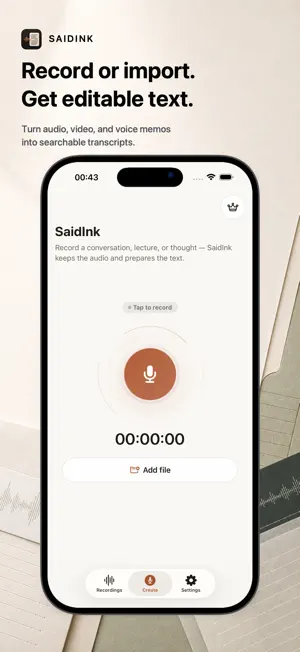
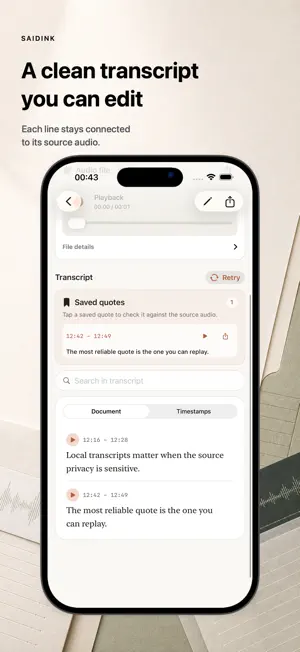
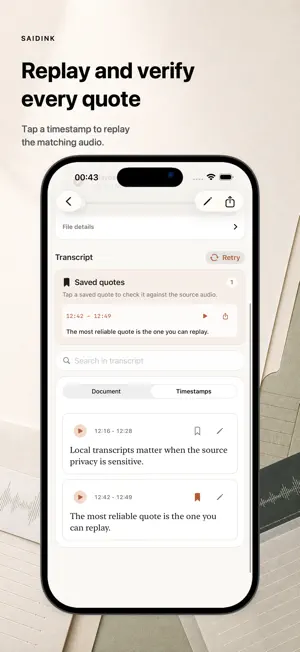
Turn recordings into editable, searchable text on your device. SaidInk records or imports audio and video, then keeps every transcript line linked to its source moment. Replay a timestamp before you quote it, correct the wording, bookmark important passages and export clean text or subtitles. Your recordings are not uploaded for transcription. Record in the app, import from Files, or send compatible audio/video files to SaidInk from the iOS Share Sheet. Download a local transcription model when you are ready, transcribe on device, then edit, search and verify the result as a clean document. Built for: - Interviews and quote review - Lectures and class notes - Podcasts and subtitles - Research and field notes - Voice memos and sensitive recordings Core features: - Record audio and save it locally - Import audio/video files - Transcribe on device after a model is installed - Choose Auto-detect or a transcript language - Search recordings and transcript text - Edit transcripts while keeping access to the source audio - Tap timestamps to replay the original moment - Bookmark important quotes - Copy transcript text; export TXT, timestamped TXT, bookmarked quotes, SRT and WebVTT subtitles Privacy and control: - No SaidInk account - No third-party analytics or ad SDKs - No SaidInk cloud transcription - Recordings and transcripts are stored as local app data - Model downloads are started by you - Purchases and restores are handled by Apple StoreKit Start with 14 days of full access on this device. After that, Free includes 15 minutes of transcription per day plus copy, plain TXT and timestamped TXT exports. SaidInk Pro removes the daily transcription limit and unlocks bookmarked TXT, SRT and WebVTT exports. Transcription quality depends on recording quality, language, background noise, model choice and device performance. SaidInk helps you review, correct and verify transcripts; it does not promise perfect transcription. Terms of Use: https://saidink.app/terms/
What’s new
Version 1.3 · Updated August 30, 2026
In version 1.3, you can share an individual saved quote with the recording title and its exact timecode.
App privacy
The developer, Gleb Kucherenko, reported these privacy practices to Apple.
Data Not Collected
The developer does not collect any data from this app.
Alternatives to SaidInk: Audio to Text
Looking for apps like SaidInk: Audio to Text? Here are 6 similar apps on the App Store. The highest rated is Quick & Simple Doc Scanner (4.5/5), and all 6 are free to download.
-
 Rechka: audio to text
-
 Sorted: Beat Bed Rotting
-
 SpeakSense: Voice Recorder
-
 BroSpeech: Voice to Text
-
 Revera: TLDL Notes, Transcribe
-
 Quick & Simple Doc Scanner
4.5
Quick & Simple Doc Scanner
4.5
| App | Rating | Price | Last updated | Compare |
|---|---|---|---|---|
| SaidInk: Audio to Text | – | Free | August 30, 2026 | |
| Rechka: audio to text | – | Free | Sep 2, 2026 | Compare |
| Sorted: Beat Bed Rotting | – | Free | Jul 12, 2026 | Compare |
| SpeakSense: Voice Recorder | – | Free | Aug 19, 2026 | Compare |
| BroSpeech: Voice to Text | – | Free | Jul 10, 2026 | Compare |
| Revera: TLDL Notes, Transcribe | – | Free | Oct 20, 2026 | Compare |
| Quick & Simple Doc Scanner | 4.5 / 5 (2) | Free | May 29, 2025 | Compare |