

DocLensr: PDF Scanner
ISTACK DEVELOPMENT Productivity iPhoneiPadiPod touch
DocLensr: PDF Scanner is a free Productivity app for iPhone and iPad by ISTACK DEVELOPMENT. Requires iOS 16.0. Updated September 23, 2026.
- Price
- Free
- on the App Store
- Size
- 13 MB
- Age 4+
- Updated
- Sep 23
- 2026 · v1.0
Screenshots


About DocLensr: PDF Scanner
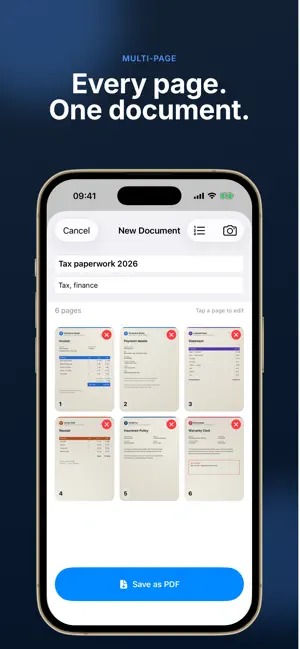
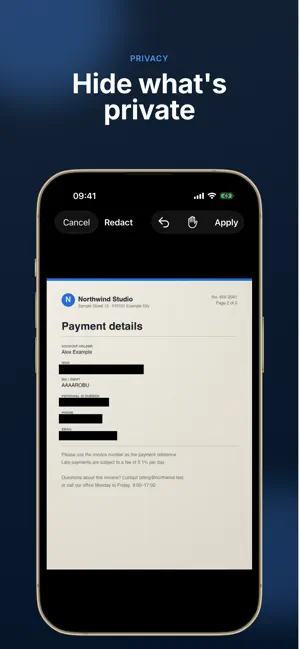
DocLensr turns your iPhone into a private document scanner. Capture pages, clean them up, hide what shouldn't be shared and send a tidy PDF — without creating an account or uploading anything to the cloud. SCAN IN SECONDS The camera detects the edges of the page as you frame it. Snap the photo, then fine-tune the crop by dragging the four corners. ONE DOCUMENT, MANY PAGES Keep scanning as many pages as you need, add forgotten ones later and drag to reorder them before you save. CLEAN, READABLE PAGES Pick Original, Grayscale, Contrast+ or Black & White for each page, and rotate pages that were shot sideways. HIDE WHAT'S PRIVATE Cover ID numbers, addresses, IBANs or phone numbers with black boxes before you share. Pinch to zoom for precise placement. Redaction is permanent — the boxes are applied to the image itself. SHARE AS PDF Export a clean PDF and send it anywhere through the iOS share sheet — Mail, Messages, Files, AirDrop and more. FIND IT AGAIN Name your documents, add tags and search your library by title or tag. Unfinished scans are kept as a draft, so you can pick up where you left off. PRIVATE BY DESIGN No account. No ads. No analytics. Your documents stay on your iPhone. FREE TO TRY, PRO TO SAVE Scan, crop, filter and redact for free. Saving documents to your library and exporting them as PDF requires DocLensr Pro, available as: • Monthly subscription • Annual subscription (best value) • Lifetime — one-time purchase Subscription details: payment is charged to your Apple ID account at confirmation of purchase. Monthly and annual subscriptions renew automatically unless cancelled at least 24 hours before the end of the current period. Your account is charged for renewal within 24 hours before the end of the current period. You can manage or cancel subscriptions anytime in Settings > Apple ID > Subscriptions. Lifetime is a one-time purchase and does not renew. Scans are digital copies and may not be accepted as certified or official copies by every institution. DocLensr is an independent app. Terms of Use: https://doclensr.istack.ro/terms.html Privacy Policy: https://doclensr.istack.ro/privacy.html
App privacy
The developer, ISTACK DEVELOPMENT, reported these privacy practices to Apple.
Data Linked to You
The following data, which may be collected and linked to your identity, may be used for the following purposes:
- Purchases: Purchase History
- Identifiers: Device ID
Used for: App Functionality
Alternatives to DocLensr: PDF Scanner
Looking for apps like DocLensr: PDF Scanner? Here are 6 similar apps on the App Store. The highest rated is PDF Scanner App: Docs Scan (4.8/5), and all 6 are free to download.
-
 FreeScanner: PDF & OCR Scanner
4.7
FreeScanner: PDF & OCR Scanner
4.7
-
 Inventory Tracker Itemlist
4.7
Inventory Tracker Itemlist
4.7
-
 Islamic Calendar & Converter
4.7
Islamic Calendar & Converter
4.7
-
 eAqoonsi
4.2
eAqoonsi
4.2
-
 CamVision: PDF & OCR Scanner
4.3
CamVision: PDF & OCR Scanner
4.3
-
 PDF Scanner App: Docs Scan
4.8
PDF Scanner App: Docs Scan
4.8
| App | Rating | Price | Last updated | Compare |
|---|---|---|---|---|
| DocLensr: PDF Scanner | – | Free | September 23, 2026 | |
| FreeScanner: PDF & OCR Scanner | 4.7 / 5 (3) | Free | Oct 22, 2026 | Compare |
| Inventory Tracker Itemlist | 4.7 / 5 (213) | Free | Aug 28, 2026 | Compare |
| Islamic Calendar & Converter | 4.7 / 5 (43) | Free | May 6, 2024 | Compare |
| eAqoonsi | 4.2 / 5 (6) | Free | Oct 7, 2026 | Compare |
| CamVision: PDF & OCR Scanner | 4.3 / 5 (59) | Free | Oct 27, 2026 | Compare |
| PDF Scanner App: Docs Scan | 4.8 / 5 (493) | Free | May 8, 2026 | Compare |