

Let's Settle Up: Split Bills
Michał Salwin Finance iPhoneiPadiPod touch
Let's Settle Up: Split Bills is a free Finance app for iPhone and iPad by Michał Salwin. Requires iOS 16.0. Updated October 19, 2026.
- Price
- Free
- on the App Store
- Size
- 51 MB
- Age 4+
- Updated
- Oct 19
- 2026 · v1.5
Screenshots


About Let's Settle Up: Split Bills
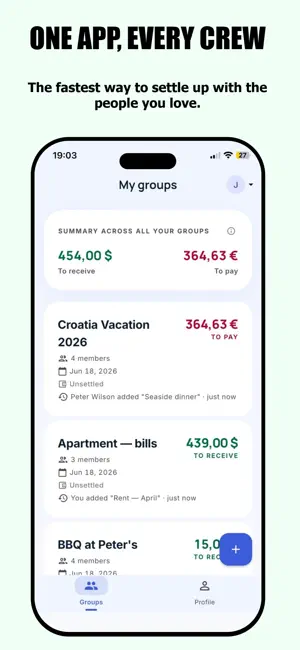
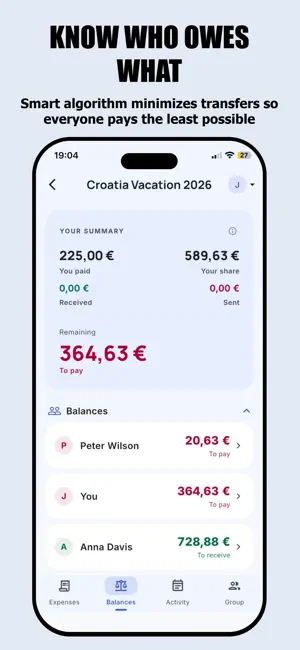
Let's Settle Up! is an intuitive, free tool for splitting bills and tracking shared expenses with friends, flatmates, your partner, or on trips together. No ads. Shared rent, a weekend getaway, or just pizza with friends? Let's Settle Up! precisely tracks who paid for what, who owes whom, and suggests the optimal way to settle up with the fewest possible transfers. Key features: • Receipt scanning — snap a photo and AI turns the items into expenses • Unlimited expenses within shared groups • Smart debt simplification — settle up in the fewest possible transactions • Three split methods: equally, by amount, by percentage • Individual multipliers (e.g. for someone eating more) • Multi-currency — expenses in any currency, automatically converted to the group's settlement currency • Available on iPhone and in the browser: letssettleup.com Groups that fit your life: Create separate groups for different occasions — a holiday with friends, a shared flat, regular dinners. Each group has its own members, currency, and history. Three ways to invite: • An 8-character invite code • A shareable link • An email invitation (auto-join after creating an account) The owner and admins can manage members, edit other people's expenses, and confirm settlements on behalf of others — perfect for cash payments outside the app. Settlements made simple: After every expense, the app calculates net balances and proposes the optimal set of transfers. Two-step confirmation: the payer marks the transfer as sent, the recipient confirms receipt of the funds. No more misunderstandings about who owes whom how much. The app keeps a full history of all transactions. Activity and statistics: • An activity feed shows new expenses, settlements, and group changes • Per-group statistics: total expenses, your share, largest expenses, a pie chart of contributions • Mark a group as closed once a trip is over — browse the history without the risk of accidental changes Import and export: • Import existing expenses from a CSV file (Splitwise format supported) • Export any group as a PDF (formatted report) or XLSX (5 sheets: summary, members, expenses, settlements, balances) • Share reports via your favourite app or save to the cloud Notifications under control: You'll get a notification when someone adds an expense, joins a group, or settles up with you. Full control — turn each type on or off separately. No ads, no spam. Privacy and security: • Data stored in Firebase Firestore (Warsaw, EU region) — GDPR compliant • No data analytics, no tracking • Optional error reporting (Crashlytics) — the choice is yours • Delete your account with one tap at any time Try it without registering: Choose "Try demo" on the login screen — a full test version with 4 accounts and 3 sample groups, no registration required. All data stays on your device. Many languages: Available in 11 languages, push notifications included. How it works — in 3 steps: 1. Create a group and invite your friends 2. Add expenses as you go — who paid, how much, who shared 3. Open the settlements screen and see the simplest way to clear the debts Free to use: Create your first groups for free. If you need more, support development with a one-time donation (Coffee, Pizza, or Dinner) — each adds slots for new groups. No subscription, no recurring fees. Questions, ideas, or bug reports? Contact us at [email protected]. Let's Settle Up! — because friendship shouldn't end with an awkward conversation about money.
What’s new
Version 1.5 · Updated October 19, 2026
What's new: - Import expenses from a receipt photo — take a picture or pick one from your library, crop it, and AI reads the items. You decide what to add: one expense for the whole receipt or separate expenses for chosen items. Multi-unit items get the quantity in the name, e.g. "Beer x 5". - Joining a group: scan the invitation QR code instead of typing the code. - Expense list: new "By person" view — how much each person spent, broken down by item. - PDF export: each expense shows every participant's share (amount and %), plus a new section with expenses grouped by participant.
App privacy
The developer, Michał Salwin, reported these privacy practices to Apple.
Data Linked to You
The following data, which may be collected and linked to your identity, may be used for the following purposes:
- Purchases: Purchase History
- Contact Info: Email Address, Name
- User Content: Photos or Videos, Other User Content
- Identifiers: User ID
Used for: App Functionality
Data Not Linked to You
The following data, which may be collected but is not linked to your identity, may be used for the following purposes:
- Diagnostics: Crash Data
Used for: App Functionality
Alternatives to Let's Settle Up: Split Bills
Looking for apps like Let's Settle Up: Split Bills? Here are 6 similar apps on the App Store. The highest rated is DivvyTrip (5.0/5), and 5 of the 6 are free to download.
-
 JeySplit - Split Expenses
-
 SplitReceipt - Scan & Share
-
 DivvyTrip
5.0
DivvyTrip
5.0
-
 Splitsies: Shared Expenses
5.0
Splitsies: Shared Expenses
5.0
-
 Splendo: Split Bills & Rent
-
 Splitt: Split Expenses & Bills
| App | Rating | Price | Last updated | Compare |
|---|---|---|---|---|
| Let's Settle Up: Split Bills | – | Free | October 19, 2026 | |
| JeySplit - Split Expenses | – | Free | Jul 29, 2026 | Compare |
| SplitReceipt - Scan & Share | – | Free | Oct 18, 2026 | Compare |
| DivvyTrip | 5.0 / 5 (3) | 2.99 USD | Sep 15, 2026 | Compare |
| Splitsies: Shared Expenses | 5.0 / 5 (1) | Free | Jun 30, 2026 | Compare |
| Splendo: Split Bills & Rent | – | Free | Oct 19, 2026 | Compare |
| Splitt: Split Expenses & Bills | – | Free | Oct 7, 2026 | Compare |