

CreatorCrop: Product Photos
Sandoval LLC Graphics & Design iPhoneiPadiPod touchMac
CreatorCrop: Product Photos is a free Graphics & Design app for iPhone and iPad by Sandoval LLC. Requires iOS 17.6. Updated October 13, 2026.
- Price
- Free
- on the App Store
- Size
- 1 MB
- Age 4+
- Updated
- Oct 13
- 2026 · v1.2
Screenshots



About CreatorCrop: Product Photos
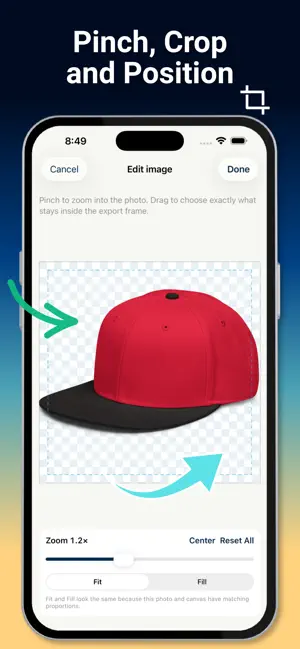
Create marketplace-ready product photos without uploading your images to a server. CreatorCrop makes it easy to resize, crop, clean up, and export an entire batch of product images from your iPhone, iPad, or Mac. BUILT FOR PRODUCT SELLERS Choose ready-made canvas sizes for popular marketplaces or create an exact custom size. CreatorCrop shows a live preview so you can see how every image will look before exporting. PRECISE CROPPING • Pinch to zoom and drag images into position • Zoom in closely to feature a logo or product detail • Choose Fit or Fill for different framing styles • Add padding or use per-image positioning • Center or reset adjustments at any time ON-DEVICE BACKGROUND REMOVAL Remove image backgrounds privately on your device. If part of the product is removed by mistake, use the restore and erase brushes to refine the cutout. EXPORT YOUR WAY • PNG with transparent backgrounds • JPEG for compact marketplace-ready files • PDF export • Multiple sizes in one export • Automatic, customizable file naming • Save or share your finished files READY FOR POPULAR MARKETPLACES Use built-in presets for Shopify, Amazon, eBay, Etsy, Walmart, Poshmark, Google Shopping, TikTok Shop, YouTube, and more. PRIVATE BY DESIGN Your source photos stay on your device. CreatorCrop does not upload your images to its servers or use them to train models. CREATORCROP PRO Unlock the complete toolkit with a single lifetime in-app purchase. No subscription. One Apple purchase unlocks Pro on compatible iPhone, iPad, and Mac devices signed into the same Apple Account. CreatorCrop Web Pro is sold separately.Spend less time preparing product photos and more time listing what you sell. Keep the rest. Just ensure cross-device purchase restoration has been tested before promising it in the listing.
What’s new
Version 1.2 · Updated October 13, 2026
What’s new in CreatorCrop: - Selective batch editing: Adjust one photo, selected photos, or the entire batch. - Larger editing previews: Expand for precision or collapse to see more controls. - Photo switching: Move between photos using thumbnails without leaving the editor. - Improved crop controls: Zoom into details, reposition horizontally or vertically, and center or reset crops. - Apply edits to other photos: Reuse adjustments across a chosen group. - Cleaner workspace: Removed duplicate previews and consolidated editing controls. - Clearer navigation: Crop, Background, Canvas, and Export tabs, plus hints when more settings are below. - Mac and web improvements: Updated selection outlines, editing controls, and preview behavior. - Reliability fixes: More consistent exports and safer handling when clearing photos during import.
App privacy
The developer, Sandoval LLC, reported these privacy practices to Apple.
Data Not Collected
The developer does not collect any data from this app.
Alternatives to CreatorCrop: Product Photos
Looking for apps like CreatorCrop: Product Photos? Here are 5 similar apps on the App Store. The highest rated is AI Brochure Maker Generator (4.7/5), and all 5 are free to download.
-
 AI Brochure Maker Generator
4.7
-
 Cut Sage: Create Product Photo
4.5
-
 JustSketchMe
3.6
-
 Munbyn Print
4.5
-
 Arvin®: AI Product Photo Maker
4.6
| App | Rating | Price | Last updated | Compare |
|---|---|---|---|---|
| CreatorCrop: Product Photos | – | Free | October 13, 2026 | |
| AI Brochure Maker Generator | 4.7 / 5 (3) | Free | Jul 28, 2026 | Compare |
| Cut Sage: Create Product Photo | 4.5 / 5 (65) | Free | Nov 16, 2025 | Compare |
| JustSketchMe | 3.6 / 5 (170) | Free | Feb 2, 2026 | Compare |
| Munbyn Print | 4.5 / 5 (1,617) | Free | Oct 26, 2026 | Compare |
| Arvin®: AI Product Photo Maker | 4.6 / 5 (59,404) | Free | Aug 4, 2026 | Compare |