

DrivioCam – Dash Cam
RONGNENG LUO Photo & Video iPhoneiPadiPod touch
DrivioCam – Dash Cam is a free Photo & Video app for iPhone and iPad by RONGNENG LUO. Requires iOS 15.6. Updated October 23, 2026.
- Price
- Free
- on the App Store
- Size
- 15 MB
- Age 4+
- Updated
- Oct 23
- 2026 · viOS 1.0.7
Screenshots
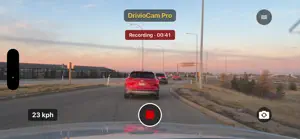

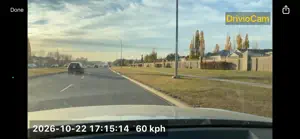

About DrivioCam – Dash Cam
DrivioCam turns your spare or everyday iPhone into a practical dash camera—without dedicated dash cam hardware. Record your journeys, monitor activity while parked, and find important footage when you need it. A redesigned camera screen provides clear recording status, easy-to-use controls, and a choice of full-frame or fill-screen previews. KEY FEATURES • Continuous and loop recording Record your drive in manageable clips, with adjustable video quality, clip length, camera selection, and optional audio. • Parking monitoring Detect movement near your vehicle while parked. Automatic switching between driving and parking modes makes monitoring more convenient. • Five-second pre-event buffer Capture up to five seconds before a detected event when the recording buffer is active and ready. • Incident detection Detect sudden deceleration or impact-like motion and automatically save important footage for later review. • Protected event recordings Accident and motion-event recordings are protected from automatic storage cleanup. They remain saved until you manually delete them. • Useful recording details Add timestamps and, with Pro features, speed and GPS information to your recordings. • Customizable video watermarks With Pro or an active trial, personalize your watermark text, font size, color, and position—or turn it off. • Convenient video management Browse and filter recordings by date or type, replay footage, save copies to Photos, and share through compatible apps or email. Delete individual videos or multiple selected clips. • Storage and display controls Manage recording storage limits and use screen dimming to reduce display brightness while DrivioCam remains active. • Multilingual interface Choose from 12 interface languages, including English. BASIC, TRIAL, AND PRO Try Pro features free for one week. After the trial, DrivioCam Basic remains available with basic and loop recording, 720p/1080p video, timestamps, and playback. Basic includes a cumulative recording allowance of 15 minutes per day, a 1 GB recording storage limit, and a fixed gold “Recorded by DrivioCam” watermark. Unlock Pro with a one-time lifetime purchase to access advanced features, configurable storage limits, and watermark customization, without Basic’s daily recording allowance. Buy once and use DrivioCam Pro on your compatible iPhones signed in with the same App Store account. Purchases do not transfer between the App Store and Google Play. IMPORTANT INFORMATION • Keep DrivioCam open while recording. On iOS, recording while using another navigation app in the background is not supported. • Motion and incident detection depend on device placement, lighting, sensors, permissions, and operating conditions. Detection and capture of every event are not guaranteed. • Pre-event footage requires an active, ready recording buffer. The available pre-event duration may be shorter immediately after monitoring starts. • Speed and location accuracy depend on device sensors, GPS reception, and granted permissions. • Protected event videos still consume storage. Recording may stop if protected videos fill the available space. Export important footage separately; recordings are not automatically backed up to the cloud. • Extended recording and parking monitoring use battery power and may generate heat. For longer sessions, use a suitable power source and keep the phone adequately ventilated. • Mount your phone securely without obstructing your view. Configure the app before driving, do not operate it while driving, and follow local recording and road-safety rules. Learn more: https://fortivia.org
What’s new
Version iOS 1.0.7 · Updated October 23, 2026
Refreshed camera screen with clearer recording status, improved controls, and Fit/Fill preview options. Enhanced motion detection with a five-second pre-event buffer to capture moments before an event. Accident and motion-event recordings are now protected from automatic storage cleanup. Added customizable video watermarks with adjustable text, position, font size, and color for Pro and trial users. Added clearer Basic, Trial, and Pro license identification and a license comparison link. Improved language selection, added an About screen, and introduced rating and review options. Improved screen dimming and overall usability.
App privacy
The developer, RONGNENG LUO, reported these privacy practices to Apple.
Data Not Linked to You
The following data, which may be collected but is not linked to your identity, may be used for the following purposes:
- Location: Precise Location
- User Content: Photos or Videos, Audio Data
- Identifiers: Device ID
Used for: App Functionality
Alternatives to DrivioCam – Dash Cam
Looking for apps like DrivioCam – Dash Cam? Here are 6 similar apps on the App Store. The highest rated is Dog Vision Cam (5.0/5), and 5 of the 6 are free to download.
-
 MightyDash: Private Dash Cam
-
 Dog Vision Cam
5.0
Dog Vision Cam
5.0
-
 CarpeCam
4.3
CarpeCam
4.3
-
 GPS map camera to geotag photo
-
 beatCam
4.0
beatCam
4.0
-
 Cam Stamper - Dashcam Editor
| App | Rating | Price | Last updated | Compare |
|---|---|---|---|---|
| DrivioCam – Dash Cam | – | Free | October 23, 2026 | |
| MightyDash: Private Dash Cam | – | Free | Aug 4, 2026 | Compare |
| Dog Vision Cam | 5.0 / 5 (1) | 1.99 USD | Apr 6, 2026 | Compare |
| CarpeCam | 4.3 / 5 (15) | Free | Jun 16, 2026 | Compare |
| GPS map camera to geotag photo | – | Free | Apr 1, 2025 | Compare |
| beatCam | 4.0 / 5 (1) | Free | Sep 1, 2026 | Compare |
| Cam Stamper - Dashcam Editor | – | Free | Apr 17, 2025 | Compare |