

SquadCal Family Calendar
Junior Varsity Enterprises, LLC Productivity iPhoneiPadiPod touch
SquadCal Family Calendar is a free Productivity app for iPhone and iPad by Junior Varsity Enterprises, LLC. Rated 5.0/5 from 1 ratings. Requires iOS 15.0.
- Rating
- 5.0
- 1 ratings
- Price
- Free
- on the App Store
- Size
- 11 MB
- Age 4+
- Updated
- Oct 16
- 2026 · v1.0.10
Screenshots


About SquadCal Family Calendar
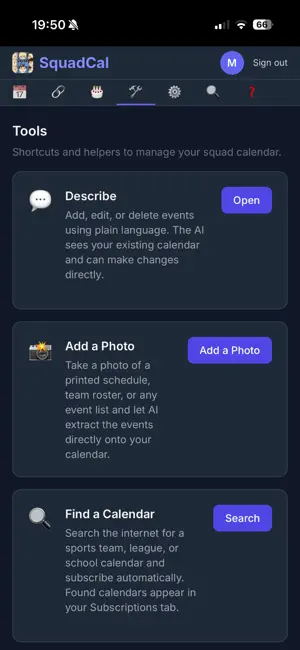
Most family calendars just show you a grid. SquadCal adds an assistant that does the work for you. FAMILY SETUP The first person sets everything up in a couple of minutes: create the account, choose an Organizer password for yourself and a Squad password to share, then send the invite link. Everyone else taps the link, enters their name, and they're on the shared calendar. Prefer everyone to have their own password instead? Flip one switch in Settings. THE ASSISTANT - WHAT SETS SQUADCAL APART - Describe: Add, change, or delete events by typing in plain English - "Mia has soccer practice every Monday and Wednesday at 4pm starting next week." The assistant reads your existing calendar and makes the change directly. No forms, no menu-tapping. - Add a Photo: Snap a printed schedule, team roster, or school flyer and every event lands on your calendar automatically. No more typing in a whole season of games by hand. - Find a Calendar: Name the team, league, or school and SquadCal finds the schedule online and subscribes you, so it stays up to date on its own. Every family gets 5 free assistant actions each month to use on any of these. NEW - DESCRIBE NOW LISTENS Don't feel like typing? Tap the mic and say it out loud instead: "Boden has a dentist appointment next Wednesday at ten." SquadCal asks any follow-up questions out loud, you answer out loud, and it reads the event back before saving - say "save" and it's done, without touching the screen. Handy when your hands are full or you're walking out the door. Your speech is turned into text right on your device; no audio is ever recorded, stored, or uploaded. Prefer typing? The Text button keeps Describe exactly as it was. THE SHARED-CALENDAR BASICS (all free) - One calendar the whole family sees and edits - Works offline - open the app on a plane or with no service and your schedule is still there - Push and on-phone reminders so plans never slip - Color-coded per person; tap to RSVP, drag to reschedule - Birthdays, all-day events, and repeating events - Undo a delete with one tap - Place suggestions that put the nearest match first, with the distance beside it - Hide members you don't need to see from your own view - remembered on every device, and it never changes what anyone else sees - Mark a member as a calendar rather than a person (a school feed, a team's fixtures) and it's skipped by "everyone" events and double-booking checks - Give each person their own calendar feed to subscribe to in Apple or Google Calendar - Subscribe to outside calendars (sports, school, holidays) and keep it all in one place - Stay signed in - sessions last about 90 days of normal use - iPhone, iPad, and any web browser SQUADCAL PRO One subscription covers your entire family: - Unlimited assistant actions: Describe, Add a Photo, and Find a Calendar every day - Email invites straight to your calendar: give your squad its own address and add it as a guest on any Google, Outlook, or Apple invite. The event lands on your family calendar with its reminder, organizer, and guest list, and you RSVP right from SquadCal. - Overlap warnings: a heads-up before you double-book someone - Voice for Describe: say the event out loud instead of typing it - Grandparent View: a view-only calendar link for relatives - no account or password needed - Week Ahead summary: a Sunday-evening preview of the family's week - Morning agenda: a daily notification with the day's events, at the hour you choose 7-day free trial, then $3.00/month or $30.00/year (2 months free). Cancel anytime. Everything else is free, forever. One simple place for everything your family has going on, with an assistant that keeps it organized for you. Terms of Use (EULA): https://www.apple.com/legal/internet-services/itunes/dev/stdeula/
What’s new
Version 1.0.10 · Updated October 16, 2026
Show today's date on the SquadCal icon: switch on "Show today's date on the app icon" in Settings → Notifications and the icon's number shows the date, like 1015 for October 15. It changes over at midnight. SquadCal's notifications now reach your iPhone reliably.
App privacy
The developer, Junior Varsity Enterprises, LLC, reported these privacy practices to Apple.
Data Linked to You
The following data, which may be collected and linked to your identity, may be used for the following purposes:
- Contact Info: Email Address, Name
- User Content: Other User Content
- Identifiers: User ID, Device ID
Used for: App Functionality
Alternatives to SquadCal Family Calendar
Looking for apps like SquadCal Family Calendar? Here are 6 similar apps on the App Store. The highest rated is Expert Chase: AI for Life (5.0/5), and all 6 are free to download.
-
 Expert Chase: AI for Life
5.0
-
 Sealed Calendar
3.0
-
 Snugee - AI Family Calendar
5.0
-
 Cally.
5.0
-
 Japanese Holiday Year Calendar
5.0
-
 Honeydew Family Calendar
5.0
| App | Rating | Price | Last updated | Compare |
|---|---|---|---|---|
| SquadCal Family Calendar | 5.0 / 5 (1 rating) | Free | October 16, 2026 | |
| Expert Chase: AI for Life | 5.0 / 5 (1) | Free | Sep 12, 2026 | Compare |
| Sealed Calendar | 3.0 / 5 (1) | Free | Feb 22, 2026 | Compare |
| Snugee - AI Family Calendar | 5.0 / 5 (1) | Free | Aug 8, 2026 | Compare |
| Cally. | 5.0 / 5 (6) | Free | Oct 21, 2026 | Compare |
| Japanese Holiday Year Calendar | 5.0 / 5 (3) | Free | Dec 27, 2025 | Compare |
| Honeydew Family Calendar | 5.0 / 5 (3) | Free | Jun 7, 2026 | Compare |