

LiBook: EPUB, TXT, PDF Reader
JOOYOUNG MAENG Book iPhoneiPadiPod touch
LiBook: EPUB, TXT, PDF Reader is a free Book app for iPhone and iPad by JOOYOUNG MAENG. Rated 4.2/5 from 6 ratings. Requires iOS 18.0.
- Rating
- 4.2
- 6 ratings
- Price
- Free
- on the App Store
- Size
- 16 MB
- Age 4+
- Updated
- Oct 16
- 2026 · v2.6
Screenshots


About LiBook: EPUB, TXT, PDF Reader
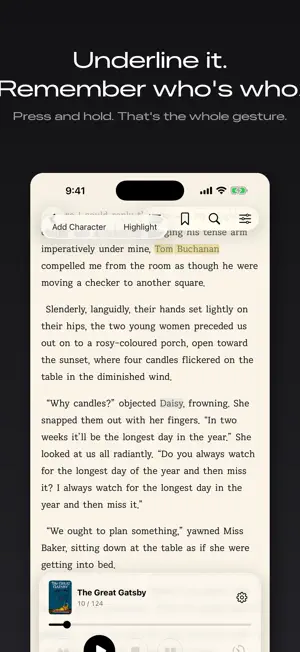
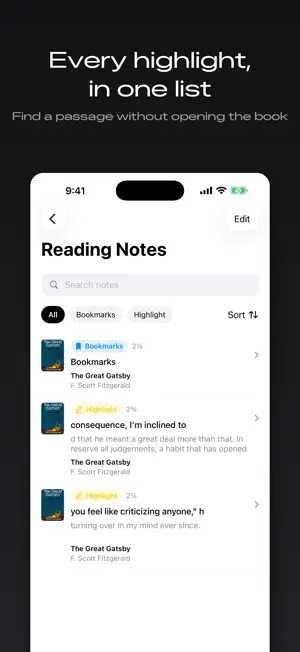
LiBook is a personal reading app that brings all your ebooks together in one place. Import your EPUB, PDF, and TXT files, organize them into your library and collections, and pick up right where you left off. With support for table of contents, search, bookmarks, and highlights, you can easily find what you need—even in long books—and come back to it whenever you want. With iCloud, your reading experience continues seamlessly across your devices. Your books, highlights, and reading positions are stored in your own iCloud and stay in sync across devices using the same Apple Account. If a book isn't currently stored on your device, a download indicator appears on its cover, allowing you to download it whenever you need it. You can also download an entire collection in advance for offline reading. When you need to free up storage space, you can remove books from your device while keeping them safely stored in iCloud. Keep track of characters while reading novels and long-form books. In EPUB and TXT books, you can select a character's name and save it as a character card with your own notes and descriptions. You can also see where a registered character appears throughout the book, making it easier to keep track of characters in stories with large casts. Customize your reading experience to suit each book and your preferences. For EPUB books, you can adjust font size, line spacing, paragraph spacing, margins, themes, and more. For PDFs, you can configure screen fitting, scrolling direction, and page-turning behavior. When reading isn't convenient, listen to your books with TTS. LiBook supports play, pause, previous and next navigation, adjustable speech speed, and a sleep timer, so you can listen comfortably whenever you want. ### Key Features * Import EPUB, PDF, and TXT files * Organize your library and collections * Manage book covers * Sort collections by recently modified, newest, name, or number of books * Save reading position and progress * iCloud sync for books, highlights, and reading positions * Download entire collections for offline reading * Remove books from your device while keeping them in iCloud * Table of contents, search, bookmarks, and highlights * Character registration and character cards for EPUB/TXT * View character appearances throughout a book * EPUB reading customization * PDF viewing settings * TTS playback and sleep timer * Multilingual UI support LiBook focuses on the reading experience rather than complicated features. Import your books, organize them your way, pick up where you left off, and quickly find what you need when you need it. LiBook keeps the essentials of personal reading simple, clean, and comfortable. Partnerships & Inquiries [[email protected]](mailto:[email protected])
Ratings & reviews
4.2
6 ratings
What’s new
Version 2.6 · Updated October 16, 2026
Added a "No Collections" tag. It shows only the books that are not in any collection.
App privacy
The developer, JOOYOUNG MAENG, reported these privacy practices to Apple.
Data Not Collected
The developer does not collect any data from this app.
Alternatives to LiBook: EPUB, TXT, PDF Reader
Looking for apps like LiBook: EPUB, TXT, PDF Reader? Here are 6 similar apps on the App Store. The highest rated is ePub Pro (5.0/5), and all 6 are free to download.
-
 ePub Pro
5.0
-
 ZRead - EPUB Reader
3.0
-
 EpubReader: Ebook Reader & TTS
4.7
-
 JustReader: EPUB & FB2 Reader
-
 Vellum Reader
-
 Afterglow - EPUB Reader
5.0
| App | Rating | Price | Last updated | Compare |
|---|---|---|---|---|
| LiBook: EPUB, TXT, PDF Reader | 4.2 / 5 (6 ratings) | Free | October 16, 2026 | |
| ePub Pro | 5.0 / 5 (2) | Free | Aug 27, 2026 | Compare |
| ZRead - EPUB Reader | 3.0 / 5 (2) | Free | Jul 2, 2026 | Compare |
| EpubReader: Ebook Reader & TTS | 4.7 / 5 (3) | Free | Aug 24, 2026 | Compare |
| JustReader: EPUB & FB2 Reader | – | Free | Oct 2, 2026 | Compare |
| Vellum Reader | – | Free | Dec 17, 2025 | Compare |
| Afterglow - EPUB Reader | 5.0 / 5 (1) | Free | Sep 10, 2026 | Compare |