

PianoFX: Easy Piano Learning
VAN CHIEN NGUYEN Music iPhoneiPadiPod touch
PianoFX: Easy Piano Learning is a free Music app for iPhone and iPad by VAN CHIEN NGUYEN. Rated 5.0/5 from 4 ratings. Requires iOS 16.
- Rating
- 5.0
- 4 ratings
- Price
- Free
- on the App Store
- Size
- 109 MB
- Age 4+
- Updated
- Oct 13
- 2026 · v1.0.9
Screenshots



About PianoFX: Easy Piano Learning
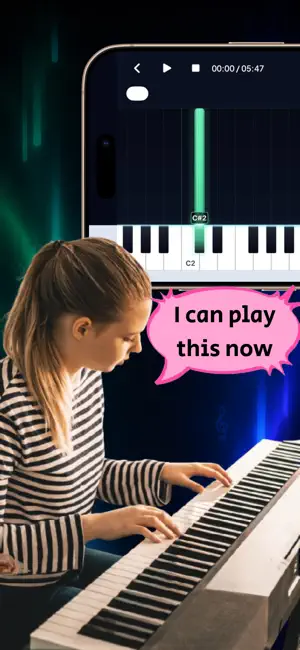
PianoFX: Easy Piano Learning Learn the piano songs you love with visual falling notes—no sheet music required. PianoFX turns piano performances into interactive tutorials you can watch, practice, and replay at your own pace. Import a video from your device, paste a supported YouTube, TikTok, or Instagram link, or open a MIDI file. PianoFX transforms the notes into an easy-to-follow piano roll displayed directly above the keyboard. Whether you are learning your first song, working through a difficult passage, or creating a piano tutorial to share, PianoFX gives you the tools to practice your way. LEARN FROM YOUR OWN VIDEOS You are not limited to a fixed song catalog. Choose a piano performance you want to learn and turn it into a personalized falling-notes tutorial. IMPORT VIDEOS, LINKS, OR MIDI Choose a saved video from Photos or Files, paste a supported video link, or import a .mid or .midi file to start practicing. PRACTICE AT YOUR OWN PACE Slow down difficult passages, move anywhere on the timeline, and repeat a selected section until it feels natural. CREATE AND SHARE PIANO VIDEOS Export your falling-notes tutorial as an HD video with audio. Choose landscape 16:9 for YouTube or portrait 9:16 for TikTok, Reels, and Shorts, then save it to Photos or share it directly. FEATURES • Automatically convert piano videos into falling-notes tutorials • Import videos from Photos, Files, Downloads, or Drive • Paste supported YouTube, TikTok, and Instagram links • Import standard MIDI files • Practice with an interactive piano roll and keyboard • Adjust playback speed from 0.5× to 1.25× • Create A–B loops for focused practice • Seek to any point in the song • Switch between sustained and compact note displays • Follow color-coded notes and keyboard highlights • Practice in portrait or landscape orientation • Browse a library of ready-to-practice songs • Save converted songs in My Songs • Export HD falling-notes videos with audio • Save exported videos to Photos or share them HOW IT WORKS 1. Import a piano video, paste a supported link, or choose a MIDI file. 2. PianoFX prepares your visual falling-notes tutorial. 3. Play, slow down, loop difficult sections, and practice at your own pace. PERFECT FOR • Beginners who prefer visual learning • Intermediate and advanced piano players • Learning songs without sheet music • Practicing difficult sections • Piano teachers and students • Musicians creating piano tutorial videos No sheet music. No fixed lesson path. Choose what you want to learn and let PianoFX turn it into a visual piano tutorial. Download PianoFX and start practicing today. PREMIUM Upgrade to Premium to unlock the complete PianoFX experience, including: • Unlimited piano video transcriptions • Unlimited access to Practice Mode • Playback speed controls • A–B section looping • Timeline seeking • MIDI import • HD video export • All future Premium features Subscription plans and prices are displayed in the app before purchase. IMPORTANT NOTE PianoFX is a learning and practice tool. When you import a supported video link, its audio is processed to detect piano notes and create an interactive falling-notes tutorial. The original video and its visual content are not included in the generated tutorial or made available for playback in Practice Mode. PianoFX does not claim ownership of third-party content. You are responsible for ensuring that you have the rights or permission necessary to import, process, export, or share any content used with the app. Terms of Use: https://sites.google.com/view/piano-tutorial-maker/term-of-use Privacy Policy: https://sites.google.com/view/piano-tutorial-maker/privacy-policy
What’s new
Version 1.0.9 · Updated October 13, 2026
Update 1.0.9 includes: - Added pedal guide - Added practice modes for left hand, right hand, and both hands - Added option to play original audio or MIDI-generated sound - Added MIDI export - Upgraded "falling note" UI for a better look - Upgraded AI model for improved accuracy Upcoming features: - Scan sheet music into piano roll - Transcribe songs into sheet music
App privacy
The developer, VAN CHIEN NGUYEN, reported these privacy practices to Apple.
Data Not Collected
The developer does not collect any data from this app.
Alternatives to PianoFX: Easy Piano Learning
Looking for apps like PianoFX: Easy Piano Learning? Here are 6 similar apps on the App Store. The highest rated is Falling Notes Piano Trainer (4.7/5), and all 6 are free to download.
-
 SnapNotes: Falling Notes
4.2
-
 Pianora: Piano & Falling Notes
3.0
-
 Piano Pulse
4.5
-
 Falling Notes Piano Trainer
4.7
-
 Ivory - Piano Sheet Music,MIDI
4.5
-
 Keys - Play Any Song on Piano
4.5
| App | Rating | Price | Last updated | Compare |
|---|---|---|---|---|
| PianoFX: Easy Piano Learning | 5.0 / 5 (4 ratings) | Free | October 13, 2026 | |
| SnapNotes: Falling Notes | 4.2 / 5 (5) | Free | Oct 13, 2026 | Compare |
| Pianora: Piano & Falling Notes | 3.0 / 5 (2) | Free | Oct 13, 2026 | Compare |
| Piano Pulse | 4.5 / 5 (4) | Free | Oct 12, 2026 | Compare |
| Falling Notes Piano Trainer | 4.7 / 5 (6) | Free | Jul 6, 2026 | Compare |
| Ivory - Piano Sheet Music,MIDI | 4.5 / 5 (35) | Free | Oct 15, 2026 | Compare |
| Keys - Play Any Song on Piano | 4.6 / 5 (160) | Free | Sep 16, 2026 | Compare |