

Synchordy
EMMANOUIL MARAGKAKIS Music iPhoneiPadiPod touch
Synchordy is a free Music app for iPhone and iPad by EMMANOUIL MARAGKAKIS. Rated 5.0/5 from 2 ratings. Requires iOS 17.0. Updated August 8, 2026.
- Rating
- 5.0
- 2 ratings
- Price
- Free
- on the App Store
- Size
- 1 MB
- Age 4+
- Updated
- Aug 8
- 2026 · v1.1
Screenshots


About Synchordy
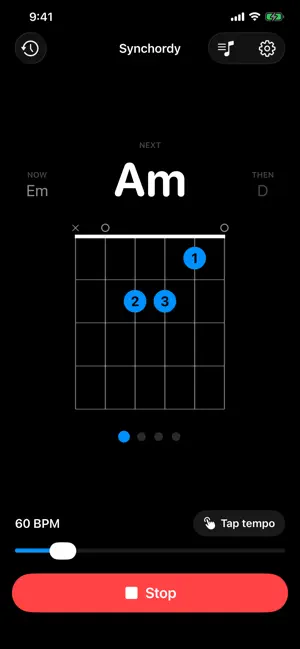
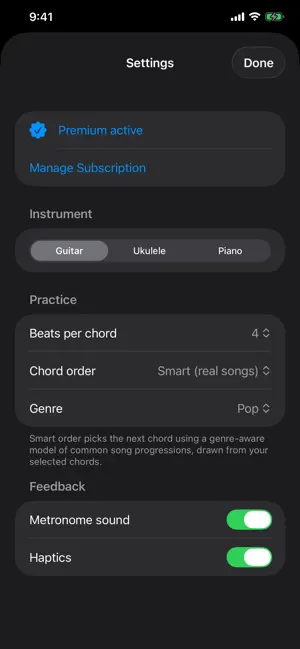
Synchordy turns the hardest part of learning an instrument — changing chords cleanly and in time — into simple, focused practice. Pick your chords, set a tempo, and Synchordy cycles through them with a built-in metronome so you always know what's coming next. Every chord appears with a clear diagram, so switching becomes muscle memory instead of guesswork. Guitar, ukulele, and piano supported. WHY SYNCHORDY • Practice the real skill: smooth, in-time chord transitions • See each chord as a clean fretboard or keyboard diagram • Stay locked to the beat with a precise metronome • Build a daily habit with practice history and streaks FEATURES • Metronome with adjustable tempo and tap tempo • Hold each chord for 1, 2, 4, or 8 beats • Chord order: shuffle, sequential, or Smart • Smart order follows patterns from real songs, by genre (Pop, Rock, Folk, Jazz) • Guitar, ukulele, and piano chord libraries with diagrams • Clean, dark, distraction-free design that reads at arm's length • Portrait and landscape, on iPhone and iPad FREE & PREMIUM Synchordy is free to start: practice on guitar with E, Em, and D, plus the full metronome. Synchordy Premium unlocks everything: • All instruments — guitar, ukulele, and piano • The complete chord library and presets • Smart progressions that follow real songs • Practice history and streaks Start with a 1-week free trial, then $4.99/year. SUBSCRIPTION • Synchordy Premium is $4.99 per year, following a 1-week free trial. • Payment is charged to your Apple Account at the end of the free trial. • The subscription renews automatically unless turned off at least 24 hours before the end of the current period. • Manage or cancel anytime in your Apple Account settings. • Terms of Use (EULA): https://www.apple.com/legal/internet-services/itunes/dev/stdeula/ • Privacy Policy: https://gist.github.com/mnsmar/7c1e4447f603c25f1b8022f4987505e7 Questions or feedback? Email [email protected]
What’s new
Version 1.1 · Updated August 8, 2026
The practice screen now says what it means: which chord you're on, which one you're changing to, and how long you've got. • NOW and NEXT labels make the intent clear. The large chord — and its diagram — is the one you're changing to, and the bar you're playing is your time to get ready for it. • The beat dots fill through the bar, counting down to the change. • A count-in before the first chord, so you have a full bar to get your hands on the instrument after pressing Start. • A steadier display — chord names no longer nudge the layout around as they change length. • Fixed: the metronome could be left playing with no way to stop it if you deselected every chord mid-session.
App privacy
The developer, EMMANOUIL MARAGKAKIS, reported these privacy practices to Apple.
Data Not Collected
The developer does not collect any data from this app.
Alternatives to Synchordy
Looking for apps like Synchordy? Here are 6 similar apps on the App Store.
-
 Guitar Chords Trainer
-
 FretDaily: Guitar Practice
-
 Guitar Chords & Practice
-
 UkeFlow: Ukulele Chords
-
 Fretlas: Guitar Scales
-
 SampleHook - AI Vocals
| App | Rating | Price | Last updated | Compare |
|---|---|---|---|---|
| Synchordy | 5.0 / 5 (2 ratings) | Free | August 8, 2026 | |
| Guitar Chords Trainer | – | Free | Oct 20, 2026 | Compare |
| FretDaily: Guitar Practice | – | Free | Aug 3, 2026 | Compare |
| Guitar Chords & Practice | – | Free | Aug 12, 2026 | Compare |
| UkeFlow: Ukulele Chords | – | Free | Sep 10, 2026 | Compare |
| Fretlas: Guitar Scales | – | Free | Sep 7, 2026 | Compare |
| SampleHook - AI Vocals | – | Free | Oct 15, 2026 | Compare |
Compare Synchordy with the top alternatives: ratings, updates, ASO score and keyword gaps →