

Button: SOS Panic Button
Sentrivo OU Lifestyle iPhoneiPadiPod touchApple Watch
Button: SOS Panic Button is a free Lifestyle app for iPhone and iPad by Sentrivo OU. Requires iOS 16.4. Updated November 14, 2026.
- Price
- Free
- on the App Store
- Size
- 227 MB
- Age 4+
- Updated
- Nov 14
- 2026 · v1.0.26
Screenshots
Save to Pinterest

About Button: SOS Panic Button
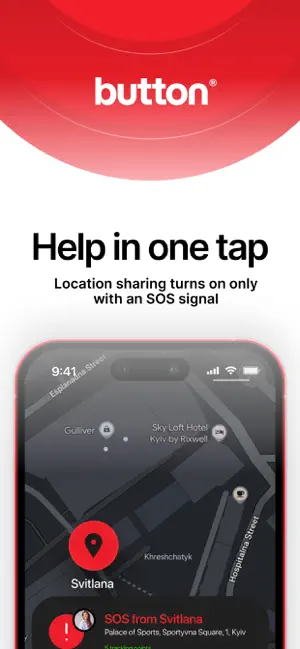
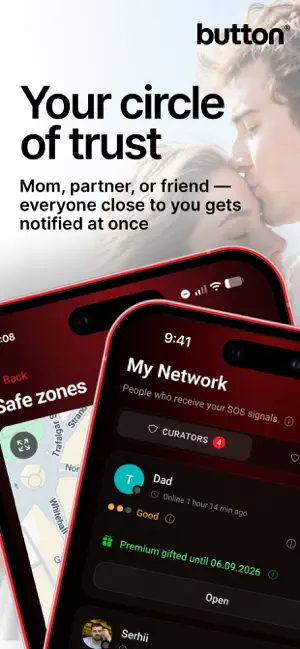
Button is a personal safety app with an SOS panic button. One tap, and the people you trust get an emergency alert with your live location on a map. When something feels wrong, there is no time to open a chat and type. There is one large button. HOW THE PANIC BUTTON WORKS 01. You press the SOS button. A 5-second countdown starts, so you can cancel an accidental tap. 02. Your trusted contact gets an alert with your name and location. 03. They open it and see you on a live map. Your location updates in real time. 04. If the alert is not delivered within 60 seconds, an SMS is sent automatically. 15 seconds later, an email. BUTTON DOES NOT TRACK YOU This is not a GPS tracker for everyday monitoring. Your location is shared only during an active SOS alert, and only with the people you chose yourself. Outside of an alert, nobody sees where you are. WHAT YOU GET - SOS panic button with a 5-second cancel countdown - Live location on a map for as long as the alert is active - Alerts that are hard to miss - Automatic SMS and email backup if the alert does not arrive - Message template — describe your situation in advance - Offline mode — the alert queues and sends the moment you are back online - Invite someone by QR code or link - Available in English, Ukrainian and Russian PREMIUM - Up to 25 trusted contacts in 5 groups — pick the group when you send an alert - Photo, video and sound attached to your SOS - Safe zones — up to 10 places. Your people are notified when you arrive or leave - Home screen widget — the panic button always within reach WHEN YOU NEED IT - Walking home alone. A late shift, an unfamiliar street, a rideshare at night. - Living alone. One tap if something goes wrong and no one else is around. - Kids and parents. Instead of five "where are you?" texts, you simply know. - Older relatives. One large button instead of finding a number in a menu. - Distance. Your family is in another country. One tap across any distance. PRIVACY AND SAFETY Your location is shared only during an active alert and only with the contacts you chose. Outside of an alert, your location is not stored. Data is handled in line with GDPR on servers in the EU. IMPORTANT Button does not contact emergency services. Your alert goes to the people you chose, and they decide what to do next — call you, come to you, or dial 911. For immediate emergency help, call 911 or your local emergency number. PRICING - Free forever — the SOS button and one trusted contact. - Premium — $3.49 weekly, $4.99 monthly, $29.99 yearly with the first 7 days free, and a family plan for up to 6 people. - Subscriptions renew automatically unless canceled at least 24 hours before the end of the current period. Payment is charged to your App Store account upon confirmation of purchase. Manage your subscription in Apple ID settings. Button — a panic button that is always with you. Your location stays yours. Questions and support: [email protected] Terms of Use (EULA): https://www.apple.com/legal/internet-services/itunes/dev/stdeula/
What’s new
Version 1.0.26 · Updated November 14, 2026
Parental controls — Invite your child with a code, and the app walks them through the setup. — See how long your child spent in apps today, and set a daily limit. — Block adult sites, gambling and scams. Or build a list of your own. — Pause the phone for half an hour, an hour or two. Calls, texts and the SOS button always work. — Set quiet hours: when the phone goes silent and which apps stay available. — Child not answering? Send a loud signal. It rings even on silent. — Listen to a minute of sound around your child's phone when you need to know all is calm. — Button stays on your child's phone: it can't just be removed. — Have more than one child? Switch between them on one screen. Also — Fixed bugs, smoothed out small annoyances, and tidied the app up.
App privacy
The developer, Sentrivo OU, reported these privacy practices to Apple.
Data Used to Track You
The following data may be used to track you across apps and websites owned by other companies:
- Identifiers: Device ID
Data Linked to You
The following data, which may be collected and linked to your identity, may be used for the following purposes:
- Identifiers: Device ID
- Purchases: Purchase History
- Location: Precise Location, Coarse Location
- Contact Info: Email Address, Name, Phone Number
- User Content: Photos or Videos, Audio Data, Other User Content
- Browsing History: Browsing History
- Usage Data: Product Interaction, Other Usage Data
- Diagnostics: Crash Data, Performance Data
Used for: Third-Party Advertising, App Functionality
Alternatives to Button: SOS Panic Button
Looking for apps like Button: SOS Panic Button? Here are 6 similar apps on the App Store. The highest rated is Vira – Психологічна Допомога (5.0/5), and all 6 are free to download.
-
 CarNoti
-
 Vira – Психологічна Допомога
5.0
-
 Freya — догляд за похованнями
-
 SmartCіty
-
 Nona · Numerology & Life Path
4.3
-
 SOS Group Alert
| App | Rating | Price | Last updated | Compare |
|---|---|---|---|---|
| Button: SOS Panic Button | – | Free | November 14, 2026 | |
| CarNoti | – | Free | Nov 17, 2026 | Compare |
| Vira – Психологічна Допомога | 5.0 / 5 (3) | Free | Apr 30, 2026 | Compare |
| Freya — догляд за похованнями | – | Free | Nov 12, 2026 | Compare |
| SmartCіty | – | Free | Oct 16, 2026 | Compare |
| Nona · Numerology & Life Path | 4.3 / 5 (3) | Free | Nov 13, 2026 | Compare |
| SOS Group Alert | – | Free | Jul 9, 2026 | Compare |