

Beat Kitchen Harmonic Synth
Beat Kitchen LLC Music iPhoneiPadiPod touch
Beat Kitchen Harmonic Synth is a free Music app for iPhone and iPad by Beat Kitchen LLC. Rated 4.8/5 from 12 ratings. Requires iOS 16.0.
- Rating
- 4.8
- 12 ratings
- Price
- Free
- on the App Store
- Size
- 59 MB
- Age 4+
- Updated
- Sep 25
- 2026 · v1.7.0
Screenshots
About Beat Kitchen Harmonic Synth
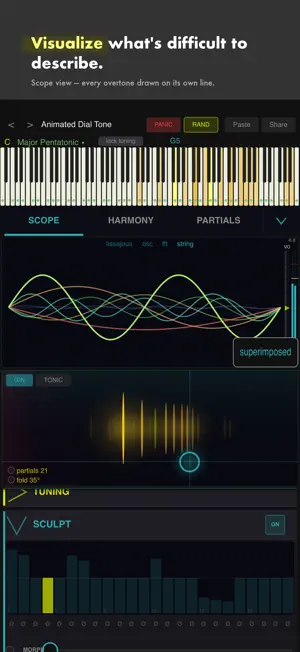
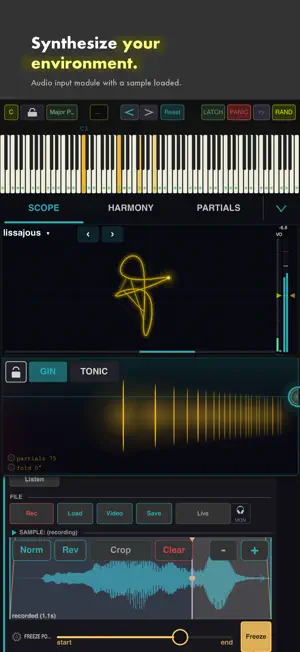
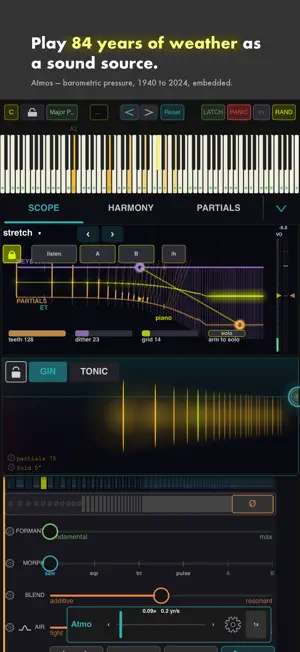
BKS Harmonic is an additive synthesizer that builds sound from individual overtones, then gives you tools to shape, scan and filter them by harmony. Load it as an Audio Unit v3 inside AUM, GarageBand, Cubasis, Loopy Pro or any AUv3 host, or run it standalone. A TUNER THAT KNOWS ABOUT STRETCH Tune mode turns the scope into a tuner: it names the note it hears and shows how far sharp or flat it is in cents, with a ring that closes as you land on the pitch. It tunes against the stretch curve rather than equal temperament, so it follows a real instrument. Stretch shapes the overtones inside a note; Key Stretch makes the keyboard follow it, so octaves widen the way a piano's do. FOURTEEN TUNING SYSTEMS, AND A TEMPERAMENT EDITOR Equal and Just, five historical temperaments, and six from outside the European tradition including Maqam Rast, Turkish Rast, Slendro, Pelog and the Harmonic Series. The Temperament slider is a morph, not a switch: fully left is Just, fully right is whichever you chose. Twelve bars show any system as cents away from equal; drag one to make the tuning yours, then copy it out as plain text. Tunings save with the preset. FIVE HUNDRED SCALES Searchable by alternate name: malkauns, nikriz, bhupali and freygish find the right set. THE PARTIALS ARE THE INSTRUMENT The partials display shows every overtone in your sound, and four tools work on it directly. FOLD sweeps upper partials below the fundamental, redistributing energy across harmonic layers — not a filter. The OVERTONE SCAN steps a spotlight through individual partials with triangle, saw or random patterns, and can visit only partials in the active scale. The HARMONIC GATE reinforces partials whose pitch class matches your chord and suppresses the rest: capture a chord, follow MIDI, split the keyboard, or pick the notes on the gate's own keys. SCULPT draws the level and pan of every partial, slides the curve up the grid as a formant, and locks partials in place while the rest moves. THE HARMONIC VOCODER Pass live input or a sample through the synth as an effect. Your sound travels through a bank of tuned peaking bells rather than being replaced by filtered noise: open the Air and the source stays dry, tighten it and the bands resonate into it. Key Track is the mode switch: on it plays as an instrument, off it is a fixed filter you can sweep. Aimed at a sample, the bands track that sample's spectrum as it evolves. One level-matched Blend control crossfades it against the oscillators. PULSE-WIDTH MODULATION Set the core to a saw and Source 2 to a saw: the two ramps subtract, which is what a pulse wave is, and the phase between them sets the duty cycle. Modulate it and you have PWM. A preset in the Utility folder is ready to play. MODULATION A cog on almost every control, so the synth's own engine can drive nearly anything in the interface, including the display. Sources include velocity, envelopes, LFOs, how many notes you hold, how many oscillators sound, the synth's own output level, and Atmo, a shape driven by 84 years of barometric weather data from the Beat Kitchen Weather Sonification Project. Rates run from audio rate down to cycles that span years. THE SCOPE A stereoscope, oscilloscope, spectrum and a live per-partial display. Glow takes the trace from a hard line to a diffuse bloom, Colour sets the hue, Trace Speed and Dot set how it draws — and every one is a modulation target. Route velocity to Colour and the trace shifts as you play. LIVE INPUT A headphone button passes the side-chain straight to the output, so you can hear and see your input with nothing held: green when signal arrives, amber when a bus is connected but silent, red when nothing is. Resynth Speed locks a sample's playback speed to pitch, tape-style, or keeps them independent. Every control has a tooltip, presets work offline, and a harmony wheel follows what you play. One purchase, every update. Made by Beat Kitchen, a music production and teaching community.
Ratings & reviews
4.8
12 ratings
What’s new
Version 1.7.0 · Updated September 25, 2026
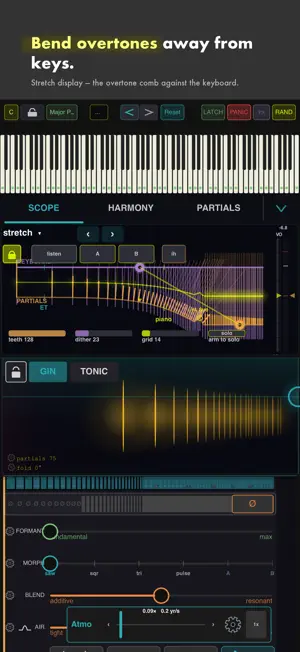
MEASURE A REAL INSTRUMENT Press listen and Harmonic analyses what you play at it instead of its own output. It reports the pitch it hears, every partial's departure in cents, its level, and B — the single number piano technicians use to describe how stiff a string is, and the number that generates a whole stretch curve. Press A or B to keep that reading. The departures and the levels are both stored, the stretch detent moves to the instrument you just measured, and Sculpt can take the same slot's levels. So you can measure your own piano and play in its tuning. THE STRETCH DISPLAY A new view in the scope draws one note's overtones against the keys they land near, on a shared frequency axis. Each tooth's length is how far that partial sits from its pure harmonic, and the yellow line marks where the two systems meet. Hover any tooth for the partial, its departure, its key's departure, and the gap between them. Drag either comb by its handle to bend it — right stretches, left compresses through zero into negative. A lock ties the keyboard's curve to the overtones', and unlocked the two move independently, so the keyboard can compress while the strings stretch. Detents snap to an upright, a grand, a concert grand, or a loaded sample's own measured stiffness. Teeth, Dither and Grid control the drawing. Arm to solo, then hover a tooth to hear that one partial on its own. A SECOND CONVERGE Click the CONVERGE label. Going up, Converge 2 gathers the whole series onto the highest audible partial rather than spreading it without limit, so the spacing stays even and nothing runs past the sample rate. Going down, both laws gather toward the lowest partial, but Converge 2 arrives sooner. Set the Clamp ceiling first — that is what it gathers onto. Saved with the preset. A KEYED EXCITER The resonant engine's exciter can follow the keyboard, giving every voice its own carrier at that voice's pitch instead of one shared source. UNDO Undo and redo, including the first edit of a session. AN FX BUTTON One press applies the resonant-reverb recipe: audio in, live, full resynthesis, Sculpt on, fully resonant blend, excited by the loaded sample. Press it again and every value it touched goes back exactly as it was. THE TUNER Target mode latches a reference note and defeats the synth, so you hear only the thing you are tuning. It names the incoming pitch, and it now holds through the attack of a bass note — the part of a piano note where the reading matters most. SMALLER THINGS A slider label that is also a switch is outlined, so you can see which labels do something when you click them. The preset name field opens with the name selected, and has an x to clear it. Output volume is a mark on the level meter, opposite the limiter's. Shift bypasses and Option removes, everywhere. FIXED Sample playback is cleaner: no burst of level at the end of a read, no clicks while scrubbing, and notes are no longer cut short. Solo and mute reach the resonant engine as well as the additive one. IF YOU MISSED THE LAST UPDATE Key Stretch makes the keyboard follow the same curve the overtones do, so octaves widen the way a real piano's do. Fourteen tuning systems: equal and just, five historical temperaments, and six from outside the European tradition. The Temperament slider morphs between just and whichever system you chose rather than switching between them. A twelve-bar editor shows any system as cents away from equal - drag a bar to make it your own, and copy and paste move a whole tuning as plain text. The scale library passes five hundred entries and is searchable by alternate name. Type malkauns, nikriz or freygish and you land on the right set.
App privacy
The developer, Beat Kitchen LLC, reported these privacy practices to Apple.
Data Not Collected
The developer does not collect any data from this app.
Alternatives to Beat Kitchen Harmonic Synth
Looking for apps like Beat Kitchen Harmonic Synth? Here are 6 similar apps on the App Store. The highest rated is Skipback AUv3 (5.0/5), and 3 of the 6 are free to download.
-
 Mochizuki - AUv3 Synth
3.5
Mochizuki - AUv3 Synth
3.5
-
 Skipback AUv3
5.0
Skipback AUv3
5.0
-
 Tessera Sequenced Resonator
4.9
Tessera Sequenced Resonator
4.9
-
 AlchemDie - Alchemical Synth
4.9
AlchemDie - Alchemical Synth
4.9
-
 FOAM: Physical Modeling Synth
4.8
FOAM: Physical Modeling Synth
4.8
-
 Orbeat: Drum Machine
5.0
Orbeat: Drum Machine
5.0
| App | Rating | Price | Last updated | Compare |
|---|---|---|---|---|
| Beat Kitchen Harmonic Synth | 4.8 / 5 (12 ratings) | Free | September 25, 2026 | |
| Mochizuki - AUv3 Synth | 3.5 / 5 (10) | Free | Sep 28, 2026 | Compare |
| Skipback AUv3 | 5.0 / 5 (4) | Free | Jul 23, 2026 | Compare |
| Tessera Sequenced Resonator | 4.9 / 5 (11) | 7.99 USD | Jul 21, 2026 | Compare |
| AlchemDie - Alchemical Synth | 4.9 / 5 (13) | 4.99 USD | Jul 14, 2026 | Compare |
| FOAM: Physical Modeling Synth | 4.8 / 5 (6) | 11.99 USD | Aug 13, 2026 | Compare |
| Orbeat: Drum Machine | 5.0 / 5 (6) | Free | Sep 9, 2026 | Compare |