

Memo Clock
原赫 张 Education iPhoneiPadiPod touch
Memo Clock is a paid Education app for iPhone and iPad by 原赫 张. Requires iOS 17.0. Updated October 16, 2026.
- Price
- 6.99 USD
- on the App Store
- Size
- 25 MB
- Age 4+
- Updated
- Oct 16
- 2026 · v2.0.0
Screenshots

About Memo Clock
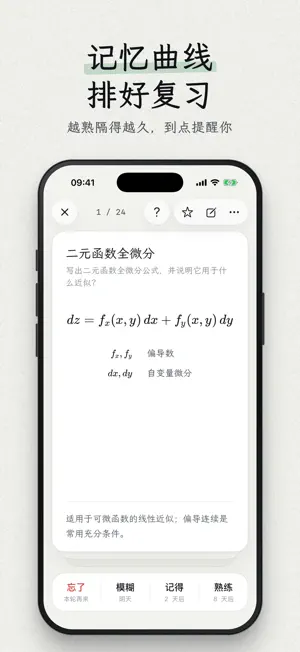
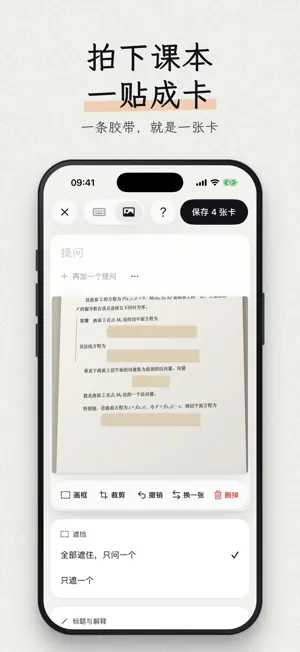
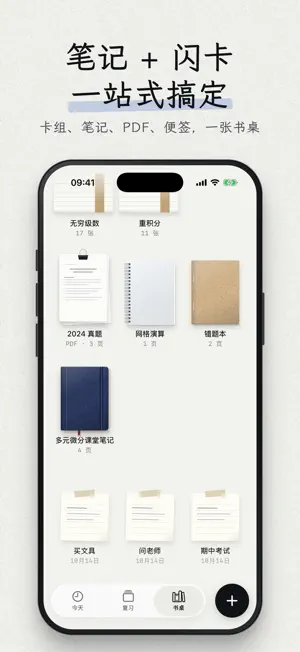
Write it down, and remember it. Today is a home page you DIY: widgets keep today's reviews in front of you, and your notebooks, flashcards, notes and PDFs share one desk. Pay once and get everything: no in-app purchases, no subscription, no ads, no account. TODAY: DIY YOUR STUDY HOME WITH DOZENS OF WIDGETS • Long-press to edit, drag to rearrange, drag a corner to resize; small, medium and large each have their own layout and a choice of paper. • Review: what's due and how long it takes, one tap to start; the cards due next; the two weeks around today. • Focus: a Pomodoro timer that records your focus time; white noise on a radio, record player, cassette deck or music box, with rain, ocean, campfire, café and library sounds. • Tools: Countdown, Timetable, Term Progress, Checklist, Habit, Counter, Motto, Photo, Handwritten Note. • Stats: Today's Numbers, Accuracy, Answer Spread, Streak Calendar, Review Heatmap. • Illustrations: a sleeping cat, rain on the window, a desk lamp, an hourglass, a plant, a night sky, changing with your reviews and focus. • Pin a deck, a notebook or a note from your desk to Today. HOME SCREEN WIDGETS: REVIEW WITHOUT OPENING THE APP • Next Card asks you the card that's due first, right on your Home Screen; tap to see the answer. • Today's Reviews, Focus (start or pause the Pomodoro), White Noise, Countdown, New Card, and shortcuts to your decks, notebooks and notes. • Extra-large widgets on iPad; Lock Screen widgets on iPhone. HANDWRITTEN NOTEBOOKS: FRAME IT, AND IT'S A CARD • Write with Apple Pencil on grid, lined, dotted, blank, Cornell or graph paper. • Import a PDF and write right on its pages. • Tap "Make Card" and frame what you need to memorize: that part of the page becomes a flashcard. • Every card remembers where it came from: tap "Source" to go back to that page of the notebook. • Handwriting and text in photos are recognized on your device, so you can search them. NEW CARD: TYPE, WRITE OR TAKE A PHOTO • A formula bar for typing math, shown properly typeset. • Write a card by hand with Apple Pencil. • Photograph a textbook page, a handout or the board, then cover the parts to learn with memory tape. Each piece of tape is one card. REVIEW: FLIP IT. DO YOU STILL REMEMBER? • Read the question, recall, flip, then tap Forgot, Fuzzy, Got it or Easy. Each choice shows when you'll see the card again. • Forgotten cards come back before you finish; the better you know a card, the longer the gap, based on your own review history. • Write It Out: write the answer on iPad first, then compare. Self-Test: test yourself any time without changing your schedule. • Recitation Lock (turn it on in Settings): new cards wait 3 minutes before you review them. • Morning and evening reminders, and the number of cards due on the app icon. THE DESK: DECKS, NOTEBOOKS, PDFS AND NOTES, EACH IN ITS PLACE • Decks, notebooks, PDFs and notes sit on the desk as objects with their own covers and materials. On iPad, place them freely or line them up with one tap. BRING YOUR ANKI DECKS, SHARE WITH CLASSMATES • Import Anki deck packages (.apkg): text, formulas, images, cloze cards and your review progress all come along. • Turn a few cards into a file; a classmate opens it in Memo Clock to import them. IPAD AND IPHONE • iPad is the workbench: handwriting, making cards, arranging the desk. • iPhone goes with you: review a few cards in spare moments, type a card or take a photo. Notebooks and handwritten cards from your iPad are there to read. • Sign in with the same Apple ID and everything syncs through your own iCloud. PRIVACY No account, no servers, no analytics, no ads. Your content stays on your devices and in your own iCloud. English and Simplified Chinese. Requires iPadOS 17 / iOS 17 or later. Handwriting needs an iPad with Apple Pencil.
What’s new
Version 2.0.0 · Updated October 16, 2026
Memo Clock 2.0 is a complete redesign: • Today: DIY your study home with dozens of widgets, including a Pomodoro timer, white noise, countdowns, a timetable and illustrations. • Home Screen widgets: review the next card without opening the app; Lock Screen widgets on iPhone. • The desk: decks, handwritten notebooks, PDFs and notes on one desk, placed freely or lined up with one tap. • Handwritten notebooks: take notes with Apple Pencil, frame part of a page to make a card, and jump from the card back to its page. • Photo cards: cover what to learn with memory tape; each piece of tape is a card. • Review: a new card flip and four-level rating, plus Write It Out and Self-Test. • New: Anki deck import with review progress, notes, and search for text in handwriting and photos. • Now in English as well as Simplified Chinese. • Now a one-time purchase: everything is included, no more in-app purchases. • A redesigned iPhone app.
App privacy
The developer, 原赫 张, reported these privacy practices to Apple.
Data Not Collected
The developer does not collect any data from this app.
Alternatives to Memo Clock
Looking for apps like Memo Clock? Here are 6 similar apps on the App Store. The highest rated is 面包Anki (5.0/5), and 4 of the 6 are free to download.


| App | Rating | Price | Last updated | Compare |
|---|---|---|---|---|
| Memo Clock | – | 6.99 USD | October 16, 2026 | |
| FlowRead - 英语阅读与AI文章精读 | – | Free | Sep 23, 2026 | Compare |
| 词忆MemQuirk | – | Free | Sep 5, 2026 | Compare |
| 克莱猫 | – | Free | Oct 17, 2026 | Compare |
| 面包Anki | 5.0 / 5 (1) | 0.99 USD | May 29, 2026 | Compare |
| Forgetting Curve Reminder | – | 1.99 USD | Oct 22, 2026 | Compare |
| 奇迹英语练习题 | – | Free | Aug 30, 2026 | Compare |
Compare Memo Clock with the top alternatives: ratings, updates, ASO score and keyword gaps →