

LiTeX
CHENG WEI TUNG Utilities iPhoneiPadiPod touch
LiTeX is a free Utilities app for iPhone and iPad by CHENG WEI TUNG. Requires iOS 26.2. Updated September 1, 2026.
- Price
- Free
- on the App Store
- Size
- 21 MB
- Age 4+
- Updated
- Sep 1
- 2026 · v1.0.2
Screenshots

About LiTeX
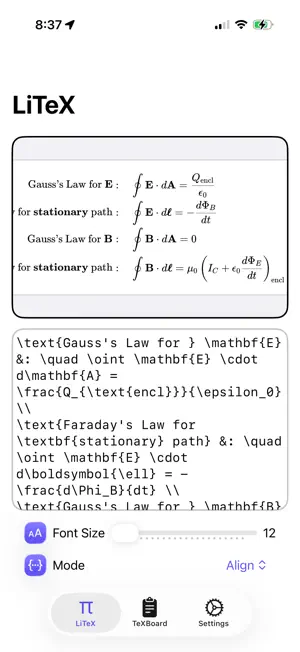
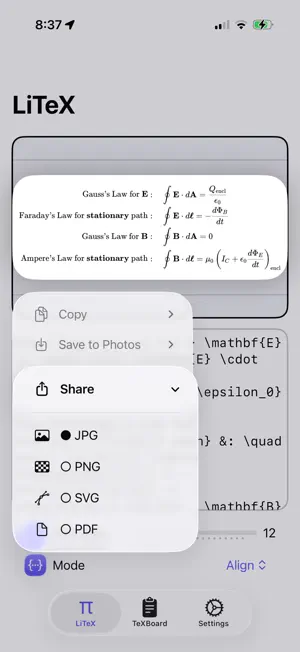
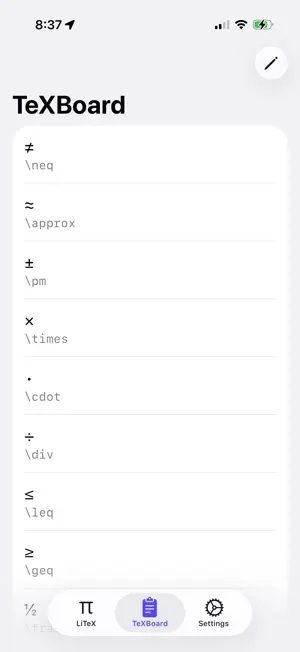
LiTeX is a powerful yet intuitive LaTeX equation editor for iOS. Perfect for students, scientists, engineers, and educators who need to write, render, and share mathematical expressions on the go. Perfect For: Taking Notes - Capture complex equations in your digital notes with proper mathematical notation - Integrate LaTeX equations seamlessly into your note-taking workflow - Keep all your scientific notes beautifully formatted and professional Studying & Learning - Create study materials with properly formatted mathematical expressions - Build your personal equation library for quick reference - Study math, physics, chemistry, and advanced sciences with clarity Presentations & Slideshows - Generate high-quality equation images for Keynote, PowerPoint, or Google Slides - Export equations instantly and paste them into any presentation - Impress with professional-looking mathematical notation in every slide Research & Papers - Write equations for research papers and academic documents - Share equation images via email or collaboration apps - Maintain consistency in your mathematical notation across documents Homework & Assignments - Solve problem sets with properly formatted equations - Share your work with teachers and classmates - Document your mathematical thinking clearly Key Features: Live Equation Editor - Write LaTeX equations with real-time preview - Support for multiple math modes: align, display, inline, and text - Adjustable font sizing for optimal readability - Beautiful, fast rendering with KaTeX TeXBoard - Smart Command Library - Quick access to 50+ commonly used LaTeX commands and symbols - Pre-built templates for fractions, roots, operators, and calculus notation - Save and manage your custom commands for frequently used expressions - One-tap insertion for efficient editing Export & Share - Capture equation previews as high-quality images - Share directly to Messages, Mail, Notes, or Files - One-click copy to paste into presentations and documents Customization - Choose from custom accent colors to personalize your workspace - Dark and light mode support - Multi-language support (English, Traditional Chinese) - Fully localized interface Smart Assistance - Interactive tips to guide new users - Responsive keyboard integration - Context-aware preview generation
What’s new
Version 1.0.2 · Updated September 1, 2026
UI enhancements
App privacy
The developer, CHENG WEI TUNG, reported these privacy practices to Apple.
Data Not Collected
The developer does not collect any data from this app.
Alternatives to LiTeX
Looking for apps like LiTeX? Here are 6 similar apps on the App Store. The highest rated is MoneyCare Lite (5.0/5), and 5 of the 6 are free to download.
-
 Now - Message Notes
-
 AI Gallery:AI image generator
-
 MoneyCare Lite
5.0
MoneyCare Lite
5.0
-
 CalcPro0123456789
-
 The Course Kit
-
 Change Focus
| App | Rating | Price | Last updated | Compare |
|---|---|---|---|---|
| LiTeX | – | Free | September 1, 2026 | |
| Now - Message Notes | – | 0.99 USD | Oct 22, 2026 | Compare |
| AI Gallery:AI image generator | – | Free | May 19, 2026 | Compare |
| MoneyCare Lite | 5.0 / 5 (1) | Free | Sep 9, 2025 | Compare |
| CalcPro0123456789 | – | Free | Aug 1, 2026 | Compare |
| The Course Kit | – | Free | Oct 26, 2026 | Compare |
| Change Focus | – | Free | Nov 27, 2023 | Compare |
Compare LiTeX with the top alternatives: ratings, updates, ASO score and keyword gaps →