

PeopleFree Photo Cleaner
凯 封 Photo & Video iPhoneiPadiPod touch
PeopleFree Photo Cleaner is a free Photo & Video app for iPhone and iPad by 凯 封. Requires iOS 18.0. Updated July 6, 2026.
- Price
- Free
- on the App Store
- Size
- 9 MB
- Age 4+
- Updated
- Jul 6
- 2026 · v1.0
Screenshots


About PeopleFree Photo Cleaner
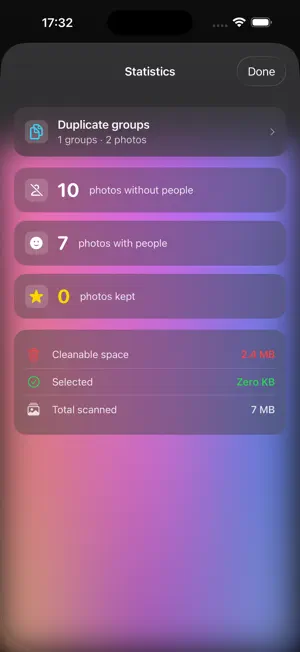
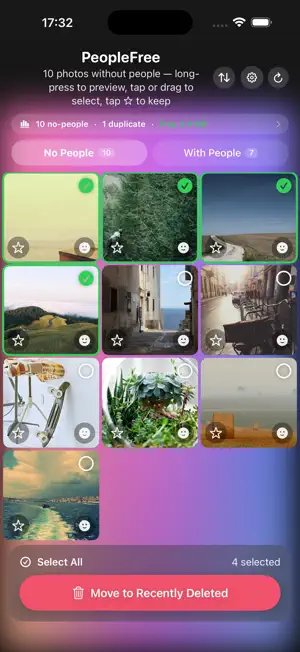
PeopleFree helps you reclaim space by finding the photos in your library that DON'T contain people — landscapes, meals, skies, receipts, and screenshots — and now also spots near-duplicates and bursts, so you can review them and clear the clutter in one tap. WHY PEOPLEFREE? Most of us take far more photos of places and things than we realize, and snap several shots of the same scene. PeopleFree uses on-device face detection and image hashing to surface what you probably don't need: • No People — photos without faces: your top candidates to delete. • Duplicates — near-identical shots and bursts: keep the best, clean the rest. Nothing is uploaded. Every photo stays on your device, and all detection runs entirely locally. HOW IT WORKS 1. Grant photo access and PeopleFree scans your library on-device. 2. Browse a tidy grid of "No People" photos. Long-press any photo for a full-screen preview. 3. Tap the star to Keep photos you love — they're protected from accidental deletion. 4. Open Duplicates to keep the best shot of each group and clean the rest. 5. Sort by newest, oldest, or name, and check Statistics to see how much space you'll free. 6. Review exactly what's selected, confirm, and the photos move to Recently Deleted — recoverable for 30 days. KEY FEATURES • On-device Vision face detection — private by design, works offline. • Duplicate & similar-photo detection — keep one, clean the rest. • No People / With People tabs to focus your cleanup. • Keep — star the shots you care about to protect them from bulk delete. • Statistics: cleanable space, duplicates, and totals at a glance. • Review-before-delete: always confirm exactly what's removed. • Sort by newest, oldest, or name. • Drag-to-select, Select All, and per-photo selection. • Full-screen preview before you decide. • Settings: clear cache & re-scan, haptics, about. • Cached scans — re-opening is instant; only new or edited photos are re-checked. • Recoverable: photos go to Recently Deleted (30 days), never destroyed instantly. • 7 languages: English, 简体中文, 繁體中文, 日本語, 한국어, Português, Español. PeopleFree never uploads your photos, never tracks you, and includes no ads. It just helps you tidy the shots you don't need.
App privacy
The developer, 凯 封, reported these privacy practices to Apple.
Data Not Collected
The developer does not collect any data from this app.
Alternatives to PeopleFree Photo Cleaner
Looking for apps like PeopleFree Photo Cleaner? Here are 6 similar apps on the App Store. The highest rated is Photo Delete Swipe Cleaner (5.0/5), and 5 of the 6 are free to download.
-
 CleanPix – AI Photo Cleaner
-
 Photo FaceFinder
-
 Album Craft - Photo Notes
-
 AI PhotoSieve
1.0
AI PhotoSieve
1.0
-
 Photo Delete Swipe Cleaner
5.0
Photo Delete Swipe Cleaner
5.0
-
 MYDECO - Fairy tale -
| App | Rating | Price | Last updated | Compare |
|---|---|---|---|---|
| PeopleFree Photo Cleaner | – | Free | July 6, 2026 | |
| CleanPix – AI Photo Cleaner | – | Free | Oct 24, 2026 | Compare |
| Photo FaceFinder | – | Free | Sep 30, 2026 | Compare |
| Album Craft - Photo Notes | – | Free | Sep 25, 2026 | Compare |
| AI PhotoSieve | 1.0 / 5 (1) | 3.99 USD | Oct 22, 2026 | Compare |
| Photo Delete Swipe Cleaner | 5.0 / 5 (3) | Free | Sep 10, 2026 | Compare |
| MYDECO - Fairy tale - | – | Free | Oct 20, 2026 | Compare |