

Luma Vision
Enso Inc. Utilities iPhoneiPadiPod touch
Luma Vision is a free Utilities app for iPhone and iPad by Enso Inc. Requires iOS 18.0. Updated August 31, 2026.
- Price
- Free
- on the App Store
- Size
- 10 MB
- Age 17+
- Updated
- Aug 31
- 2026 · v1.4
Screenshots



About Luma Vision
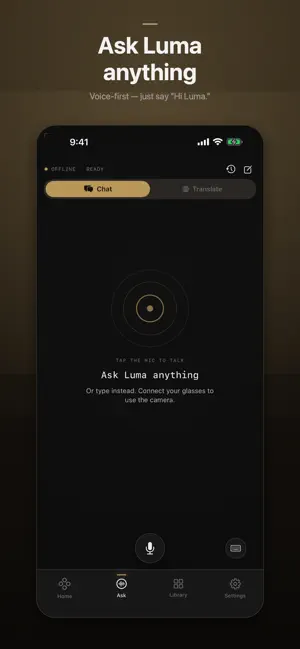
Luma is the companion app for your AI camera glasses — a calm, hands-free assistant for asking, seeing, and translating the world in front of you. Pair your glasses over Bluetooth and Luma turns them into a voice-first assistant. Say "Hi Luma" to start, ask about what you're looking at, or have a conversation translated as it happens. WHAT LUMA DOES • AI chat — ask by voice or text and get spoken answers • Live translation — translate conversations and signs, on-device when your languages support it • Look & describe — point your glasses and ask what you're seeing • Capture — take photos, videos, and voice memos on your glasses with a tap or a gesture • Gallery — pull your captures onto your phone over the glasses' own Wi-Fi, then keep, share, or delete them • Gestures — map a nod or a shake to capture, cancel, or pause PRIVATE BY DEFAULT Speech is transcribed on your device when your language supports it; otherwise it is processed by Apple's speech-recognition service. Captured photos and videos stay on your phone until you choose to share them. When you use cloud AI, only what's needed to answer your request is sent to our service — see the in-app Privacy Policy. TRANSLATES ACROSS NINE LANGUAGES Luma's live translation works between English, Spanish, French, German, Italian, Portuguese, Japanese, Korean, and Chinese. YOUR ACCOUNT Sign in with Apple or an email link to sync and unlock cloud AI chat. Camera and translation work without an account. Delete your account and data anytime from Settings. REQUIRES COMPATIBLE GLASSES Luma is a companion app and needs supported AI camera glasses, paired over Bluetooth, for capture, vision, and live voice features. Luma is an everyday assistant. AI answers and translations can be imperfect — don't rely on them for safety-critical, legal, or medical decisions. When using camera features, respect the privacy of people around you and local recording laws.
What’s new
Version 1.4 · Updated August 31, 2026
Bug fix and bluetooth stability improvements.
App privacy
The developer, Enso Inc., reported these privacy practices to Apple.
Data Linked to You
The following data, which may be collected and linked to your identity, may be used for the following purposes:
- Identifiers: User ID, Device ID
- Contact Info: Email Address, Name
- User Content: Photos or Videos, Other User Content
Used for: Analytics, App Functionality
Data Not Linked to You
The following data, which may be collected but is not linked to your identity, may be used for the following purposes:
- Usage Data: Product Interaction
- Diagnostics: Crash Data, Performance Data
Used for: Analytics
Alternatives to Luma Vision
Looking for apps like Luma Vision? Here are 6 similar apps on the App Store. The highest rated is Vishion Ai (5.0/5), and 5 of the 6 are free to download.


| App | Rating | Price | Last updated | Compare |
|---|---|---|---|---|
| Luma Vision | – | Free | August 31, 2026 | |
| Handy Remind | 3.0 / 5 (2) | 0.99 USD | Nov 28, 2023 | Compare |
| Vishion Ai | 5.0 / 5 (1) | Free | Sep 3, 2026 | Compare |
| EXPOCAL | – | Free | Sep 8, 2026 | Compare |
| C-OX | – | Free | Nov 28, 2025 | Compare |
| NetSense Wi-Fi Check | 5.0 / 5 (4) | Free | Aug 29, 2026 | Compare |
| NB Glasses | – | Free | Sep 25, 2026 | Compare |
Compare Luma Vision with the top alternatives: ratings, updates, ASO score and keyword gaps →