

Oshi Life - Fan Planner
Shoya Matsubara Lifestyle iPhoneiPadiPod touch
Oshi Life - Fan Planner is a free Lifestyle app for iPhone and iPad by Shoya Matsubara. Requires iOS 17.0. Updated September 18, 2026.
- Price
- Free
- on the App Store
- Size
- 30 MB
- Age 4+
- Updated
- Sep 18
- 2026 · v1.7
Screenshots

About Oshi Life - Fan Planner
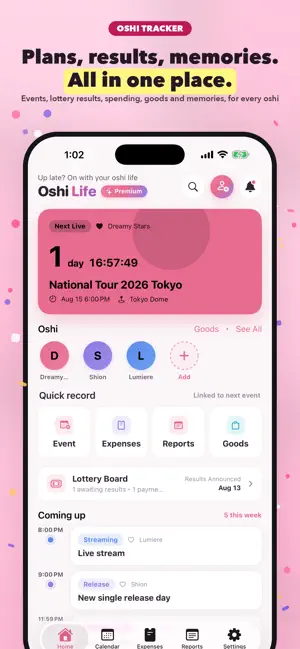
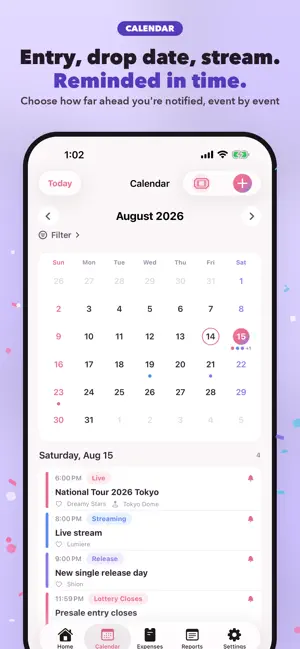
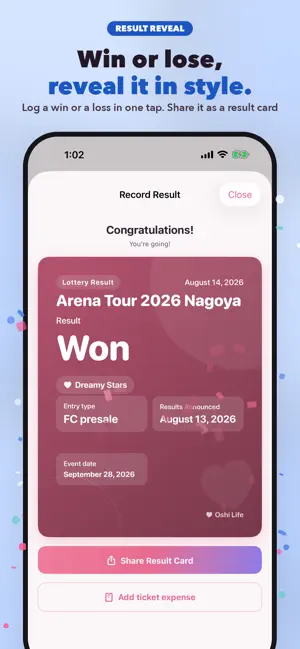
Your whole oshi life, in one place. Oshi Life is an oshi-life calendar that brings together your "oshi" schedule—lives, release dates, streams—along with spending on tickets and goods, and your treasured memories. No more juggling social apps, notes, and budgeting apps. Available in English, Japanese, Korean, and Chinese (Traditional / Simplified). ■ Register and organize your oshi Add your oshi by genre: idol, artist, voice actor, VTuber, actor, anime, game, sports, brand, and more. Custom categories are supported too, so you can manage your "oshi" exactly your way. ■ See every plan on the calendar Built for fan life with event types like live shows, releases, streams, lottery open/close, results, payment deadlines, TV, radio, YouTube, and goods—plus a countdown to your next event. ■ Never miss the big moments Set reminders for each event at 10 minutes, 1 hour, 1 day, 3 days, or 7 days before. Stay on top of lottery results, payment deadlines, and ticket sign-up cutoffs. ■ Track your spending with ease Record expenses by category—tickets, goods, transport, lodging, subscriptions, food. See exactly how much you've spent on your oshi, perfect for budgeting trips and events. ■ Keep your goods and memories Log the goods you've collected and your thouports you choose to share can appear on otherusers' timelines. ■ Everything at a glance on Home Today's plans, upcoming reminders, ongoing eur next event—all on the Home screen. Justopen the app to know what's next. ■ Sign-in optional, data kept safe Start right away without signing in. Sign inry your data over after switching orreinstalling. — About Premium (monthly / yearly) — The Free plan covers the essentials. Upgraded make the following unlimited: • Oshi (Free: up to 3) • Events (Free: up to 30) • Expenses (Free: up to 50) • Reports (Free: up to 50) • Cloud image backup (Premium only) Make fan life more fun and effortless. Start recording your days with your oshi today. ——————— * About subscriptions • Payment is charged to your Apple ID account. • It auto-renews unless turned off at least nds. • The renewal fee is charged within 24 hours before the current period ends. • Manage or cancel anytime from your Apple ID account. • It auto-renews unless turned off at least 24 hours before the period ends. • The renewal fee is charged within 24 hours before the current period ends. • Manage or cancel anytime from your Apple ID account settings. • Terms of Use (EULA): https://www.apple.com/legal/internet-services/itunes/dev/stdeula/ • Privacy Policy: https://smallwarestudio.github.io/OshiLife-Docs
What’s new
Version 1.7 · Updated September 18, 2026
What's new in 1.7 ■ Use it by talking to Siri Ask for your next event or this month's spending and Siri answers. Say "add an event" and the new event screen opens already filled in — you can edit it before saving. It works from the Shortcuts app too. ■ Find your oshi from iPhone search Swipe down on the Home Screen, type a name, and go straight to that oshi without opening the app. ■ See the countdown on your Lock Screen on show day From six hours before the show, the time left appears on the Lock Screen and in the Dynamic Island. This does not add any notifications. ■ A larger widget size See the next event for every oshi at a glance. iOS 27 adds an extra large portrait size. ■ Ticket scanning got smarter It now picks up details it used to miss (on supported devices). As before, images are processed on your device and never sent anywhere. ■ Bug fixes - Widgets were missing from the list on some iPhones. You can now add them to both the Home Screen and the Lock Screen. If anything seems off, let us know from Settings.
App privacy
The developer, Shoya Matsubara, reported these privacy practices to Apple.
Data Used to Track You
The following data may be used to track you across apps and websites owned by other companies:
- Identifiers: Device ID
- Usage Data: Product Interaction, Advertising Data
Data Linked to You
The following data, which may be collected and linked to your identity, may be used for the following purposes:
- Purchases: Purchase History
- Contact Info: Email Address, Name
- User Content: Photos or Videos, Other User Content
- Identifiers: User ID
Used for: App Functionality
Data Not Linked to You
The following data, which may be collected but is not linked to your identity, may be used for the following purposes:
- Identifiers: Device ID
- Usage Data: Product Interaction, Advertising Data
- Diagnostics: Crash Data, Performance Data, Other Diagnostic Data
Used for: Third-Party Advertising, Analytics, App Functionality
Alternatives to Oshi Life - Fan Planner
Looking for apps like Oshi Life - Fan Planner? Here are 6 similar apps on the App Store. The highest rated is 推しいろ - 推し活記録アプリ (5.0/5), and all 6 are free to download.
-
 推しログ - 推し活の記録・家計簿・予定管理
-
 推しメモ手帳
-
 推しごよみ - 推し活手帳・チケット管理
-
 推し活ライフ - 推し活の家計簿・推し貯金
-
 MyFanClub - Oshi Tracker
-
 推しいろ - 推し活記録アプリ
5.0
推しいろ - 推し活記録アプリ
5.0
| App | Rating | Price | Last updated | Compare |
|---|---|---|---|---|
| Oshi Life - Fan Planner | – | Free | September 18, 2026 | |
| 推しログ - 推し活の記録・家計簿・予定管理 | – | Free | Oct 11, 2026 | Compare |
| 推しメモ手帳 | – | Free | Oct 12, 2026 | Compare |
| 推しごよみ - 推し活手帳・チケット管理 | – | Free | Sep 24, 2026 | Compare |
| 推し活ライフ - 推し活の家計簿・推し貯金 | – | Free | Sep 20, 2026 | Compare |
| MyFanClub - Oshi Tracker | – | Free | Sep 29, 2026 | Compare |
| 推しいろ - 推し活記録アプリ | 5.0 / 5 (1) | Free | Oct 7, 2026 | Compare |