

Koedori — Voice Recorder Diary
256 GIKEN CO., LTD. Lifestyle iPhoneiPadiPod touchApple Watch
Koedori — Voice Recorder Diary is a free Lifestyle app for iPhone and iPad by 256 GIKEN CO., LTD. Requires iOS 26.0. Updated October 8, 2026.
- Price
- Free
- on the App Store
- Size
- 61 MB
- Age 4+
- Updated
- Oct 8
- 2026 · v1.7.0
Screenshots


About Koedori — Voice Recorder Diary
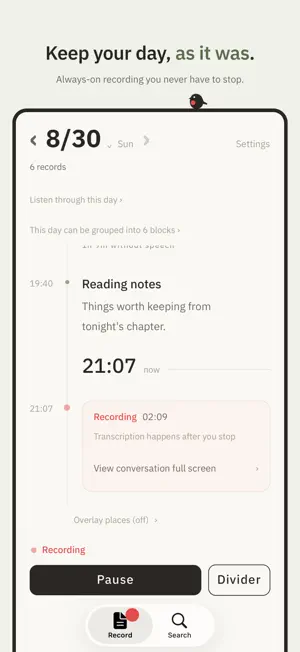
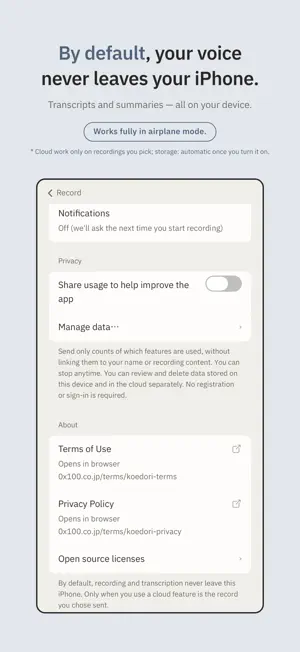
You already talk — on a walk, in the car, thinking out loud. Koedori keeps it. Koedori ("voice-catcher") is a voice diary with no writing, no typing, and no new habit to build. Turn on recording, speak, and your words become text on this iPhone, kept on a timeline of your day. ■ Core features on this iPhone are free Recording, transcription, titles and summaries, search, the day player, on-device minutes, and formatted export (Markdown, SRT, PDF) are free to use. No account is needed to get started. ■ By default, everything stays on this iPhone Core recording and AI work on-device. Plus cloud processing requires confirmation. Siri is optional: enabling it shares titles, dates and transcripts, not audio, with Apple. Siri requests may use Apple's cloud. ■ For work, too Meetings, interviews, and lectures: by default neither audio nor text leaves this iPhone. Copy the transcript or build minutes on-device. Cloud processing is optional per recording. Automatic on-device speaker labels are not available yet. ■ Koedori Plus (optional subscription) Plus offers cloud processing and encrypted storage. For a meeting or interview recording you choose, the cloud can fix passages this iPhone missed, and rebuild minutes and summaries. What is sent is shown first. Audio is deleted from the server when processing finishes; text is deleted when this iPhone confirms receipt. Audio storage is off until you turn it on. Recordings leave this iPhone sealed. The vault master key stays on your iPhone and in iCloud Keychain; we never hold it. Only for requested processing, we hold a per-record key during processing, then delete it. Stored audio remains retrievable after freeing device space. After cancellation, export everything for 30 days, then retrieve recordings one by one until deletion after six months. Recording and on-device transcription remain free. Auto-renewing; cancel anytime. ■ Your pace, not ours One sentence is enough. Record ten minutes on a dog walk, or leave it on from morning to night — both are fine. Koedori recovers automatically from calls and interruptions, and you can pause anytime from the Lock Screen. While recording, the Lock Screen always says so. ■ Your voice is the original Transcripts, titles, and summaries are interpretations; Koedori keeps the recorded voice as the source. A child's slip or an idea said aloud cannot be recreated later. Keeping that original safe comes first. ■ Find the moment again Search your words and jump straight to the second you said them. Play a whole day through, from morning to night, and move from the transcript to the moment you want to hear. Read-only calendar events and opt-in places appear alongside the day. ■ It's yours Share audio as m4a and copy transcripts in full. You can delete on-device recordings, transcripts, and summaries in Settings; copies kept in the cloud follow the separate lifecycle above. Choose how long on-device audio is kept: older audio is cleaned up while text stays. ■ Quiet, even while recording One calm status on the Lock Screen and in the Dynamic Island — visible to you, and honest to the people around you. No nagging notifications. Your music and other apps keep playing. ■ Honest by design Koedori only shows what it can truly do. When it is recording, it says so. When a recording was interrupted, the gap stays visible. About supported devices: transcription requires iPhone 12 or later (not available on iPhone 11 or iPhone SE 2nd generation). AI titles, summaries, and minutes require an Apple Intelligence-capable device; on other devices they can be made in the cloud with Koedori Plus. On every other device, recording, playback, the timeline, and the day player still work. When recording conversations with people around you, please obtain their consent where appropriate. Terms of Use: https://0x100.co.jp/terms/koedori-terms
What’s new
Version 1.7.0 · Updated October 8, 2026
Your recordings now adapt to the displays on iPhone Duo, with the list and details side by side when there is room. - Added support for Siri AI in iOS 27. Find saved recordings and ask about their contents. - Added optional notifications when cloud meeting notes are ready (Plus). Siri integration requires iOS 27 / iPadOS 27 or later, Apple Intelligence, and a supported language and region. Siri sharing and cloud uploads are off by default. Bug fixes and performance improvements.
App privacy
The developer, 256 GIKEN CO., LTD., reported these privacy practices to Apple.
Data Not Linked to You
The following data, which may be collected but is not linked to your identity, may be used for the following purposes:
- Usage Data: Product Interaction
- Diagnostics: Other Diagnostic Data
Used for: Analytics, App Functionality
Alternatives to Koedori — Voice Recorder Diary
Looking for apps like Koedori — Voice Recorder Diary? Here are 6 similar apps on the App Store. The highest rated is Meadow : 自動日記アプリ (5.0/5), and 5 of the 6 are free to download.
-
 Hitotsuzuri - Auto Journal
-
 Meadow : 自動日記アプリ
5.0
Meadow : 自動日記アプリ
5.0
-
 tsumune
-
 【オフィス カノン】
-
 ForYou - 大切な人のための日記/目標
-
 Carmemo - Vehicle service log
| App | Rating | Price | Last updated | Compare |
|---|---|---|---|---|
| Koedori — Voice Recorder Diary | – | Free | October 8, 2026 | |
| Hitotsuzuri - Auto Journal | – | Free | Oct 5, 2026 | Compare |
| Meadow : 自動日記アプリ | 5.0 / 5 (1) | Free | Jun 9, 2026 | Compare |
| tsumune | – | 1.99 USD | Apr 15, 2026 | Compare |
| 【オフィス カノン】 | – | Free | Nov 27, 2024 | Compare |
| ForYou - 大切な人のための日記/目標 | – | Free | Oct 9, 2026 | Compare |
| Carmemo - Vehicle service log | – | Free | Oct 12, 2026 | Compare |