

PTO Minder
Brown's Tech Co. LLC Productivity iPhoneiPadiPod touchApple Watch
PTO Minder is a free Productivity app for iPhone and iPad by Brown's Tech Co. LLC. Requires iOS 17.0. Updated November 14, 2026.
- Price
- Free
- on the App Store
- Size
- 39 MB
- Age 4+
- Updated
- Nov 14
- 2026 · v1.11
Screenshots
Save to Pinterest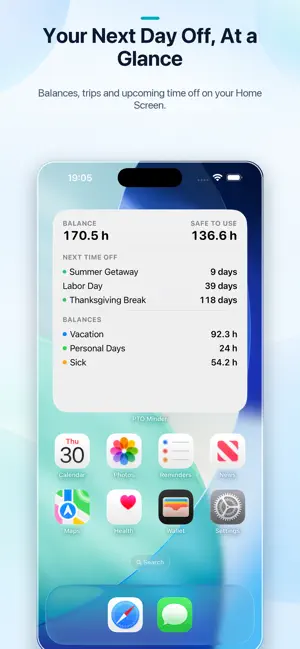


About PTO Minder
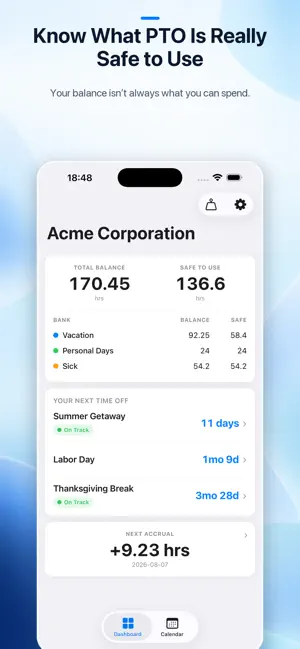
Stop guessing how much PTO is actually safe to use. PTO Minder helps you forecast your future paid time off balance based on your accrual schedule, booked time off, holidays, and upcoming pay periods. Instead of only showing what you have today, it helps answer two practical questions: “Will I have enough PTO for this trip?” and “How much can I safely use now without jeopardizing plans I already booked?” Use PTO Minder to plan vacations, long weekends, sick days, personal days, and holidays with a clearer view of what your future balance will look like. Plan trips with clear readiness labels: • On Track: your projected balance covers the time off • At Risk: the plan is tight and worth watching • Short: you are projected to come up short Know your Safe to Use amount: • See how much PTO is available after protecting upcoming planned time off • Decide whether a random 3-day weekend fits your plan • Avoid accidentally spending PTO you were counting on later • Model new time off before requesting it through work PTO Minder is built for real-world time off planning: • Add, move, and model trips before making an official request • Track PTO balances by employer and bank • Forecast balances across future pay periods • Add vacations, sick days, personal days, holidays, and unpaid leave • View trips and holidays together on a calendar • Review a pay-period ledger with accrual, usage, and running balances • Reconcile against the numbers from your employer or HR portal • Export and import your data with JSON backup PTO Minder is a planning tool, not an HR system. It does not log in to payroll, HR, calendar, or employer systems. You enter your own PTO rules and plans, then officially request time off through your employer’s normal process. The free version is fully useful for simple PTO planning, including one employer, one balance-bearing PTO bank, forecasting, calendar planning, holidays, reconciliation, and backup. PTO Minder Plus adds more power when you need it: • Unlimited additional PTO banks • Multiple active employers • iCloud sync across iPhone and iPad • Accrual caps and proactive alerts • Carryover and use-by expiration tracking • Scheduled future accrual changes • Home Screen and Lock Screen widgets • Apple Watch app and complication No account required. No ads. No third-party tracking. PTO Minder is for anyone who wants to use time off confidently without accidentally undermining future plans.
What’s new
Version 1.11 · Updated November 14, 2026
What's new in PTO Minder 1.11.0 • Restoring Plus on a new iPhone is more reliable. If the App Store is still finishing sign-in, PTO Minder checks again automatically. If iCloud isn't available on this device, Restore now tells you what to fix. • iCloud sync no longer misses changes that arrive while the app is starting up. • The Today button on the Calendar and Pay Periods now shows today's date. • Accrual schedules show the yearly amount first, followed by what each paycheck adds. • iPhone Duo: the tabs appear when the app opens in landscape, sheets such as Pay Periods and Settings no longer slide under the side bar, and the Pay Periods list stays steady. • Stability improvements for iOS 27.
App privacy
The developer, Brown's Tech Co. LLC, reported these privacy practices to Apple.
Data Not Collected
The developer does not collect any data from this app.
Alternatives to PTO Minder
Looking for apps like PTO Minder? Here are 6 similar apps on the App Store. The highest rated is Paid Time Off (5.0/5), and all 6 are free to download.
-
 MyPTO: Track & Plan Time Off
-
 PlayTime: PTO Tracker
-
 My PTO
4.4
-
 PTO Tracker: Vacation Days
-
 Paid Time Off
5.0
-
 IndyCRM: Clients & Invoices
4.6
| App | Rating | Price | Last updated | Compare |
|---|---|---|---|---|
| PTO Minder | – | Free | November 14, 2026 | |
| MyPTO: Track & Plan Time Off | – | Free | Feb 26, 2026 | Compare |
| PlayTime: PTO Tracker | – | Free | Jan 29, 2026 | Compare |
| My PTO | 4.4 / 5 (35) | Free | Sep 19, 2026 | Compare |
| PTO Tracker: Vacation Days | – | Free | Oct 13, 2026 | Compare |
| Paid Time Off | 5.0 / 5 (1) | Free | Sep 22, 2025 | Compare |
| IndyCRM: Clients & Invoices | 4.6 / 5 (5) | Free | Aug 27, 2026 | Compare |
Compare PTO Minder with the top alternatives: ratings, updates, ASO score and keyword gaps →