

Day-In
JinBae Jung Productivity iPhoneiPadiPod touch
Day-In is a free Productivity app for iPhone and iPad by JinBae Jung. Requires iOS 17.0. Updated August 20, 2026.
- Price
- Free
- on the App Store
- Size
- 38 MB
- Age 4+
- Updated
- Aug 20
- 2026 · v1.3.3
Screenshots

About Day-In
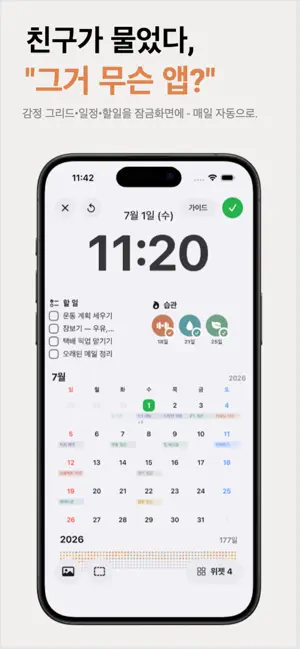
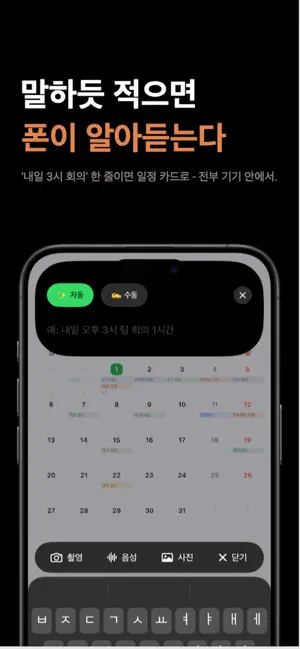
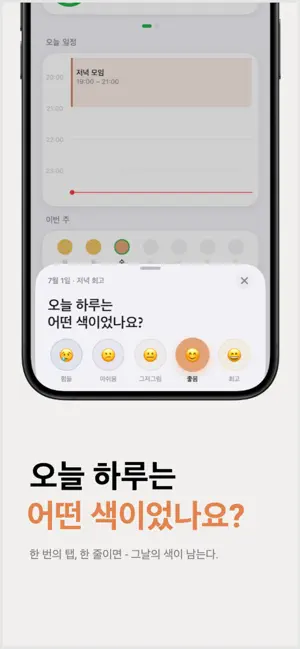
Day In — the kindest way to look back on your day, all in one. Habit tracking, to-dos, daily reflection (mood logging), the Eisenhower Matrix, a calendar, and even lock screen wallpapers. Plan, do, and reflect on today — all in Day In, without hopping between apps. ● Lock Screen Wallpaper Studio Set your own photo or a soft gradient as the background, then drag to-dos, habits, events, and calendar elements wherever you like. Resize by the corners and tune text color, size, and opacity. With a Shortcut, a fresh wallpaper reflecting today's to-dos and habits can apply every morning. ● Daily Reflection & Emotion Dot Grid Capture your day in one sentence and log your mood on a 5-level scale, from tough to great. The emotion dot grid — a year of moods filling in as dots of color — is Day In's signature. Tap a past dot to reopen that day's reflection and habits; saving a reflection fills the dot with a little reward. ● Eisenhower Matrix Organize to-dos and habits across four quadrants of urgency and importance. Drag items between quadrants and priorities reorganize instantly. Add and check off items in each quadrant; your arrangement is saved. View as a 2×2 grid or a list. ● Building Habits Create habits that repeat daily, on weekdays/weekends, or on the days you choose. Pick an icon and color, add a duration and notes, and set a reminder. Streaks and a grass graph show how long you've kept it up, and you can leave a one-line note per habit. ● To-Do Management Quickly add the day's to-dos and check them off with a tap. Long-press to delete, and see today's completion rate at a glance with a progress ring. ● Calendar Manage your schedule in a monthly view that pulls in your iOS Calendar events and holidays. Set title, time, place, notes, alerts, and repeats — event alerts arrive via iOS Calendar. Drag an event to another date and Undo to revert. Each day's mood, reflection, and habits appear on the date, so a tap reopens your day. ● Widgets Add widgets to your home and lock screens. The "Today" widget shows completed habits and to-dos, your progress, and what's next. The Pro-only "Emotion Grid" widget shows your recent mood flow as dots of color. Widgets refresh automatically. ● Notifications Get an evening reflection reminder at the time and on the days you choose, coming through even in Focus mode. Set a time for each habit, too; tapping a notification takes you straight to logging. ● iCloud Sync Everything is stored safely on your device and, when signed in to iCloud, backed up and synced automatically. Changes on another device with the same Apple Account appear automatically. Your records are never sent to our own servers. ● Themes Choose Light, Dark, or System and apply it across the app instantly. Pick habit icons from hundreds of emoji, painted with 8 suggested colors or one you tune yourself. ● Day In Pro Upgrade to Pro for unlimited habits, the Pro-only emotion grid widget, and detailed insights like yearly emotion analysis, weekday patterns, and habit streaks. Try Pro free for 7 days and cancel anytime. Restore Purchase carries Pro across devices. ● Key Features - One-line reflection with 5-level mood logging - Emotion dot grid — a year of moods in color - Eisenhower Matrix by urgency and importance - Daily and day-of-week habits with streaks and a grass graph - Simple to-dos — tap to complete, long-press to delete - Monthly calendar + iOS Calendar and holiday integration - Add, edit, delete events, with drag-to-move and Undo - "Today" and Pro-only "Emotion Grid" widgets - Lock Screen Studio over your photo or gradient - Evening reflection and habit reminders on your schedule - Automatic iCloud backup and multi-device sync ----------------------------------------------------------------------------------------------- Terms of Use: https://www.apple.com/legal/internet-services/itunes/dev/stdeula/ Privacy Policy: https://dam-dam-studio.vercel.app/apps/dayin/privacy
What’s new
Version 1.3.3 · Updated August 20, 2026
New – Japanese is now supported. – Siri and Shortcuts — say "Write a reflection in Day In" or "Add a to-do to Day In" and it lands without opening the app. Handy when your hands are full. – Unfinished — what you didn't get to yesterday now shows up today as well. The date stays put, so your calendar keeps that day's record. Improvements – Descriptions and secondary text are far easier to read. Every washed-out label has been reworked. – A light tap of haptic feedback when you switch tabs. – To-dos now appear in the same order in the app and in widgets. Fixes – Fixed checking off a to-do in a widget doing nothing — it happened on days you passed midnight without opening the app.
App privacy
The developer, JinBae Jung, reported these privacy practices to Apple.
Data Used to Track You
The following data may be used to track you across apps and websites owned by other companies:
- Identifiers: Device ID
Data Linked to You
The following data, which may be collected and linked to your identity, may be used for the following purposes:
- Identifiers: Device ID
Used for: Third-Party Advertising, Analytics, App Functionality
Data Not Linked to You
The following data, which may be collected but is not linked to your identity, may be used for the following purposes:
- Usage Data: Product Interaction
- Diagnostics: Crash Data, Other Diagnostic Data
Used for: Analytics
Alternatives to Day-In
Looking for apps like Day-In? Here are 6 similar apps on the App Store.
-
 Daily Mood & Emotion Tracker
-
 다이브: 할일 관리, 투두리스트, 일정, 루틴
-
 GoalNine: Mandalart Planner
-
 TextEditS - Edit In Place
-
 VIXair Pass
-
 Gen AMS
| App | Rating | Price | Last updated | Compare |
|---|---|---|---|---|
| Day-In | – | Free | August 20, 2026 | |
| Daily Mood & Emotion Tracker | – | 0.99 USD | Feb 18, 2026 | Compare |
| 다이브: 할일 관리, 투두리스트, 일정, 루틴 | – | 2.99 USD | Aug 24, 2026 | Compare |
| GoalNine: Mandalart Planner | – | Free | Aug 11, 2026 | Compare |
| TextEditS - Edit In Place | – | Free | Sep 22, 2026 | Compare |
| VIXair Pass | – | Free | Sep 11, 2025 | Compare |
| Gen AMS | – | Free | Sep 16, 2026 | Compare |
Compare Day-In with the top alternatives: ratings, updates, ASO score and keyword gaps →