

AutoCut Mobile
Rafael Nascimento Photo & Video iPhoneiPadiPod touch
AutoCut Mobile is a free Photo & Video app for iPhone and iPad by Rafael Nascimento. Requires iOS 15.0. Updated November 2, 2026.
- Price
- Free
- on the App Store
- Size
- 64 MB
- Age 4+
- Updated
- Nov 2
- 2026 · v1.1.8
Screenshots



About AutoCut Mobile
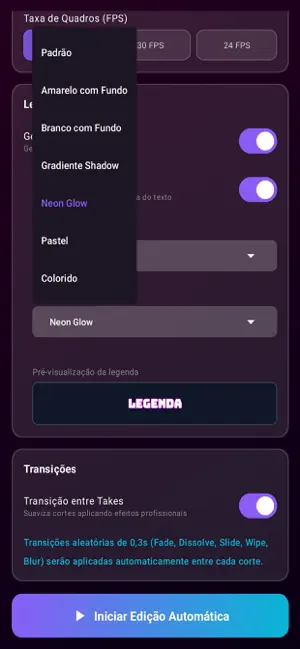
AutoCut: Automatic video editing Record and let AutoCut edit for you. In just a few minutes, right on your iPhone, it turns your raw video into one that's ready to post: • Automatic removal of silences and filler words: it finds the parts with no speech and cuts them to keep your video moving. • Animated automatic captions, synced to your speech, in the style and font you choose. • Cinematic transitions between cuts. • Balanced volume with audio normalization. • Exports straight to your photo library. Perfect for Reels, Shorts, YouTube, lessons and any talking video. Processing happens on your device, and your videos are not sent to any server. Available in English, Spanish and Portuguese. Start for free. More features and higher limits are available with an in-app subscription. Terms of Use (EULA): https://autocut.com.br/termos.php Privacy Policy: https://autocut.com.br/politica-privacidade.html
What’s new
Version 1.1.8 · Updated November 2, 2026
- A new look, with a step by step panel and the new Account screen. - Faster editing. - Captions keep the same size in every font and style. - Animations and animated captions now use the same engine as AutoCut for computers: the same motion on every device. - You can now delete your account right in the app. - Sign up with the Terms of Use and the Privacy Policy in your language. - Ad privacy choices for users in Europe. - Your edited video never gets stuck: if Photos refuses it, you can save it another way. - If you already subscribe on our website, you no longer see the purchase screen. - Filler word removal now works in English and Spanish too, once it is available in your country, and you can choose the speech language. - Stability and security fixes.
App privacy
The developer, Rafael Nascimento, reported these privacy practices to Apple.
Data Linked to You
The following data, which may be collected and linked to your identity, may be used for the following purposes:
- Contact Info: Email Address, Name, Phone Number, Physical Address
- Usage Data: Advertising Data, Product Interaction
- Identifiers: Device ID, User ID
- Financial Info: Payment Info
- User Content: Photos or Videos, Audio Data, Customer Support, Other User Content
- Diagnostics: Crash Data, Performance Data
Used for: Developer’s Advertising or Marketing, Analytics, Product Personalization, App Functionality
Data Not Linked to You
The following data, which may be collected but is not linked to your identity, may be used for the following purposes:
- Location: Coarse Location
- Identifiers: Device ID
- Usage Data: Product Interaction, Advertising Data
- Contact Info: Phone Number
Used for: Third-Party Advertising, Analytics, App Functionality
Alternatives to AutoCut Mobile
Looking for apps like AutoCut Mobile? Here are 6 similar apps on the App Store. The highest rated is AutoCut: Silence Remover (5.0/5), and all 6 are free to download.
-
 Background Remover Offline
-
 VLOG AutoCut Camera: SlapCut
-
 AutoCut: Silence Remover
5.0
-
 veedio
-
 PixDance - AI Video Generator
5.0
-
 Silence Remover - Auto Cut
5.0
| App | Rating | Price | Last updated | Compare |
|---|---|---|---|---|
| AutoCut Mobile | – | Free | November 2, 2026 | |
| Background Remover Offline | – | Free | Oct 14, 2026 | Compare |
| VLOG AutoCut Camera: SlapCut | – | Free | Jul 1, 2026 | Compare |
| AutoCut: Silence Remover | 5.0 / 5 (7) | Free | Sep 13, 2026 | Compare |
| veedio | – | Free | Sep 22, 2026 | Compare |
| PixDance - AI Video Generator | 5.0 / 5 (1) | Free | Jul 21, 2026 | Compare |
| Silence Remover - Auto Cut | 5.0 / 5 (1) | Free | Oct 22, 2026 | Compare |
Compare AutoCut Mobile with the top alternatives: ratings, updates, ASO score and keyword gaps →