
Grammar Fix
APPCITY Limited Liability Company Productivity iPhoneiPadiPod touch
Grammar Fix is a free Productivity app for iPhone and iPad by APPCITY Limited Liability Company. Requires iOS 18.0. Updated October 6, 2026.
- Price
- Free
- on the App Store
- Size
- 3 MB
- Age 4+
- Updated
- Oct 6
- 2026 · v1.2
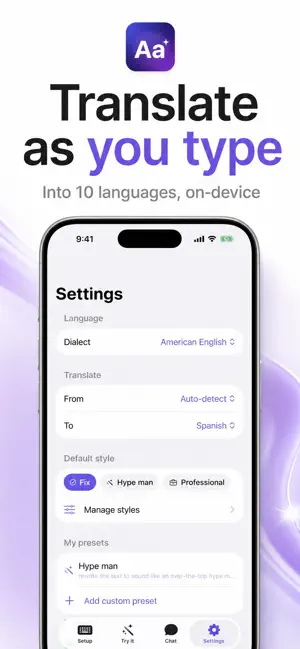
Screenshots



About Grammar Fix
GrammarFix helps you correct grammar, rewrite, translate and draft wherever you type. Choose on-device Apple Intelligence or optional Cloud AI powered by GPT. Tap to fix grammar and spelling in Messages, Mail, Notes and other apps that support custom keyboards. Rewrite in styles such as Professional, Friendly, Concise, Polite, Confident and Funny, or use presets for X, Instagram and Threads. REFINE YOUR WRITING Preview a rewrite, then give another instruction before applying it. Cloud AI can suggest editing directions based on the draft. Apply when you are happy with the result, or cancel and keep your original text. Undo restores the original after a correction or rewrite. A BETTER KEYBOARD Type with spelling suggestions and optional auto-correction. Hold Delete to repeat, double-tap Space for a period, double-tap Shift for Caps Lock, or hold Space and drag to move the cursor. Optional haptics add feedback while typing. MORE WRITING TOOLS - Translate into 10 languages - Draft and refine text with AI chat - Send your draft from the keyboard into chat with Craft - Create custom rewrite presets - Save optional background and writing preferences for personalization YOUR CHOICE OF AI On-device AI uses Apple Intelligence and processes submitted text locally. It requires iOS 26, a supported iPhone and Apple Intelligence availability. Cloud AI is optional and off by default. Selecting it sends submitted text, recent chat context and enabled personalization to App City Studios and OpenAI. Cloud editing suggestions also send the current draft. Cloud AI requires internet, is subject to service usage limits, and requires Allow Full Access when used in the keyboard. Ordinary typing does not trigger cloud AI requests. Switch back to on-device AI in Settings at any time. See our privacy policy for processing and retention details. FREE AND PREMIUM Grammar fixes and a limited number of daily AI chats are free. Premium unlocks all writing styles, translation, emoji, custom presets, rewrite refinement and chat without the free daily chat limit. Cloud service usage limits still apply. Choose Lifetime, Monthly or Yearly. Subscriptions renew automatically unless cancelled at least 24 hours before the current period ends. Manage subscriptions in your Apple Account settings. Requires iOS 18 or later. Terms of Use: https://appcitystudios.com/eula Privacy Policy: https://appcitystudios.com/privacy-policy
What’s new
Version 1.2 · Updated October 6, 2026
- Refine a rewrite with your own instructions before applying it. - Get suggested editing directions when using Cloud AI. - Choose Cloud AI or on-device AI directly in Try it and Settings. - Enjoy faster keyboard typing, spelling suggestions, auto-correction and cursor movement by holding Space. - Preview, apply, cancel and undo rewrites with improved protection against accidental text changes.
App privacy
The developer, APPCITY Limited Liability Company, reported these privacy practices to Apple.
Data Linked to You
The following data, which may be collected and linked to your identity, may be used for the following purposes:
- User Content: Emails or Text Messages, Other User Content
- Identifiers: Device ID
- Usage Data: Other Usage Data
Used for: App Functionality
Alternatives to Grammar Fix
Looking for apps like Grammar Fix? Here are 6 similar apps on the App Store.
-
 Focus: Timer & Tasks
-
 Succeed AI: Private Writer
-
 Kamry : Clever AI Keyboard
-
 Say Better - AI Text Rewriter
-
 Pomodoro Timer: PomoKit
-
 MyStep Pomodoro & Tareas
| App | Rating | Price | Last updated | Compare |
|---|---|---|---|---|
| Grammar Fix | – | Free | October 6, 2026 | |
| Focus: Timer & Tasks | – | Free | Sep 14, 2026 | Compare |
| Succeed AI: Private Writer | – | Free | Aug 19, 2026 | Compare |
| Kamry : Clever AI Keyboard | – | Free | Sep 29, 2026 | Compare |
| Say Better - AI Text Rewriter | – | Free | Jan 14, 2026 | Compare |
| Pomodoro Timer: PomoKit | – | Free | Oct 5, 2026 | Compare |
| MyStep Pomodoro & Tareas | – | Free | Aug 6, 2026 | Compare |
Compare Grammar Fix with the top alternatives: ratings, updates, ASO score and keyword gaps →