

Splits: Split Bills with AI
Antonio Duran Finance iPhoneiPadiPod touch
Splits: Split Bills with AI is a free Finance app for iPhone and iPad by Antonio Duran. Rated 5.0/5 from 1 ratings. Requires iOS 15.1.
- Rating
- 5.0
- 1 ratings
- Price
- Free
- on the App Store
- Size
- 45 MB
- Age 4+
- Updated
- Oct 10
- 2026 · v1.2.0
Screenshots


About Splits: Split Bills with AI
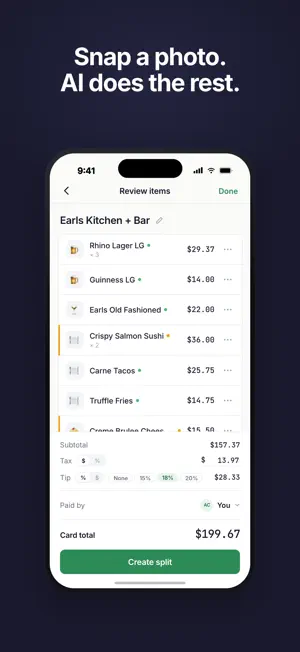
Went out with friends? Snap a photo of the receipt. Splits reads every item using AI, no typing, no squinting at tiny numbers. Share a link to your group chat and everyone picks what they had. Tax and tip get split proportionally based on what each person actually ordered. The best part? Your friends don't need to download anything. They open the link in their browser, tap their items, and they're done in 30 seconds. HOW IT WORKS - Snap the receipt: Take a photo and AI extracts every item, price, tax, and tip instantly. Works with any restaurant receipt. - Share a link: Send it via iMessage, WhatsApp, or any group chat. Friends claim their items right in the browser. - Settle up: One tap sends a Venmo request, Cash App payment, or Zelle transfer with the exact amount pre-filled. BEYOND RESTAURANT BILLS Splits isn't just for dinners. Covered an Uber? Split the groceries? Add any shared expense in seconds with Quick Add — just enter the amount, pick your friends, and split it equally or by custom amounts. No receipt needed. YOUR MONEY, YOUR PEOPLE Every shared expense lives in one place. Open Splits and see exactly where you stand with every friend, who owes you, who you owe, and how much. No more mental accounting or awkward "hey, did you pay me back?" texts. Tap into any friend to see your full history together, every dinner, every Uber, every settlement with a running balance that updates in real time. When it's time to settle up, one tap opens Venmo, Cash App, or Zelle with the right amount. Or just mark it as paid if they handed you cash. BUILT DIFFERENT - AI does the work: No manual data entry. Ever. Our AI handles quantities, multi-item lines, service charges, and every receipt format we've seen. - Zero friction for friends: They open a link. That's it. No app download, no account creation, no "can you install this real quick." - Actually fair: Tax and tip calculated based on what you ordered, not split evenly across the table. - Free: Unlimited scans, unlimited splits, unlimited friends. No premium tier, no scan limits, no paywalls.
What’s new
Version 1.2.0 · Updated October 10, 2026
Splits settle themselves Once everyone has paid, a split settles automatically. No more "Settle up" button. If some items are still unclaimed, the payer can close the split and cover what's left. See where every trip stands Tap a label in History to see what's open: who owes whom, and what Smart Settle simplified. Smart Settle, clearer - When Smart Settle sends your share to someone else, the app says so and tells you who to pay. - Friend profiles show how a simplification changed your balance, and you can undo it right there. - You're asked before an undo also changes someone else's payment. Safer settle-ups - If a balance changed while you were away, Settle Up asks what you actually sent. - A tapped-twice or retried settle-up is only recorded once. - Shares paid by a settle-up now read "Paid via settle-up". More fixes and polish - Add a split to a label from its ⋯ menu. - Split names show everywhere. - Live updates reconnect on their own. - A screen that can't load now says so, with Try again, instead of showing a blank page or $0. - A brief connection problem no longer logs you out or turns off Face ID. - Fixed duplicate splits when retrying a failed create. - Fixed receipts saved in the wrong currency.
App privacy
The developer, Antonio Duran, reported these privacy practices to Apple.
Data Linked to You
The following data, which may be collected and linked to your identity, may be used for the following purposes:
- Contact Info: Email Address, Name, Phone Number
- Usage Data: Product Interaction
- User Content: Photos or Videos
- Identifiers: Device ID
Used for: Analytics, App Functionality
Data Not Linked to You
The following data, which may be collected but is not linked to your identity, may be used for the following purposes:
- Diagnostics: Crash Data
Used for: App Functionality
Alternatives to Splits: Split Bills with AI
Looking for apps like Splits: Split Bills with AI? Here are 6 similar apps on the App Store. The highest rated is Split Pay: Get Paid Back (5.0/5), and all 6 are free to download.
-
 Aprumo
-
 Clero - Pay, Request, Split
4.6
Clero - Pay, Request, Split
4.6
-
 Split Pay: Get Paid Back
5.0
Split Pay: Get Paid Back
5.0
-
 Community National Bk Monmouth
5.0
Community National Bk Monmouth
5.0
-
 Salo: Money Manager
5.0
Salo: Money Manager
5.0
-
 RentFlow: Split Business Rent
| App | Rating | Price | Last updated | Compare |
|---|---|---|---|---|
| Splits: Split Bills with AI | 5.0 / 5 (1 rating) | Free | October 10, 2026 | |
| Aprumo | – | Free | Sep 30, 2026 | Compare |
| Clero - Pay, Request, Split | 4.6 / 5 (22) | Free | Oct 15, 2026 | Compare |
| Split Pay: Get Paid Back | 5.0 / 5 (1) | Free | Apr 17, 2026 | Compare |
| Community National Bk Monmouth | 5.0 / 5 (11) | Free | Feb 25, 2026 | Compare |
| Salo: Money Manager | 5.0 / 5 (2) | Free | Oct 15, 2026 | Compare |
| RentFlow: Split Business Rent | – | Free | Aug 12, 2026 | Compare |