

Trimage: RAW & JPEG Compressor
Kush Ketankumar Modi Photo & Video iPhoneiPadiPod touch
Trimage: RAW & JPEG Compressor is a free Photo & Video app for iPhone and iPad by Kush Ketankumar Modi. Rated 5.0/5 from 3 ratings. Requires iOS 18.0.
- Rating
- 5.0
- 3 ratings
- Price
- Free
- on the App Store
- Size
- 2 MB
- Age 4+
- Updated
- Jun 19
- 2026 · v1.1
Screenshots


About Trimage: RAW & JPEG Compressor
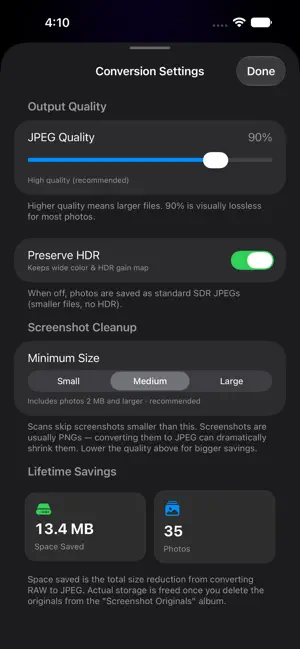
Running out of space? Your RAW photos and oversized JPEGs are likely the culprit. Trimage converts and compresses them into lean, high-quality JPEGs so you can reclaim gigabytes — without sending a single photo off your device. Two simple modes, one tap to start: CONVERT RAW → JPEG RAW and DNG files are huge. Trimage turns them into beautiful JPEGs that look the same to your eye but take up a fraction of the space. Perfect for iPhone ProRAW shooters and anyone importing from a camera. COMPRESS LARGE JPEGS Already have big JPEGs eating your storage? Trimage recompresses them at the quality you choose, so you keep the photo and lose the bulk. WHY YOU'LL LIKE IT • See your savings — watch exactly how many megabytes (and gigabytes) you reclaim. • Quality you control — a simple slider from balanced to maximum quality. • Keeps what matters — preserves dates, location, favorites, and optional HDR/wide color. • Your originals stay safe — Trimage never deletes anything automatically. Converted originals are gathered into an album so you can review and remove them in Photos whenever you're ready. • Batch friendly — convert a handful or your entire library. • Built for iPhone and iPad. PRIVATE BY DESIGN Everything happens on your device. Trimage does not collect, upload, or share your photos or any personal data — there are no accounts, no tracking, and no servers. The only thing that leaves is the storage you free up. HOW IT WORKS 1. Pick photos, or let Trimage scan your library for RAW files or large JPEGs. 2. Choose your quality. 3. Tap Convert and watch the space add up. 4. Review your originals in the album and delete them when you're happy. Reclaim your storage today — your future self (and your iCloud) will thank you.
What’s new
Version 1.1 · Updated June 19, 2026
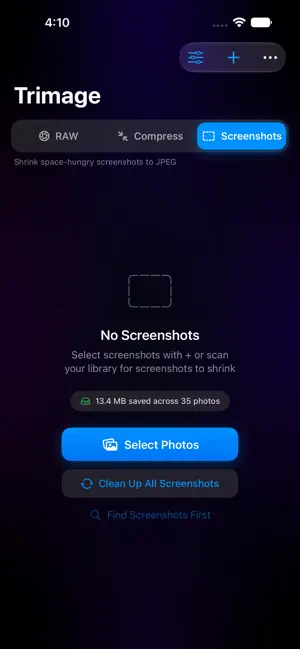
What’s New in Trimage 1.1 • Screenshots cleanup: a new mode that finds space-hungry screenshots and shrinks them to compact JPEGs. • More formats in Compress mode: now handles PNG, TIFF, BMP, and GIF in addition to JPEG (HEIC is left untouched since converting it would only grow the file). • Clearer feedback: if a selection has nothing to convert, Trimage now explains why — for example, when photos are already saved as efficient HEIC. • Simpler size filtering: pick Small, Medium, or Large to target the photos that actually save space. • Refreshed stats: a cleaner Lifetime Savings view showing total space saved and photos converted at a glance. • Polish: the settings screen now opens full-height, plus assorted UI refinements. As always, everything happens on your device — your originals are never deleted automatically and stay safe until you choose to remove them.
App privacy
The developer, Kush Ketankumar Modi, reported these privacy practices to Apple.
Data Not Collected
The developer does not collect any data from this app.
Alternatives to Trimage: RAW & JPEG Compressor
Looking for apps like Trimage: RAW & JPEG Compressor? Here are 6 similar apps on the App Store. The highest rated is Pulso Convert: RAW Converter (5.0/5), and all 6 are free to download.
-
 RAW to HEIC Pro
-
 Rawly: RAW to JPG
-
 Pulso Convert: RAW Converter
5.0
-
 Luxmio: Batch LUTs & Filters
-
 Photo Editor - Photo Art
3.7
-
 Film Cam Lab - Analog Camera
| App | Rating | Price | Last updated | Compare |
|---|---|---|---|---|
| Trimage: RAW & JPEG Compressor | 5.0 / 5 (3 ratings) | Free | June 19, 2026 | |
| RAW to HEIC Pro | – | Free | Aug 5, 2026 | Compare |
| Rawly: RAW to JPG | – | Free | Oct 25, 2026 | Compare |
| Pulso Convert: RAW Converter | 5.0 / 5 (1) | Free | Sep 24, 2026 | Compare |
| Luxmio: Batch LUTs & Filters | – | Free | Aug 27, 2026 | Compare |
| Photo Editor - Photo Art | 3.7 / 5 (3) | Free | Jun 19, 2025 | Compare |
| Film Cam Lab - Analog Camera | – | Free | Apr 8, 2026 | Compare |