

LocAIdoc – Private AI Scanner
Basse Mer Productivity iPhoneiPadiPod touchMac
LocAIdoc – Private AI Scanner is a free Productivity app for iPhone and iPad by Basse Mer. Requires iOS 26.5. Updated October 21, 2026.
- Price
- Free
- on the App Store
- Size
- 4 MB
- Age 4+
- Updated
- Oct 21
- 2026 · v1.7
Screenshots



About LocAIdoc – Private AI Scanner
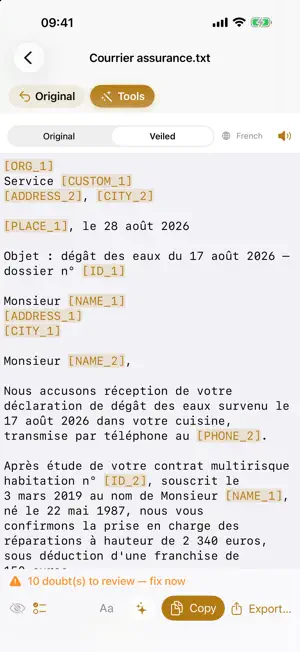
A letter to understand? A contract to summarize? A meeting to transcribe? LocAIdoc does it all on your iPhone, iPad or Mac — without a single byte leaving the device. ON DEVICE, NO NETWORK • Scan paper, import a PDF or photo, dictate a note: text is extracted locally (offline OCR and transcription). • Ten tools: scan cleanup, summary, plain language, fact sheet, ask-the-document, deadlines to Calendar, translation into six languages, read aloud… • Import from clipboard (copied email, screenshot) or from video (audio track transcribed on-device). • Editable original text: fix OCR or transcription errors before processing. • Drag & drop (Mac): drop files directly from Finder onto the app. • Crop before OCR: select the exact area to analyze when importing an image. • Formatting for export: apply bold, italic or underline — preserved when pasting into Pages, Word or Mail. • Session memory: your documents and treatments are restored on next launch. • Everything works in airplane mode. Even in a cave. TO ONLINE AI, WITHOUT YOUR DATA Need a more powerful AI? LocAIdoc anonymizes first: names, addresses, phone numbers and IDs become neutral markers. Copy the veiled text, paste the AI's reply: the real terms are restored, on your device. The mapping table NEVER leaves the device. FRUGAL Local AI does the heavy lifting for free. Online AI only receives (and bills) the essentials: a 149-page file is roughly 200,000 tokens; its veiled summary, 800. FREE, ACTUALLY No account. No ads. No subscription. No server. No data collected. Your documents. Your AI. Your device. Local AI tools (summary, fact sheet, questions…) require Apple Intelligence; pattern-based anonymization and OCR work on all compatible devices.
What’s new
Version 1.7 · Updated October 21, 2026
More reliable de-anonymization: markers ([NAME_1], [PHONE_1]…) are now language-neutral, and real terms are restored even if the remote AI slightly altered a marker. New “Copy for AI” button: adds an instruction to the veiled text asking the AI to keep the markers unchanged. Reply check: after pasting the AI's reply, the app reports which markers were found, unknown or missing. Help translated into more languages. Performance and stability improvements.
App privacy
The developer, Basse Mer, reported these privacy practices to Apple.
Data Not Collected
The developer does not collect any data from this app.
Alternatives to LocAIdoc – Private AI Scanner
Looking for apps like LocAIdoc – Private AI Scanner? Here are 6 similar apps on the App Store. The highest rated is CultivateAI Scouting (5.0/5), and all 6 are free to download.
-
 CultivateAI Scouting
5.0
CultivateAI Scouting
5.0
-
 Redactify - Black Out PDF
1.0
Redactify - Black Out PDF
1.0
-
 Weelova Pro
-
 Convert Picture to Pdf
5.0
Convert Picture to Pdf
5.0
-
 Filmotech
4.5
Filmotech
4.5
-
 PromptKit: AI Helper
4.7
PromptKit: AI Helper
4.7
| App | Rating | Price | Last updated | Compare |
|---|---|---|---|---|
| LocAIdoc – Private AI Scanner | – | Free | October 21, 2026 | |
| CultivateAI Scouting | 5.0 / 5 (2) | Free | Sep 28, 2026 | Compare |
| Redactify - Black Out PDF | 1.0 / 5 (1) | Free | Apr 17, 2026 | Compare |
| Weelova Pro | – | Free | Oct 1, 2026 | Compare |
| Convert Picture to Pdf | 5.0 / 5 (9) | Free | Feb 18, 2026 | Compare |
| Filmotech | 4.5 / 5 (4) | Free | Sep 26, 2024 | Compare |
| PromptKit: AI Helper | 4.7 / 5 (24) | Free | Jun 25, 2026 | Compare |