

ClipAI: AI Video Clipper
Isidora Tourni Photo & Video iPhoneiPadiPod touch
ClipAI: AI Video Clipper is a free Photo & Video app for iPhone and iPad by Isidora Tourni. Requires iOS 15.1. Updated October 27, 2026.
- Price
- Free
- on the App Store
- Size
- 50 MB
- Age 4+
- Updated
- Oct 27
- 2026 · v1.0.12
Screenshots
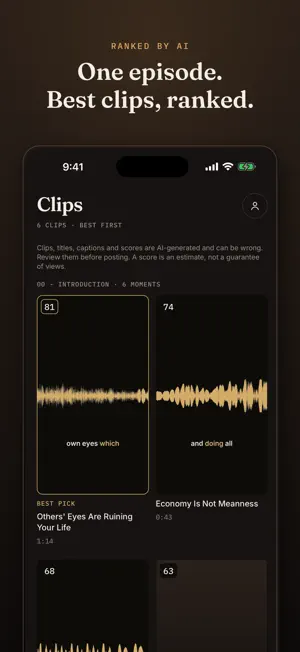


About ClipAI: AI Video Clipper
Don't waste time on the wrong clips. ClipAI finds the strongest moments in your videos, scores their viral potential, and turns them into ready-to-post Shorts and Reels with captions. Then it tracks what actually performs, so you know if the score was right. Upload a video or import a podcast episode, and ClipAI does the rest: it detects the best moments, cuts them for vertical 9:16, and adds styled captions automatically. WHAT YOU CAN DO - Upload from your camera roll or record straight in the app - Import podcast episodes from any RSS feed - AI detects clip-worthy moments and scores every highlight - Preview clips, trim the timing, and render polished exports - Add styled, auto-synced captions and 9:16 auto-reframing - Dub a clip into another language with AI, or translate its captions - Schedule posts to connected social accounts - Track views and engagement across platforms WHY CLIPAI - A virality score checked against how the clip actually performed - Save hours of manual editing - Turn one recording into a week of social clips - Go from raw video to rendered clip in one workflow ClipAI is built for creators, podcasters, marketers, educators, and anyone who wants more short-form content from the videos they already make. Sign in with email, Apple, or Google. Your account and all your data can be permanently deleted any time from Settings. Using ClipAI requires a subscription. There are three monthly plans with every feature: Starter (15 videos a month), Creator (40) and Studio (80). Each renews automatically until you cancel, which you can do any time in your App Store account settings. Subscribe in the app. Terms of Use (EULA): https://clipai.online/terms Privacy Policy: https://clipai.online/privacy
What’s new
Version 1.0.12 · Updated October 27, 2026
What's new in 1.0.12: - New plans: Starter, Creator and Studio. Every feature in each, 15 to 80 videos a month. - The app icon now fits Dark and Tinted Home Screen styles. - Photos, camera and microphone permission requests appear in your language. - Clip titles and score notes now come in the language your video is in, and silent videos use your app language. - Clearer wording in all 13 languages, plus fixes from a full translation review.
App privacy
The developer, Isidora Tourni, reported these privacy practices to Apple.
Data Linked to You
The following data, which may be collected and linked to your identity, may be used for the following purposes:
- Usage Data: Product Interaction
- Purchases: Purchase History
- Contact Info: Email Address, Name
- User Content: Photos or Videos, Audio Data, Other User Content, Customer Support
- Identifiers: User ID
Used for: Analytics, App Functionality, Other Purposes
Data Not Linked to You
The following data, which may be collected but is not linked to your identity, may be used for the following purposes:
- Diagnostics: Crash Data
Used for: App Functionality
Alternatives to ClipAI: AI Video Clipper
Looking for apps like ClipAI: AI Video Clipper? Here are 6 similar apps on the App Store. The highest rated is ClipFactory by Nostradamus (5.0/5), and all 6 are free to download.
-
 ClipperMovies
-
 CapSnap: AI Video Captions
-
 ClipFactory by Nostradamus
5.0
ClipFactory by Nostradamus
5.0
-
 Long Video Cut
-
 Nxly: AI Video Photo Generator
-
 AI Clip Maker: Shorts & Reels
1.0
AI Clip Maker: Shorts & Reels
1.0
| App | Rating | Price | Last updated | Compare |
|---|---|---|---|---|
| ClipAI: AI Video Clipper | – | Free | October 27, 2026 | |
| ClipperMovies | – | Free | Oct 23, 2026 | Compare |
| CapSnap: AI Video Captions | – | Free | Jul 31, 2026 | Compare |
| ClipFactory by Nostradamus | 5.0 / 5 (2) | Free | Aug 26, 2026 | Compare |
| Long Video Cut | – | Free | Apr 8, 2026 | Compare |
| Nxly: AI Video Photo Generator | – | Free | Jul 30, 2026 | Compare |
| AI Clip Maker: Shorts & Reels | 1.0 / 5 (1) | Free | Oct 27, 2026 | Compare |