

Authenticator App: 2FA & MFA.
Essa Studio Utilities iPhoneiPadiPod touch
Authenticator App: 2FA & MFA. is a free Utilities app for iPhone and iPad by Essa Studio. Rated 1.0/5 from 1 ratings. Requires iOS 16.0.
- Rating
- 1.0
- 1 ratings
- Price
- Free
- on the App Store
- Size
- 36 MB
- Age 4+
- Updated
- Sep 30
- 2026 · v1.0.1
Screenshots


About Authenticator App: 2FA & MFA.
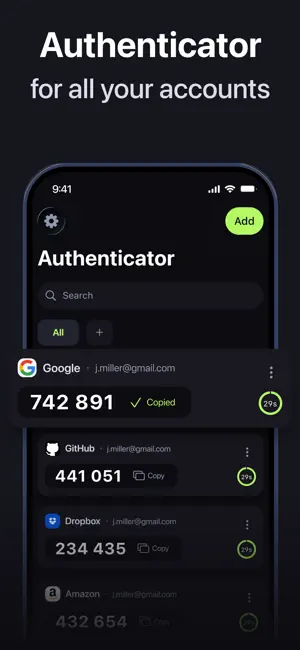
Authenticator App: 2FA, MFA generates secure one-time codes for any account — instantly, offline, and protected by your Face ID or Touch ID. Add any account manually in seconds and get a fresh 6-digit TOTP or HOTP code every 30 seconds. No SMS. No internet connection required. No third party ever sees your codes. WHAT THE APP DOES • Generates TOTP & HOTP codes (RFC 6238 / RFC 4226) for any service that supports two-factor authentication • Works with Google, Microsoft, Apple ID, Amazon, GitHub, Dropbox, Slack, Facebook, and thousands more • Add accounts via QR code or manual key entry • Stores all accounts in one organised list with custom names for easy navigation • Refreshes codes automatically every 30 seconds with a visible countdown timer • Locks the app behind Face ID or Touch ID so only you can access your codes • Runs fully offline — codes are generated on-device, never sent to a server BACKUP & RESTORE Encrypted backup saves all your accounts to the cloud. If you switch or lose your phone, restore every account to a new device in one tap. Backup is end-to-end encrypted — your keys never leave your device. SWITCHING FROM ANOTHER APP Add your existing accounts manually using the secret keys from each service. Takes a few minutes and keeps access to every account intact. PRIVACY AND SECURITY Authenticator: 2FA Auth, MFA complies with stringent privacy standards, ensuring that your data remains safe and confidential. For more information, please review our Privacy Policy at https://authgreen.com/privacy SUBSCRIPTION AND TERMS Authenticator App: 2FA, MFA is a subscription-based app with a free trial period. Subscribe for unlimited access with no commitment, and you can cancel anytime. Manage your subscription and disable auto-renewal in iTunes' Account Settings after purchase. Read our Terms of Service at https://authgreen.com/termsofuse
What’s new
Version 1.0.1 · Updated September 30, 2026
Bug fixes and performance improvements
App privacy
The developer, Essa Studio, reported these privacy practices to Apple.
Data Used to Track You
The following data may be used to track you across apps and websites owned by other companies:
- Identifiers: Device ID
Data Linked to You
The following data, which may be collected and linked to your identity, may be used for the following purposes:
- Purchases: Purchase History
- Location: Coarse Location
- Identifiers: User ID, Device ID
- Usage Data: Product Interaction
Used for: Developer’s Advertising or Marketing, Analytics, Product Personalization, App Functionality
Data Not Linked to You
The following data, which may be collected but is not linked to your identity, may be used for the following purposes:
- Diagnostics: Crash Data, Performance Data
Used for: Analytics, App Functionality
Alternatives to Authenticator App: 2FA & MFA.
Looking for apps like Authenticator App: 2FA & MFA.? Here are 6 similar apps on the App Store. The highest rated is Authenticator App-2FA・MFA・OTP (4.6/5), and all 6 are free to download.
-
 Authenticator App - 2FA, OTP
3.8
-
 Authenticator 2FA, MFA, OTP
4.4
-
 Authenticator App-2FA・MFA・OTP
4.6
-
 Authenticator™ App
4.1
-
 Authenticator ℠ App
4.3
-
 Get SMS Code - Verify
4.5
| App | Rating | Price | Last updated | Compare |
|---|---|---|---|---|
| Authenticator App: 2FA & MFA. | 1.0 / 5 (1 rating) | Free | September 30, 2026 | |
| Authenticator App - 2FA, OTP | 3.8 / 5 (4) | Free | Oct 23, 2026 | Compare |
| Authenticator 2FA, MFA, OTP | 4.4 / 5 (156) | Free | Aug 26, 2026 | Compare |
| Authenticator App-2FA・MFA・OTP | 4.6 / 5 (724) | Free | Oct 13, 2026 | Compare |
| Authenticator™ App | 4.1 / 5 (489) | Free | Oct 15, 2024 | Compare |
| Authenticator ℠ App | 4.3 / 5 (6,296) | Free | Sep 23, 2026 | Compare |
| Get SMS Code - Verify | 4.5 / 5 (2,837) | Free | Dec 11, 2025 | Compare |