

UltraPod: Retro Music Player
志超 杨 Music iPhoneiPadiPod touchApple Watch
UltraPod: Retro Music Player is a free Music app for iPhone and iPad by 志超 杨. Rated 4.7/5 from 56 ratings. Requires iOS 15.0. Updated October 29, 2026.
- Rating
- 4.7
- 56 ratings
- Price
- Free
- on the App Store
- Size
- 444 MB
- Age 4+
- Updated
- Oct 29
- 2026 · v2.9.2
Screenshots

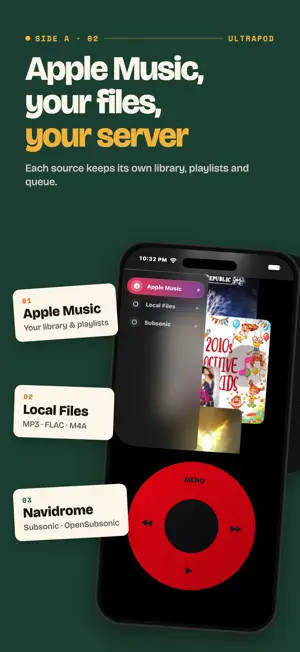
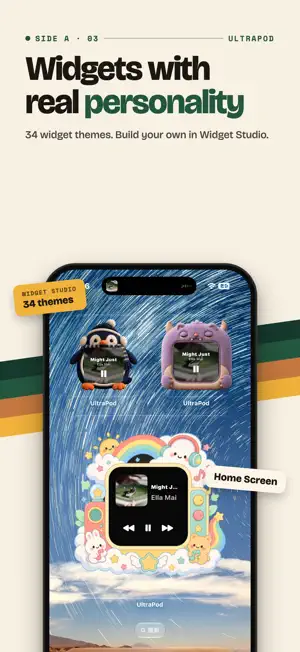

About UltraPod: Retro Music Player
A retro music player for iPhone. Spin the wheel, browse albums like records, and dress up your Home Screen with widgets and icon themes. UltraPod brings three separate music sources into one focused player: Apple Music, audio imported from Files, and Subsonic/OpenSubsonic/Navidrome servers. Each source keeps its own library, playlists, favorites, queue, and playback position—nothing is silently merged or handed to another player. THREE WAYS TO PLAY • Apple Music: Browse your authorized library, playlists, albums, recent items, and catalog content through MusicKit. Apple Music playback requires MusicKit authorization and may require an active subscription. • Local Files: Import compatible audio such as MP3, FLAC, and M4A from Files. UltraPod reads embedded titles, artists, albums, artwork, and track information to build an on-device library. • Subsonic & Navidrome: Connect multiple Subsonic, OpenSubsonic, or Navidrome servers. Stream and search your library, or download tracks, albums, artists, playlists, and entire libraries for offline listening. ONE PLAYER FOR EVERY SOURCE Use a consistent Now Playing screen, editable queue, playlists, favorites, seeking, lyrics, four playback modes, sleep timer, and 0.1×–2.0× speed control. Browse large libraries with Album Flow, personalize the player with themes and icon packs, and keep playback close with Home Screen widgets. MUSIC WITHOUT THE NOISE UltraPod also includes optional on-device tools for photos and videos, a square camera, voice memos, notes, imported books, contacts, calendars, reminders, and workouts. These tools stay secondary to a focused music experience without endless feeds. UltraPod has no proprietary account, no ads, no third-party analytics, no IDFA access, and no tracking prompt. Protected data is processed on device unless you choose an Apple service or connect to a server you provide. Continued use of GPS in the background can dramatically decrease battery life. UltraPod uses background location only during an active outdoor workout and stops updates when the workout is paused or ended. UltraPod is not affiliated with, sponsored by, or endorsed by Apple Inc. Apple Music and MusicKit are used only through Apple's public APIs.
Ratings & reviews
4.7
56 ratings
What’s new
Version 2.9.2 · Updated October 29, 2026
Your own lyrics come first • Fixed missing embedded lyrics in some FLAC, MP3, CAF, and other files. • Embedded plain-text lyrics also take priority and are no longer replaced by online lyrics. • Fixed garbled text when manually importing some Chinese LRC files. • Use Rescan Lyrics to reread garbled lyrics in Local Files. For lyrics attached in Subsonic, attach the original file again. Open your queue and see it • The Immersive theme now displays the queue and lets you browse it. • In EDC themes and full-screen mode, tap songs, swipe up or down, and close the queue popup. • An empty queue now prompts you to play music first. Find music your scans missed • Fixed playable Opus and audio-only MP4 files being skipped during folder scans. • Scanning also reads embedded lyrics and matching LRC files with the same name from the same import batch. • MP4 files containing a video track are not imported as music.
App privacy
The developer, 志超 杨, reported these privacy practices to Apple.
Data Not Collected
The developer does not collect any data from this app.
Alternatives to UltraPod: Retro Music Player
Looking for apps like UltraPod: Retro Music Player? Here are 6 similar apps on the App Store. The highest rated is MusicPal: Music Assistant (5.0/5), and all 6 are free to download.
-
 SepiaPod - Retro Music Player
4.7
SepiaPod - Retro Music Player
4.7
-
 Sleeve: Album Player
4.8
Sleeve: Album Player
4.8
-
 NewPod: Music Offline Player
4.1
NewPod: Music Offline Player
4.1
-
 MusicPal: Music Assistant
5.0
MusicPal: Music Assistant
5.0
-
 MusicPod: Classic Music Player
4.6
MusicPod: Classic Music Player
4.6
-
 TuneMySong
4.1
TuneMySong
4.1
| App | Rating | Price | Last updated | Compare |
|---|---|---|---|---|
| UltraPod: Retro Music Player | 4.7 / 5 (56 ratings) | Free | October 29, 2026 | |
| SepiaPod - Retro Music Player | 4.7 / 5 (166) | Free | Oct 27, 2026 | Compare |
| Sleeve: Album Player | 4.8 / 5 (16) | Free | Oct 15, 2026 | Compare |
| NewPod: Music Offline Player | 4.1 / 5 (15) | Free | Oct 5, 2026 | Compare |
| MusicPal: Music Assistant | 5.0 / 5 (32) | Free | Oct 12, 2026 | Compare |
| MusicPod: Classic Music Player | 4.6 / 5 (14) | Free | Oct 21, 2026 | Compare |
| TuneMySong | 4.1 / 5 (91) | Free | Sep 29, 2026 | Compare |