

PhotoColors: AI picture editor
群 彭 Photo & Video iPhoneiPadiPod touch
PhotoColors: AI picture editor is a free Photo & Video app for iPhone and iPad by 群 彭. Requires iOS 16.0. Updated October 23, 2026.
- Price
- Free
- on the App Store
- Size
- 68 MB
- Age 4+
- Updated
- Oct 23
- 2026 · v1.4.5
Screenshots
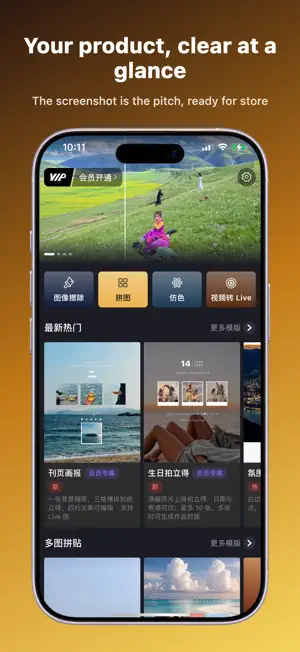


About PhotoColors: AI picture editor
PhotoColors reveals the color aesthetics hidden in your memories. Start with one photo—or up to 12—and turn dominant colors into share-ready cards. The studio uses bottom tabs and line-by-line text editing, with settings remembered per photo. Tap Save to export every card in the list. Live Photos are supported on iOS. Color extraction and layout run on-device by default for privacy. 【Popular card modes】 ◆ Glass Palette — vitreous swatches with HEX, adjustable ratio and corners ◆ Moment Card — ambient color with place/date or poetic copy ◆ Bubble Stamp — organic ink bubbles and bilingual lines; Live export ◆ Sticker Card — fridge-magnet styles (some AI steps need network) ◆ Travel Ticket / Stub Ticket / Postage Stamp / Postcard / City Archive / Holiday Spread ◆ Desk Calendar, Watercolor Study, Vibe Color ◆ Pixel Stretch, Color Band, Silk Blend, Cross Nest, Live Collage 【Create with ease】 · Drag to reframe, pinch to zoom; multi-photo lists on many templates · Edit size, weight, and typeface per line · Ratio, color, and corners isolated per selected photo · Save to Photos; rounded corners and Live export on supported modes 【PhotoColors Pro】 Subscribe to Pro for unlimited premium creations and fuller export options. Privacy Policy: https://alkaline-price-6a7.notion.site/FotoColors-3803772ed8f1800c85b7f2f01cbb2196 Terms of Use (Apple Standard EULA): https://www.apple.com/legal/internet-services/itunes/dev/stdeula/
What’s new
Version 1.4.5 · Updated October 23, 2026
bugfix
App privacy
The developer, 群 彭, reported these privacy practices to Apple.
Data Not Collected
The developer does not collect any data from this app.