

Linup: Calorie Counter
Lucas Sancar Health & Fitness iPhoneiPadiPod touch
Linup: Calorie Counter is a free Health & Fitness app for iPhone and iPad by Lucas Sancar. Requires iOS 15.1. Updated October 13, 2026.
- Price
- Free
- on the App Store
- Size
- 61 MB
- Age 4+
- Updated
- Oct 13
- 2026 · v1.2.6
Screenshots



About Linup: Calorie Counter
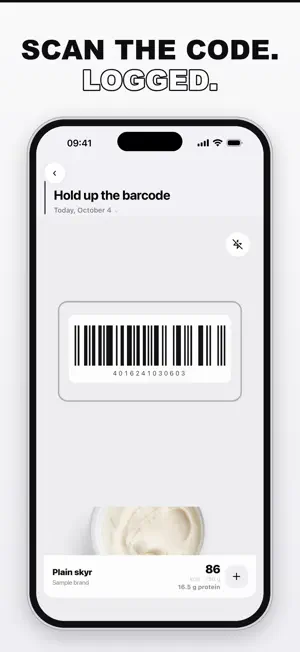
Tired of calorie counting? With Linup, log food by photo, barcode, text input or product search. Linup turns it into a transparent nutrition estimate. WHAT MAKES LINUP DIFFERENT - AI photo recognition with ingredient breakdown: you see HOW the estimate is built and fix it with one tap - Photo AI is free, no subscription wall - No ads in the app - No ad-network tracking - Your personal plan: lose weight, eat healthy, build muscle or gain weight, with an honest forecast instead of miracle promises - Weekly deficit instead of a daily number: "1,500 kcal less is about 0.2 kg of fat" - Weekly nutrient check every Monday: which nutrient (e.g. magnesium or zinc) was low in your meals and which foods help - Product search with real packaging photos, barcode scanner with community database - Suggestions that match YOUR goal, including vegetarian and vegan sections - Steps from Apple Health count into your daily budget automatically - 17 app languages HONEST STAYS HONEST No crash diets, no invented target corridors. Estimates are called estimates, and the trend matters more than a single day. YOUR DATA A free account keeps your entries backed up and on every device. Delete it anytime, right in the app. Get Linup and make your next meal the easiest one of the day.
What’s new
Version 1.2.6 · Updated October 13, 2026
New: onboarding is shorter, and you set your reminder times there or turn them off completely. Progress now shows 19 nutrients, sorted: whatever is below the reference value comes first. “Scan barcode” sits right in the plus menu. Muscle gain starts with a gentle calorie surplus, and workouts count exactly once.
App privacy
The developer, Lucas Sancar, reported these privacy practices to Apple.
Data Linked to You
The following data, which may be collected and linked to your identity, may be used for the following purposes:
- Health & Fitness: Fitness
- Contact Info: Email Address
- User Content: Photos or Videos
- Identifiers: User ID
- Diagnostics: Crash Data
Used for: App Functionality
Data Not Linked to You
The following data, which may be collected but is not linked to your identity, may be used for the following purposes:
- Location: Precise Location, Coarse Location
Used for: App Functionality
Alternatives to Linup: Calorie Counter
Looking for apps like Linup: Calorie Counter? Here are 6 similar apps on the App Store. The highest rated is CalTracker: Calorie Cam (5.0/5), and all 6 are free to download.
-
 OFood: AI Calorie Counter
-
 CalTracker: Calorie Cam
5.0
CalTracker: Calorie Cam
5.0
-
 AI Calorie Tracker - PicPlate
-
 FoodieCalc - Calorie Tracker
5.0
FoodieCalc - Calorie Tracker
5.0
-
 Burnly - AI Calorie Counter
-
 Dr. Testo: Testosterone Boost
| App | Rating | Price | Last updated | Compare |
|---|---|---|---|---|
| Linup: Calorie Counter | – | Free | October 13, 2026 | |
| OFood: AI Calorie Counter | – | Free | Oct 19, 2026 | Compare |
| CalTracker: Calorie Cam | 5.0 / 5 (1) | Free | Sep 10, 2026 | Compare |
| AI Calorie Tracker - PicPlate | – | Free | May 21, 2026 | Compare |
| FoodieCalc - Calorie Tracker | 5.0 / 5 (16) | Free | Sep 27, 2026 | Compare |
| Burnly - AI Calorie Counter | – | Free | Aug 7, 2026 | Compare |
| Dr. Testo: Testosterone Boost | – | Free | Oct 2, 2026 | Compare |