

Busker Live FX
MINJUNG CHO Music iPhoneiPadiPod touchMac
Busker Live FX is a free Music app for iPhone and iPad by MINJUNG CHO. Requires iOS 17.0. Updated September 15, 2026.
- Price
- Free
- on the App Store
- Size
- 5 MB
- Age 4+
- Updated
- Sep 15
- 2026 · v2.0.0
Screenshots


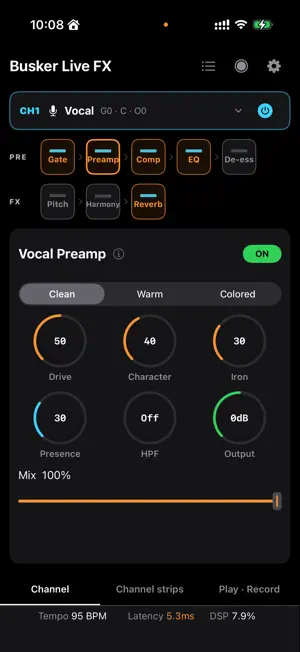

About Busker Live FX
Busker Live FX is a live guitar and vocal multi-effects app for Mac, iPhone and iPad. Connect instruments and microphones through an external audio interface, then control effects, your mix, backing tracks, loops and performance recording in one app. A console for each device • Mac and landscape iPad: channel details, channel strips and MR/Looper/Record in three columns • Portrait iPad: transport panels arranged side by side below the console • iPhone: bottom tabs for channel details, channel strips and playback/recording • Mac: select an external interface independently of the system default Independent channels and effects • Up to four inputs, depending on your interface, with Guitar or Vocal on each channel • Guitar: Tuner, Gate, Compressor, EQ, Boost, NAM AMP, IR, Doubler, Chorus, Delay and Reverb • Vocal: Gate, Preamp, Compressor, EQ, De-esser, Pitch Correction, two-voice Harmony and Reverb • Input gain, Pan, output faders, Mute/Solo and stereo Main output Perform and record • One stereo loop up to 60 seconds, with overdubbing, Undo and Clear • Import backing audio, see position and total time, and shift KEY by −3…+3 semitones • Record enabled inputs, loaded MR, active loop and final MIX as stereo 24-bit WAV files • Pause/resume within a Take; browse, preview and share individual files or a whole Take • MIDI mapping by input channel and Guitar/Vocal type, All MIDI channels and MIDI Learn • Save presets, edit names together and delete from the library All app features are free. No login or subscription is required. Presets and recordings are stored per device and do not automatically sync between devices. Requirements Requires iOS/iPadOS 17 or later, or macOS 14 or later, a compatible external audio interface and microphone permission. Built-in audio and AirPods are not treated as external interfaces for live input. Adapters, power and drivers depend on your interface. Latency and available processing capacity depend on your device, interface and buffer settings. User manual: https://buskerlivefx.pickandtune.com/manual Support: [email protected]
What’s new
Version 2.0.0 · Updated September 15, 2026
Busker Live FX 2.0 • A new live console for Mac, iPhone and iPad • Up to four independent Guitar/Vocal inputs with slim channel strips • External interface selection on Mac, independent of the system default • Guitar Doubler and vocal De-esser, Pitch Correction and Harmony • Separate MR, Looper and Record panels, plus Tempo, Latency and DSP in the footer • Stereo 24-bit WAV recording with per-channel files, pause/resume and a recording library • MIDI groups by channel and Guitar/Vocal type, All channels and multiple actions per trigger • Batch preset-name editing and improved touch/mouse controls An external audio interface is required. All app features are free.
App privacy
The developer, MINJUNG CHO, reported these privacy practices to Apple.
Data Not Collected
The developer does not collect any data from this app.
Alternatives to Busker Live FX
Looking for apps like Busker Live FX? Here are 6 similar apps on the App Store. The highest rated is Sampledex Effect Shift (5.0/5), and all 6 are free to download.
-
 VoltageControl
-
 Tonkro
-
 SimpleSampler: Loop Station
-
 Sampledex Effect Shift
5.0
Sampledex Effect Shift
5.0
-
 Audio Object
5.0
Audio Object
5.0
-
 FrankenJazz
| App | Rating | Price | Last updated | Compare |
|---|---|---|---|---|
| Busker Live FX | – | Free | September 15, 2026 | |
| VoltageControl | – | Free | Oct 15, 2026 | Compare |
| Tonkro | – | Free | Oct 25, 2026 | Compare |
| SimpleSampler: Loop Station | – | Free | Oct 1, 2026 | Compare |
| Sampledex Effect Shift | 5.0 / 5 (2) | Free | Oct 2, 2026 | Compare |
| Audio Object | 5.0 / 5 (1) | Free | Aug 25, 2026 | Compare |
| FrankenJazz | – | Free | Oct 13, 2026 | Compare |
Compare Busker Live FX with the top alternatives: ratings, updates, ASO score and keyword gaps →