

MonoVibe Black & White Camera
Denny Hoh Photo & Video iPhoneiPadiPod touch
MonoVibe Black & White Camera is a paid Photo & Video app for iPhone and iPad by Denny Hoh. Requires iOS 26.5. Updated October 16, 2026.
- Price
- 2.99 USD
- on the App Store
- Size
- 1 MB
- Age 4+
- Updated
- Oct 16
- 2026 · v1.8.1
Screenshots


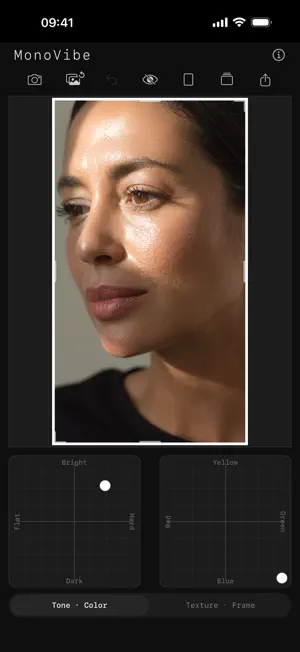

About MonoVibe Black & White Camera
Black and white, and nothing else. MonoVibe is a small app on purpose. Four controls: tone, colour filtration, texture, frame. A viewfinder that already shows the finished photograph, and a way to keep it. No layers, no masks, no curves, no library to manage. If that sounds limited: it is. The limit is the point. Most editors ask you to learn them. This one asks you to look. Shoot directly in MonoVibe. The built-in camera shows your mono look live in the viewfinder, grain included, and that grain moves the way real film does. Volume buttons work as a shutter, every frame saves straight to your photos, and the thumbnail opens your last shot for editing. What you see is what you shoot. A magnifier checks focus before you press. A self-timer waits 3 or 10 seconds, so the camera can rest on something and the press of the shutter will not shake it. A tap on the picture clears the viewfinder when you want to judge the frame on its own, and a small arrow folds the pads away so the picture can grow into their space. If you prefer, one tap does both. Adjust exposure and contrast with a single touch. Simulate classic optical lens filters for dramatic skies and rich tonal depth. Choose a grain character, classic, push or fine, and add clarity for the darkroom feel. Crop freely by pulling the frame's edges, then finish with a fine-art border, scaled and toned the way you want it. Step back at any point with undo. Three looks come ready to use, and two more slots wait for your own. Save what you like, apply it with a tap. Designed for iPhone and iPad. On the big screen all four control pads sit side by side, like a darkroom desk. Nothing here needs a manual. There is one anyway, at mucnoc.com, for when you want to know exactly how something works. Everything happens on your device. No cloud uploads, no tracking, no account, no subscription. Your photos keep their capture data and never leave your hands.
What’s new
Version 1.8.1 · Updated October 16, 2026
The Texture pad now starts where nothing happens: no grain at the bottom, no sharpening on the left. Until now the lower and left halves of the pad did nothing, so every position counts now, and grain and sharpening can be set twice as finely. Looks you have saved look exactly as before. Grain also grows evenly now, all the way up. Partway along the axis it used to fall back for a moment and lighten the picture slightly before rising again. VoiceOver reads grain, sharpening and frame width as amounts now, so the middle of an axis is announced as half rather than as nothing.
App privacy
The developer, Denny Hoh, reported these privacy practices to Apple.
Data Not Collected
The developer does not collect any data from this app.
Alternatives to MonoVibe Black & White Camera
Looking for apps like MonoVibe Black & White Camera? Here are 6 similar apps on the App Store. The highest rated is Black & White No Bullshit (5.0/5), and 4 of the 6 are free to download.
-
 Halation Film Camera
-
 grayamer
3.0
grayamer
3.0
-
 Black & White No Bullshit
5.0
Black & White No Bullshit
5.0
-
 CMRA - A Camera, Kept Simple
-
 Craftive
-
 LUTo—Less setup, more instinct
5.0
LUTo—Less setup, more instinct
5.0
| App | Rating | Price | Last updated | Compare |
|---|---|---|---|---|
| MonoVibe Black & White Camera | – | 2.99 USD | October 16, 2026 | |
| Halation Film Camera | – | 2.99 USD | Aug 13, 2026 | Compare |
| grayamer | 3.0 / 5 (1) | Free | Mar 11, 2026 | Compare |
| Black & White No Bullshit | 5.0 / 5 (1) | 2.99 USD | Feb 20, 2026 | Compare |
| CMRA - A Camera, Kept Simple | – | Free | Oct 16, 2026 | Compare |
| Craftive | – | Free | Oct 6, 2026 | Compare |
| LUTo—Less setup, more instinct | 5.0 / 5 (1) | Free | Oct 17, 2026 | Compare |