

Overwrite - Markdown & LaTeX
Stefan Muke Education iPhoneiPadiPod touch
Overwrite - Markdown & LaTeX is a free Education app for iPhone and iPad by Stefan Muke. Requires iOS 15.0. Updated October 17, 2026.
- Price
- Free
- on the App Store
- Size
- 58 MB
- Age 4+
- Updated
- Oct 17
- 2026 · v1.1
Screenshots


About Overwrite - Markdown & LaTeX
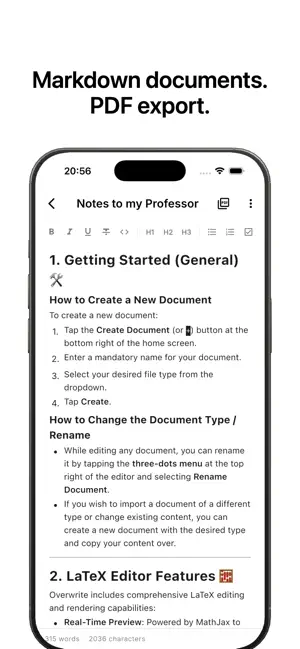
Overwrite is the ultimate minimalist workspace for developers, writers, and students with offline-first LaTeX and Markdown document editing. Ditch the bloat. Overwrite combines a distraction-free environment with high-performance editing tools. Whether you’re drafting notes in Markdown, writing mathematical equations in LaTeX, or testing JavaScript and Dart scripts, Overwrite handles it all natively and 100% offline. Designed to look stunning on both iPhone and iPad, the app features a responsive layout, a customizable monospaced interface, and a custom keyboard accessory bar to make editing on the go effortless. KEY FEATURES: 1. Rich Markdown Workspace (WYSIWYG) Draft beautiful documentation, prose, or journals. Live rendering hides formatting syntax markers unless you are editing the line (Notion-style). Format quickly with an interactive slash command (/) menu and floating selection toolbars. 2. Advanced LaTeX & Math Workspace Render complex math formulas, matrices, and equations instantly (powered offline by MathJax). Tablet Optimization: Work efficiently on iPad with a dual-pane side-by-side view (edit on the left, live preview on the right). Accessory Bar: Type faster using a dedicated keyboard accessory bar for commonly used special symbols (\, { }, \frac, \sqrt, \pi, etc.). Seamlessly wrap selected text inside equations or bracket formats with a single tap. 3. PDF Export & Offline Sync Export your Markdown and LaTeX files directly to PDF with clean, premium typography. Uses high-quality fonts (Inter and Source Code Pro) offline, with online fallback for emoji support (Noto Color Emoji). Auto-save debouncing keeps your drafts synchronized and secure on local storage. 4. Offline Code Editor Edit Java, Javascript, Python or Dart Code complete with full syntax highlighting and auto completion in a VS Code style editor. Unlock your productivity. Simplify your writing and coding workflow with Overwrite.
What’s new
Version 1.1 · Updated October 17, 2026
Fixed several bugs and improved both the Markdown and LaTeX Editor experience. Thank you for using Overwrite!
App privacy
The developer, Stefan Muke, reported these privacy practices to Apple.
Data Not Collected
The developer does not collect any data from this app.
Alternatives to Overwrite - Markdown & LaTeX
Looking for apps like Overwrite - Markdown & LaTeX? Here are 6 similar apps on the App Store. The highest rated is StudyTrail - AI Flashcards (5.0/5), and 5 of the 6 are free to download.
-
 StudyTrail - AI Flashcards
5.0
-
 Diachronica: Word Origins
5.0
-
 Vektoris3D
-
 AdaptiveHiking
-
 CogniCards: Study Flashcards
5.0
-
 Mathketeers: Math Games
| App | Rating | Price | Last updated | Compare |
|---|---|---|---|---|
| Overwrite - Markdown & LaTeX | – | Free | October 17, 2026 | |
| StudyTrail - AI Flashcards | 5.0 / 5 (1) | Free | Oct 5, 2026 | Compare |
| Diachronica: Word Origins | 5.0 / 5 (2) | Free | Sep 3, 2026 | Compare |
| Vektoris3D | – | 11.99 USD | May 21, 2026 | Compare |
| AdaptiveHiking | – | Free | Aug 11, 2026 | Compare |
| CogniCards: Study Flashcards | 5.0 / 5 (1) | Free | Aug 18, 2026 | Compare |
| Mathketeers: Math Games | – | Free | Aug 2, 2026 | Compare |