

PhotoPrep: Compress & Resize
Bunyamin METE Photo & Video iPhoneiPadiPod touch
PhotoPrep: Compress & Resize is a free Photo & Video app for iPhone and iPad by Bunyamin METE. Requires iOS 17.0. Updated June 23, 2026.
- Price
- Free
- on the App Store
- Size
- 6 MB
- Age 4+
- Updated
- Jun 23
- 2026 · v1.0
Screenshots

About PhotoPrep: Compress & Resize
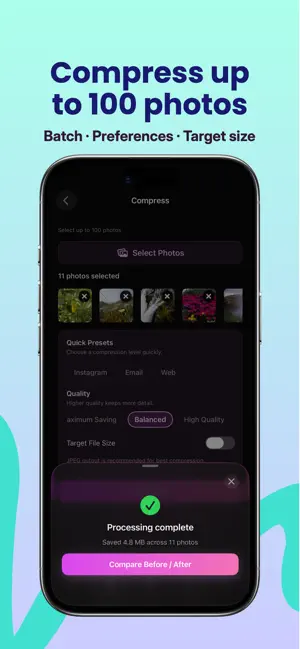
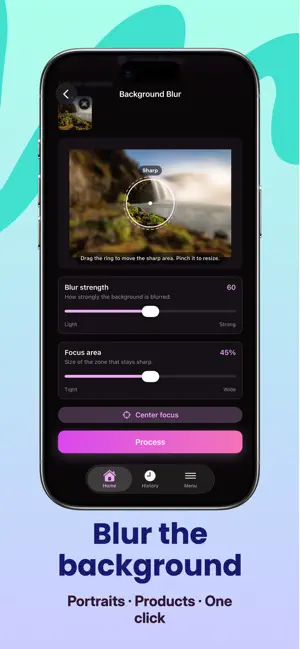
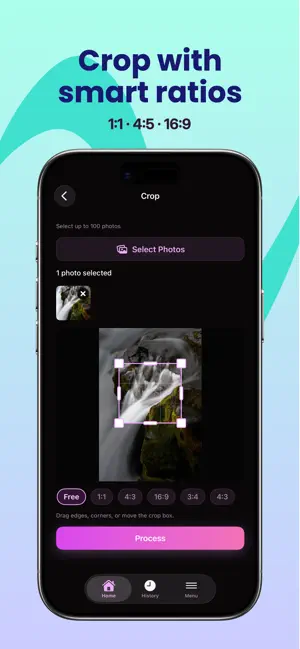
PhotoPrep: Compress & Resize — Your Offline Photo Toolkit Compress, resize, crop, and convert photos up to 90% smaller — all offline on your iPhone. PhotoPrep is the fast, private photo editor built for job applications, visa forms, government portals, email attachments, WhatsApp, Instagram, TikTok, LinkedIn, and ecommerce listings. POWERFUL COMPRESSION & RESIZE • Compress JPEG, PNG, WEBP, and HEIC images up to 90% smaller • Set exact target size in KB or MB (200KB, 500KB, 1MB presets) • Resize by pixels, percentage, or preset dimensions • Batch compress up to 100 photos in one tap • HEIC to JPG conversion for universal compatibility • Smart quality control preserves sharp details CROP, CONVERT & EDIT • Precise crop with aspect ratio presets • Convert between JPEG, PNG, WEBP formats • Background blur for professional portraits • Add text or image watermarks • Batch rename with custom patterns • Pipeline workflows for one-tap repeat jobs PRIVACY-FIRST & 100% OFFLINE • No account, no cloud upload, no internet required • All processing happens on your device • Strip EXIF metadata, GPS location, and camera data • Remove timestamps and personal information • Your photos never leave your iPhone METADATA & EXIF REMOVER • Remove GPS coordinates and location tags • Strip camera model, lens, and shooting settings • Delete date, time, and author metadata • Clean photos before sharing on social media • Protect privacy on job forms and official documents PDF & DOCUMENT EXPORT • Convert multiple images to a single PDF • Perfect for visa applications and passport scans • Government portal submissions made easy • Email-friendly document packages • Batch image-to-PDF pipelines BATCH PIPELINES & AUTOMATION • Chain compress, resize, watermark, and PDF steps • Save custom pipelines for repeat workflows • Process 100 photos with one pipeline run • History log tracks every batch job • Ideal for photographers and ecommerce sellers BUILT FOR REAL-WORLD USE CASES • Job application forms requiring 200KB or 500KB photos • Visa and passport photo size requirements • Email attachment size limits • WhatsApp, Instagram, TikTok upload optimization • LinkedIn profile and banner image sizing • Ecommerce product photo compression • Government portal document submissions 48 LANGUAGES • Full interface in 48 languages including English, Turkish, German, Spanish, French, Portuguese, Chinese, Japanese, Korean, Arabic, Hindi, and more • Beautiful native iOS design with dark mode • Intuitive navigation for beginners and power users • No learning curve — start compressing in seconds DOWNLOAD PHOTOPREP TODAY Stop struggling with oversized photos. Whether you need to compress for a job form, resize for Instagram, remove EXIF metadata, add a watermark, or batch convert HEIC to JPG — PhotoPrep handles it all offline, fast, and private. Get PhotoPrep: Compress & Resize now and take control of your photos.
App privacy
The developer, Bunyamin METE, reported these privacy practices to Apple.
Data Not Collected
The developer does not collect any data from this app.
Alternatives to PhotoPrep: Compress & Resize
Looking for apps like PhotoPrep: Compress & Resize? Here are 6 similar apps on the App Store. The highest rated is UFOSnap (5.0/5), and all 6 are free to download.
-
 写真軽量化 ResizeLite
-
 LUMISELA Photo
-
 Heicora: HEIC Converter
-
 UFOSnap
5.0
-
 Passport Photo Maker - Print
-
 Photo Compress: SendShrink
| App | Rating | Price | Last updated | Compare |
|---|---|---|---|---|
| PhotoPrep: Compress & Resize | – | Free | June 23, 2026 | |
| 写真軽量化 ResizeLite | – | Free | May 12, 2026 | Compare |
| LUMISELA Photo | – | Free | Aug 20, 2026 | Compare |
| Heicora: HEIC Converter | – | Free | Sep 8, 2026 | Compare |
| UFOSnap | 5.0 / 5 (2) | Free | May 19, 2026 | Compare |
| Passport Photo Maker - Print | – | Free | Sep 30, 2026 | Compare |
| Photo Compress: SendShrink | – | Free | Sep 10, 2026 | Compare |