

pesosaver: smart money
GRAM Technologies Incorporated Finance iPhoneiPadiPod touch
pesosaver: smart money is a free Finance app for iPhone and iPad by GRAM Technologies Incorporated. Requires iOS 15.0. Updated September 24, 2026.
- Price
- Free
- on the App Store
- Size
- 69 MB
- Age 4+
- Updated
- Sep 24
- 2026 · v1.10.0
Screenshots


About pesosaver: smart money
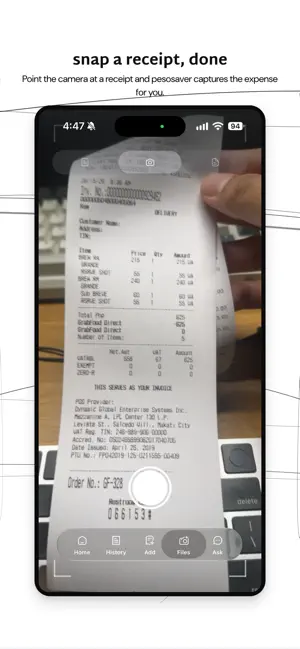
Peso Saver helps you take control of your money with simple tracking, clear insights, and habits you can actually keep. Whether you’re managing everyday spending or working toward a savings goal, Peso Saver gives you a focused toolkit—without complicated spreadsheets or overwhelming dashboards. TRACK INCOME & EXPENSES • Log transactions in seconds from the Add tab • Organize entries with categories, accounts, and tags • Allocate a portion of income toward a savings goal as you record it • Review activity in History with date filters, search, and category views • Set up recurring income and expenses so regular items stay on track STAY WITHIN BUDGET • Set monthly spending limits by category • See how you’re doing at a glance • Get budget alerts in-app and via push notifications (optional) REACH YOUR GOALS • Create savings goals on your Home dashboard • Allocate income toward goals when you record earnings • Watch your progress over time INSIGHTS & REPORTS • Period income vs. expense summaries • Weekly breakdowns to spot patterns faster • View spending by category, account, or tag • Understand where your money goes without digging through receipts JUST DESCRIBE IT • Type or speak a transaction in plain language and let the AI assistant log it • Use voice input to turn speech into text on your device • Snap a receipt to capture an expense without typing it in by hand REWARDS FOR GOOD HABITS • Complete daily, weekly, and monthly Challenges by logging transactions and staying consistent • Earn points when each period ends • Redeem eligible rewards when you have enough redeemable points (availability may vary) DESIGNED FOR EVERYDAY USE • Clean, easy-to-read interface built for clarity • Native Liquid Glass on iOS 27 for the tab bar, toolbars, and sheets • Optional Face ID / biometric unlock for quick, secure access • Display amounts in PHP and other supported currencies • Push notifications for budgets, reminders, rewards, and product updates (all optional) SIGN IN OPTIONS • Continue with Google • Continue with Facebook • Sign in with Apple (iOS) Peso Saver is free to download. It is a personal finance organizer—not financial, investment, legal, or tax advice. Always consult a qualified professional for advice tailored to your situation. Developed by GRAM Technologies Incorporated. Learn more at pesosaver.app Terms of Use: https://www.apple.com/legal/internet-services/itunes/dev/stdeula/ Peso Saver Terms: https://www.pesosaver.app/terms Privacy Policy: https://www.pesosaver.app/privacy
What’s new
Version 1.10.0 · Updated September 24, 2026
- Optimized Tablet View - Added Transfer Feature - Added Tools screen - Added Widgets
App privacy
The developer, GRAM Technologies Incorporated, reported these privacy practices to Apple.
Data Not Linked to You
The following data, which may be collected but is not linked to your identity, may be used for the following purposes:
- Financial Info: Other Financial Info
- Contact Info: Email Address, Phone Number
- User Content: Photos or Videos
Used for: App Functionality
Alternatives to pesosaver: smart money
Looking for apps like pesosaver: smart money? Here are 6 similar apps on the App Store. The highest rated is My Budget Flow (5.0/5), and all 6 are free to download.
-
 My Budget Flow
5.0
My Budget Flow
5.0
-
 Voltefy Budget-Expense Tracker
5.0
Voltefy Budget-Expense Tracker
5.0
-
 Tack: Budget & Expense Tracker
-
 Savings Goal Tracker: Jars
-
 LODI Utang Tracker
-
 Expense Manager & Money Pro
| App | Rating | Price | Last updated | Compare |
|---|---|---|---|---|
| pesosaver: smart money | – | Free | September 24, 2026 | |
| My Budget Flow | 5.0 / 5 (1) | Free | Dec 5, 2025 | Compare |
| Voltefy Budget-Expense Tracker | 5.0 / 5 (2) | Free | Aug 1, 2026 | Compare |
| Tack: Budget & Expense Tracker | – | Free | Sep 29, 2026 | Compare |
| Savings Goal Tracker: Jars | – | Free | Jul 9, 2026 | Compare |
| LODI Utang Tracker | – | Free | Oct 18, 2026 | Compare |
| Expense Manager & Money Pro | – | Free | Sep 7, 2026 | Compare |